Monthly Archives: September 2013

Sourcing Game Components: Chits

Unpunched chits from Small World.
Today I’m posting the third article in a four part series about where to buy components for your game designs. Last week I posted about Meeples. The previous week I posted about cards. Today is about those obscure little components so nicely referred to as Chits. Here is a list of the four articles in this series:
- Sourcing Cards: 9-5-13
- Sourcing Meeples: 9-12-13
- Sourcing Chits: Today!
- Sourcing Dice: 9-26-13
First, a disclaimer: There is nothing quite like that fresh new board game smell when you pull off the shrink wrap and open a game for the first time. Then you have the awesome moment of getting to punch out the chits and that really makes you feel special. I love that!
Today, however, we are not talking about unpunched chits, but rather blank chits that you can use for prototyping your game design. These include circles, squares, hexes, and more.
As a reminder I want to give credit to the list that inspired me to write these articles. This list is much more exhaustive than mine since I am just highlighting a few of the major suppliers. But here’s the list so you can check it out yourself:
So today I present a few of the sources that I think are worth checking out…

SpielMaterial.de
If you are of the European contingent, then I would suggest starting with SpielMaterial.de. They have a very nice assortment of chits that you can purchase. Here is the link:
On their page you can purchase triangles, hexagons, squares, rectangles, diamonds, circles, and more. They seem like an excellent option for purchasing chits.
Print & Play Productions
 I have purchase hexagon chits from Print & Play in the past and have been very pleased. I like to buy the blank tiles with white on both sides. You can order them with your own artwork as well, so keep that in mind. Here is their page for “Counters”:
One of the nice things about Print & Play productions is that if you order the hex tiles, you’ll also receive the little rhombuses that were in between the tiles. And those could potentially be useful in a future game design! Available to you are triangles, circles, squares, rectangles, and hexes.
The Game Crafter
 While my go-to source for chits is Print & Play it is necessary to add The Game Crafter into the list as well. If you are ordering cards and meeples from The Game Crafter, then you might as well order some chits too! Here is a link to one of the chits they offer. Below the main area they link to similar items:
They don’t have nearly the variety of SpielMaterial or Print & Play Productions. And you have to deal with the lead-time issue. But it sure is convenient if you can order all of your components from the same source.
Superior POD
 While blank counters are not available, Superior POD (Print On Demand) does offer printed square and hex tiles, but only of limited sizes. Here is the link:
They only offer 2″ hexes, 1″ squares, and 5/8″ squares. So it’s pretty limited, but it appears that they might be mailed to you unpunched, which is sweet.
So there you go. I know this is a short list, but I think that’s because there just are not very many sources for board game tiles like these. If you know of other sources that have quality components available, please let me know and I’ll add them to this list.
Thanks for checking this out. I hope it helps you as you build your game prototypes!
Monte Carlo Simulations for Game Design
Today’s article is a guest post by my good friend Adam Buckingham. You can find him on Twitter (@AdamBuckingham). Adam has written some excellent sci-fi novels, posted about them on his blog (aegisys.blogspot.com), and is planning on bringing a game design to Protospiel-Milwaukee at the end of the month. Today he is sharing some amazing stuff about using Monte Carlo simulations within Microsoft Excel to help balance your game design. Thanks, Adam, for writing this article for all of us! Throughout the article editor’s notes are in italics.
You’ve just designed the coolest game ever conceptualized. You’ve done a few playtests, and as a result, you’ve started to see some possible signs of imbalance in the deck of cards. But you’re not sure if the problem is just an anomaly of the first couple of playtests, or a core issue with the game. If only you had the time to do 1,000 playtests to test the balance. Enter the Monte Carlo Method.
What is the Monte Carlo Method?
The famous Monte Carlo Casino
The Monte Carlo method is a method of statistical modeling that uses random factors to create a set of results that can then be analyzed similarly to how a statistical sample would be. The name is in honor of the creator’s uncle, who used to borrow lots of money to gamble at the Monte Carlo Casino in Monaco. The method came into common use on the Manhattan Project (the bomb thing… not the awesome worker placement game by Minion Games) and has become a standard in fields from physics to finance. The idea is that rather than try to calculate the probability of a series of random events blindly, just create a dataset you can analyze. If you can define the random elements, determine their constraints and associated probabilities, then you can run a large number (Typically 1000 or more) of simulations to determine the most likely result.
Editor’s Nerd Note: We use Monte Carlo analysis for determining the effect that neutrons have in nuclear fusion reactors. Neat, huh?
Games are a perfect (if quite simple) application of the method. Imagine a game that has a deck of 20 goal cards (e.g., Ticket to Ride). Each player will be dealt 3 of those cards. On these cards, there are a number of resource requirements and a point value. If we know the number of players and have a list of the cards, we can simulate the starting hands for the players by generating a random shuffle of the deck. Repeat a few hundred times, and you’ve got a picture of what the game will look like if dealt repeatedly. Taking it a step further, we can calculate the likely end score, average score per player, resource requirements, average winning margin if all players complete their goals, and a whole host of other statistics.
Sounds Magical, tell me more!
It is Magical! More on that later. Running a Monte Carlo Simulation can be resource intensive (Editor’s Note: this means it can swamp your computer). Luckily, most of us have a tool on our home computers that can run simple simulations really easily. That’s right, I’m talking about Microsoft Excel. Using Excel, it’s actually quite simple to run a simulation with thousands of iterations, and takes less than 10 minutes to set up if you know what you’re doing. Hopefully, this article will get you on your way.
I’ve created a sample file that you can follow along with. It’s located here:
https://docs.google.com/uc?export=download&id=0B7jhoEOs7yvtRkNVM2NCYWxvR0k
Depending on your machine, It may take a minute to calculate, but just hang in there. If it’s unbearable, you can change to Manual calculation: Formulas Tab > Calculation Options > Manual. Just remember that you need to press F9 when you want to calculate.
To start, I’ll give an overview of a few of the key functions you will use in creating the simulation. Note that some of these functions might not be available in versions of Excel before 2007.
| Function | Arguments | Explanation |
| Rand | None | =Rand() will return a random number between zero and 1. Especially useful for calculating the occurence an event that we know will happen x% of the time. Also useful in our deck of cards example. |
| Randbetween | Lower & Upper Bound | =randbetween(1,6) will return a random number between 1 and 6 inclusive. Good for simulating die rolls. |
| Small/Large | Range & k (item # in the list you want) | =small(A:A,6) will return the 6th smallest number in column A. This is used for programmatically sorting randomized values. =Large(Range,K) works exactly opposite small |
| Vlookup | Lookup value, range, lookup column, exact | =vlookup(C1,A:B,2,0) will take the value in C1, find the same value in column A, and tell you what is in column B on the same row. Vlookup is instrumental for referencing values in a table. The function will always look for the lookup value in the leftmost column of the range you specify in the 2nd argument. The Third argument is the column number within the range specified in the 2nd argument. The 4th argument should generally be 0: return only an exact match. 1 will return the next closest if an exact match isn’t found. |
| Statistical functions | Range | Average, min, max, stdev. These will provide the statistical information you want to know about your results. |
Setting up the Simulation
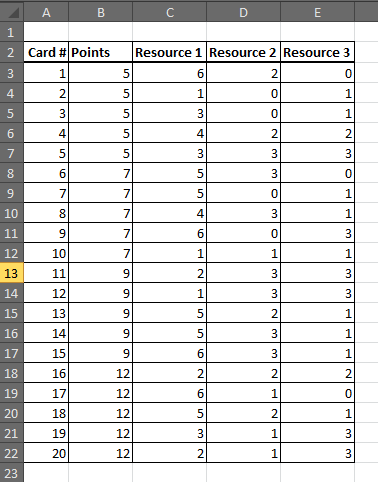
Basic Card Design: Assigning “resources” to your cards.
Let’s go back to the earlier example of the 20 card deck with resources and points for each card. In order to create our Monte Carlo Model, we need to be able to create a single, randomly generated simulation of our game. Once we do that, we can repeat that setup 1,000 times to calculate our statistics.
The first step is to input all the card parameters into a table in excel. For each card, we need the number of points and the requirements for each resource. We’ll put this on the first tab of our workbook. You could add other elements to this table, but for now, we’ll keep it simple.
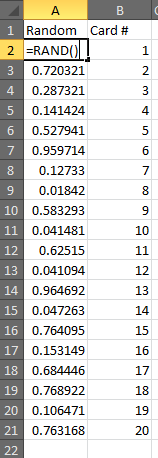 Next, we’ll create our simulation on a second tab in the same file. We need to create a deck shuffling engine. To do this, we’re going to generate a random value for each card, and then sort the cards based on that value. This will put them in a random order each time we calculate our spreadsheet.
Put the numbers “1” through “20” in column B to represent the 20 cards in your deck. In column A, we’re going to use our Rand function to generate random numbers. So type =Rand() next to the first card, and fill that down to card number 20. The result will look something like the picture to the left.
Why did we use Rand() instead of Randbetween(1,20)? You could use randbetween, but since each function result is truly random, it would be possible to get two results that are the same number. This will cause issues when sorting later. With rand, you get 15 digits, which means it’s very unlikely that there will be two values that are exactly the same.
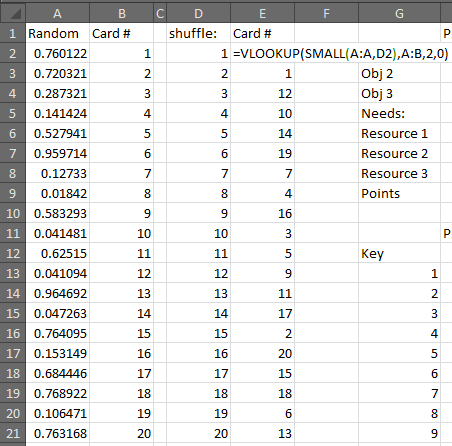
Using Vlookup and Small will allow for correct sorting every time!
Speaking of Sorting, it’s time to sort these numbers by the randomly generated numbers. We can’t just sort the list, because the order will change every time we “shuffle” the deck. So we’re going to do it programmatically. To do this, we’re going to use a combination of vlookup and small. Remember that small returns the kth smallest value in a list. So we are going to start by making a list from 1 to 20, representing the order of the cards in the deck. Put that in Column D. Then in E2, we’re going to use Small to return the smallest random value: =small(A:A,D2). That returns the smallest random number from column A. We’ll go a step further and return the card number from Column B using a Vlookup: =vlookup(small(A:A,D2),A:B,2,0). Fill that formula down and we’ve got a shuffled deck. Press F9 a few times to verify that it shuffles each time you calculate.
Now that the deck is shuffled, we’re almost there. We just need to deal 3 to each player. So we’ll create yet another table, with the 4 players listed across the top and the 3 cards dealt to each. P1 is dealt the 1st, 5th, and 9th cards, etc… Make sure you use a formula to fill in these values (=E2, etc.). Below that, we’re going to calculate the resources each player needs and the points they earn. We’ll use a bunch of Vlookups to look these values up in the first table we built. We end up with a table that looks something like this:

So now we just need to repeat that 1000 times. Just keep pressing F9 over and over, and write down the results…
Actually, Let’s do it the Fancy Way!
To make this easier, we’re going to translate all those values above so that they show up in a single row of data. So P1 R1 | P1 R2 | P1 R3 | P1 Points | P2 R1| etc… and create formulas for each column that points to the appropriate cell in our table above. We’ll also add columns to the right that sum the total needs for each resource and total points. It should look like this (click to embiggen):

You can see I’ve labeled this row “Key” because this will serve as the key from which we will run our thousand simulations. Below the word Key, we’re going to number 1 to 1,000. (Quick tip, you can do this via the “Fill” button on the Home tab in Excel. Type 1 in the first cell, then select it and go to Fill>Series, then select columns, and a Stop value of 1000).
Now we’ll use the Magic of Excel to run 1,000 iterations of your simulation. We’ll use the Table tool for this. Start by selecting your key row (including the word Key), and dragging down to your last numbered row. So you should have a big selection of 1,000 rows and a bunch of columns. Now go to the Data Tab in Excel, and click What-If Analysis > Data Table:
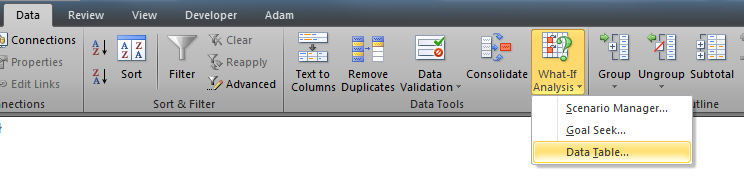
Awesomeness approaches!
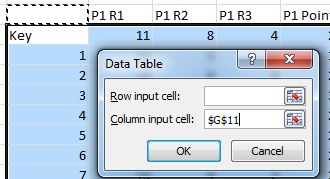
In the pop-up window, leave “Row Input Cell” blank, and for Column Input Cell, just select some empty cell. Maybe the cell directly above the word “Key,” it doesn’t matter, as long as the cell is completely empty, and is outside your table range.
Click OK, sit back, and watch the magic. Excel will run your simulation 1000 times. Now you can calculate statistics like the average number of resource 1 per player or the average total points per game. Press F9 a few times. The statistics should change slightly, but not significantly. If they are changing a lot, you can try making a bigger table with 2,000 iterations or more until you get a more stable result.

Results! Yay! What do they mean???
Interpreting the Results
Editor’s Note: This is the tricky part. If you can’t understand what the results are actually saying, then don’t bother doing the analysis. When you start the simulation, make sure you ask yourself what you expect or want the results to look like. Then you can compare the results with what you expected. After that you can tweak your deck of cards, in this example, to get the expected result.
Based on our result, we can see that Resources 2 (R2) and 3 (R3) are fairly well balanced with each other, while Resource 1 is in much greater demand. This might be ok, but you will want to make sure that there is enough Resource 1 available. We see the average points per player is about 25 per game, with a minimum of 15 and a max of 36. The average total score between 4 players is 99. The average highest possible score for any given game is about 30, while the average spread is about 10 points from highest to lowest.
See! It is Magical!
So there you have it. You’ve just tested balance in your game without having to touch a single card. Now you can re-balance and get your friends together to play. Of course, you shouldn’t consider this to be a replacement for playtesting. Excel can’t tell you if your game is fun, and it can’t simulate strategy. It can’t make complicated choices or stab you in the back. It’s difficult to simulate social game or smack-talk. But it might be able to help you see areas of imbalance or help you make tweaks.
https://docs.google.com/uc?export=download&id=0B7jhoEOs7yvtRkNVM2NCYWxvR0k
I’ve uploaded a copy of the simulation above that you can feel free to download and use to test your own designs. I’ve also included a simple Blackjack dealing simulation, and a few die roll simulations. Feel free to contact me with any questions. @AdamBuckingham or AdamLBuckingham at gmail.
Editor’s Note: Thanks, Adam, for writing this article! I know that this method has already helped me with the Scoville design. I’m looking forward to hearing success stories from other people!
Also, I am definitely NOT the person to contact about this. If you have questions, please send them Adam’s way rather than posting as comments on this article.

Monday Brews: 9-16-13
First things first: Happy birthday to my good friend Jeremy (@JeremyVanMan). I hope you have a great day!
Second, it’s Monday, which means you’re probably having one of the worst days of your week. And that’s why I present The Monday Brews to you weekly. Hopefully by reading what I enjoyed over the past week you can forget about work for a few minutes and remember the fun games you played this past week.
So here’s the Boards & Barley that I enjoyed this past week:
The Barley:

Have you ever tried to kick a pumpkin???
Ben Franklin’s Honey: I was able to enjoy my second to last of this homebrew while homebrewing. As Charlie Papazian says, “Relax and have a homebrew!” There’s nothing better than enjoying one of your hombrews while you’re homebrewing.
Leinenkugels Oktoberfest: Now that the temperatures are dropping this seems like a more appropriate beer choice rather than like two weeks ago when it was 90 degrees. I love the oktoberfest style and attending Oktoberfest in Germany is definitely near the top of my Bucket List.
New Belgium Pumpkick: Now that fall is nearly upon us it’s time to start enjoying spicy pumpkin beer. The New Belgium approach to pumpkin beer was an excellent one! Some pumpkin beers are just too pumpkinny, but this one was very nicely done with a subtle presence of pumpkin. Nicely done, New Belgium!
Great Dane Stone of Scone Scotch Ale: The scotch ale style is quickly becoming one of my favorites. I used to consider Belgian styles as my favorites, particularly Tripels, but my palate is changing. This was brought to my house in a growler and was thoroughly enjoyed.
New Glarus Staghorn: This is a local Oktoberfest style brew that the aforementioned Jeremy considers the best Oktoberfest there is. I cannot disagree. This is an excellent beer and I look forward to Autumn so that I can enjoy this particular beverage.
The Boards:
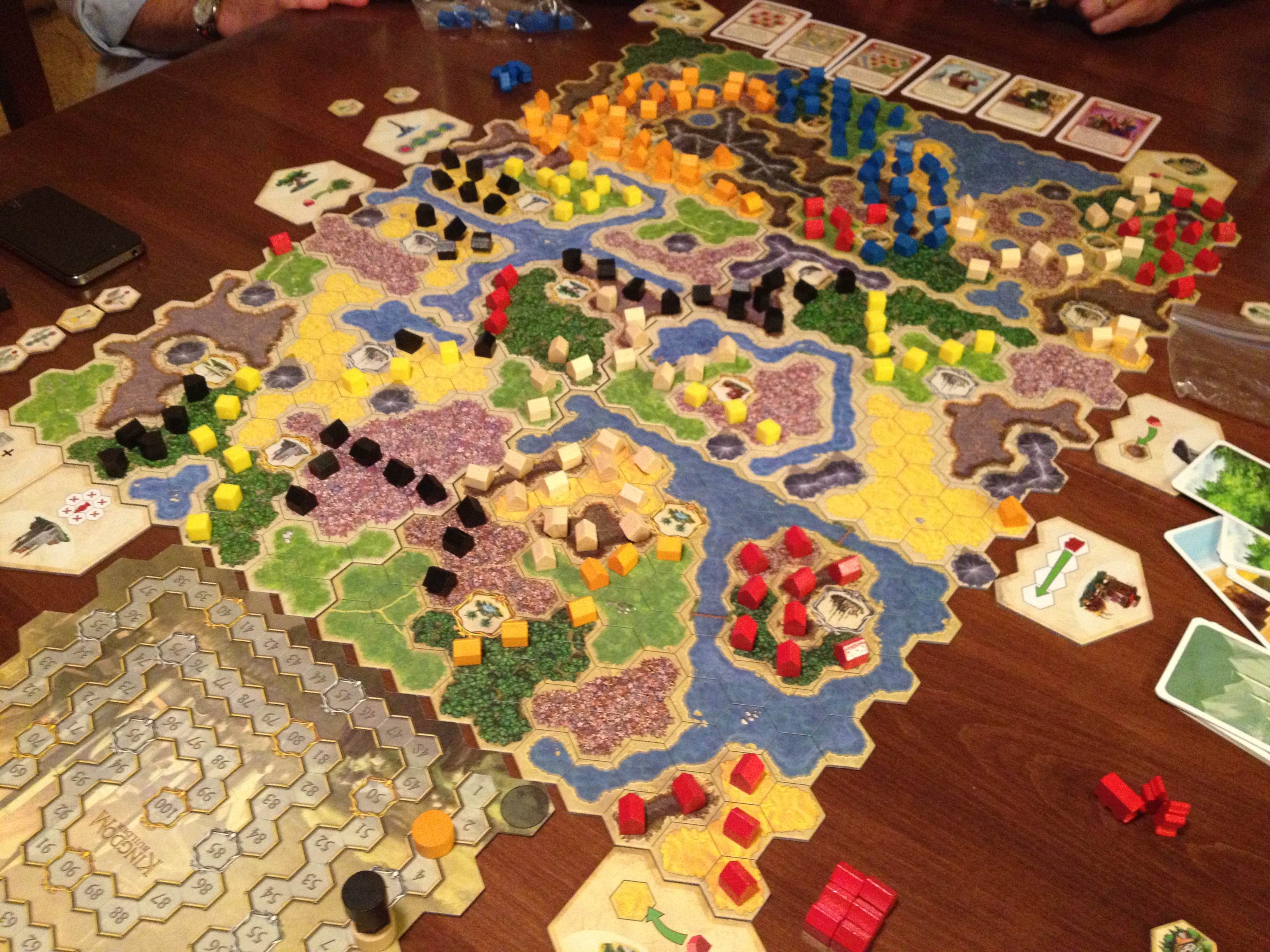
6 Player Kingdom Builder Variant of Awesomeness!
Kingdom Builder x3: I’ve been loving this game since I bought the Crossroads expansion at GenCon. I think that the new expansion is a very nice addition to the game. And we also made a 6 player variant that would also work for 8 players. The picture shows the setup we used for 6 players. We played with three teams of two. You would work together and the final scoring would be done based on your two teams colors together. Yet the adjacency rule only held for your own color. I may write this up as a session report on BGG because it worked so well.
The Little Prince: I can’t get enough of this game. We taught another new player and he enjoyed it despite not doing very well. It’s just so clever. On the flipside, I wouldn’t mind a retheme. Get on that, internets!
Skyline: When looking for fillers, this game has been our pick of the poison lately. It’s simple. It’s quick. And it’s fun. My only complaint is that I wish the base dice, middle dice, and top dice were different colors. That would make it just a bit easier to see what dice you are actually using. But it’s a very fun game.
***
So that was the Boards & Barley that I enjoyed last week. What did you enjoy??
Design Me: Tile Placement
Two weeks ago I started this new bi-weekly feature called Design Me. The idea is that I come up with a random game design on the fly in an act of basically barfing a design into words that you are now reading! For the first Design Me I came up with a dice drafting/worker placement game called The Rolling Wort Boil. Today, after soliciting theme suggestions on Twitter and receiving none (I assume you all were at lunch) I have decided to collaborate with an awesome new tool available.
The tool is called Boardgamizer. It is a website that punches you in the gut with ideas for game designs. The way it works is it randomly chooses Mechanics, Themes, Victory Conditions, and Constraints. Then it’s up to you to let your mind plug away and come up with something. That basically makes Boardgamizer the perfect tool for these articles!
Here is the result for today:

Distopian Flight Tile Placement? Sounds good to me!
Hou-ti-son Basin

I’d fly in that!
The concept behind Hou-ti-son Basin is that the world has undergone massive changes. With the invention of flying automobiles, referred to as aircars, the road infrastructure has been completely neglected and mostly destroyed. There are only a few roads left that can be landed on. The other development is that with the aircars came aircar accidents. In the air there are no roads, so people would fly wherever they wanted, however fast they wanted.
Unfortunately when aircars crash in the air, they fall to the ground, often on houses or buildings. That’s not so good.
The other problem with the future is that supplies are very limited. People have to make death-defying flights to scary locations where they are put at risk so that they can purchase the supplies they need. But at the same time, they must be careful not to stock too many supplies at their “base of operations” lest they become a target of theft.
How To Play
At it’s heart, Hou-ti-son Basin is a tile placement game. Each turn players will draw and place a tile like they do in Carcassonne. However, the main thing that differentiates Hou-ti-son Basin from Carcassonne is that the tiles will be used for movement. This probably makes it more similar to Tsuro or Cable Car.
But there’s a catch. Players may place tiles on top of already existing tiles. The tiles themselves will show the flight paths that you are allowed to take with your craft. But flight paths are expensive to register with the recently founded Hou-ti-son Basin Aerial Flight Commision Ministry of Aerial Convenience. That means you’ll likely have to share the cost burden with your opponents by adding and sharing your flight paths. That save money, but opens the door to thievery and aircar accidents.
To win the game you will have to defend your base. That means you have to successfully fly out and procure the correct types of resources and return them to your base. This also means that you will have to protect your base from thievery. If other player have a flight path that connects to your base, they then have the capability to fly in there and steal some of your resources. To prevent that you will need to be close enough to your base to eliminate their flight path that gives them access.
So each player will have a secret card that shows their victory condition. These are different combinations of resources that they need to procure. If at any time their victory condition is met, all of the players will have one more turn to try to also meet their victory condition. If there are multiple players that meet their victory condition on the same turn, then the player with the most resources will win.
Tile Placement
The tiles themselves represent the different resources in the game. For the sake of simplicity for this article I have created three different types. Let’s pretend they are water (blue), corn (green), and biomass (brown). Here are the available tile types in this quick design exercise:

The six types of tiles in Hou-ti-son Basin.
There are a few rules to how tiles can be placed:
- White flight paths must line up.
- A tile can only be placed over a tile of the same color.
- Tiles can never be place over one’s starting base.
- Tiles must be placed orthogonal to already existing tiles.
The resources a player earns in the game are a direct result of their flight path. If a flight path has three or more of any type (color) of resource in a row, you earn one of those resources when you fly your aircar. If a flight path has 5 or more of the same color in a row, you earn 3 of that resource. So players will need to carefully place their flight paths so that they can earn the resources they need.
Here is the starting map:
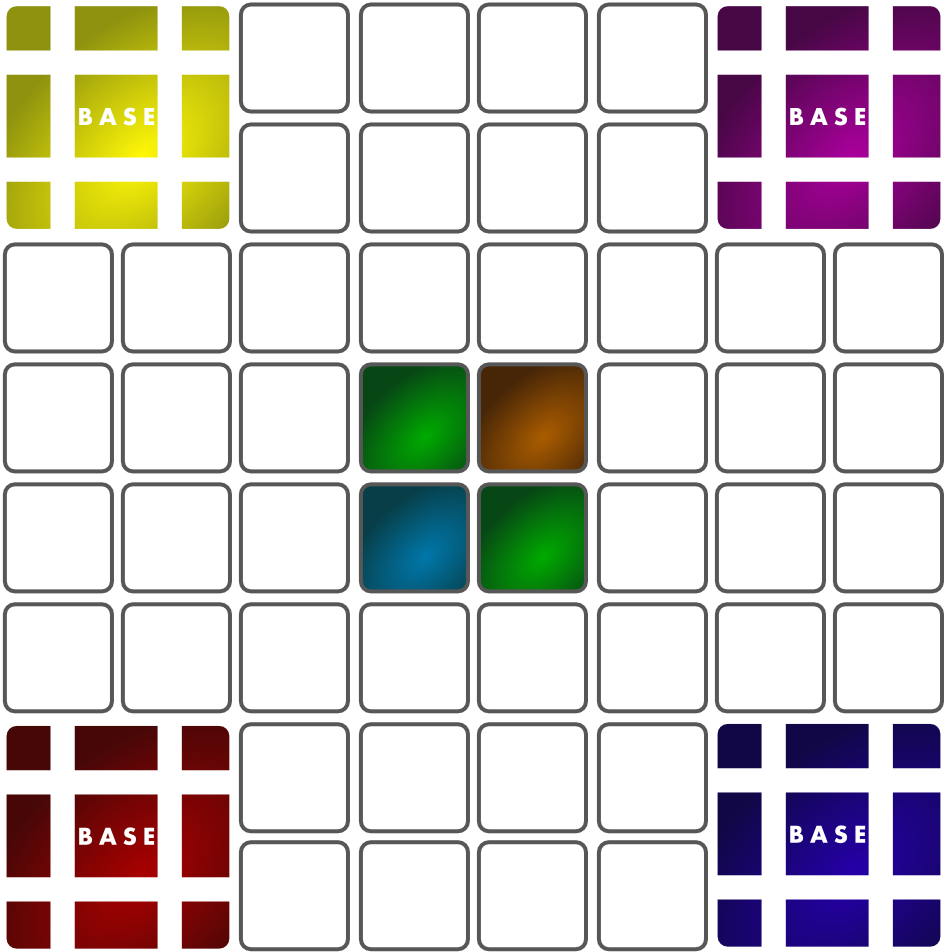
Warning: ugly prototype art!
More Details…
I’m not a huge fan of the “defending your base” victory thing. Nor am I necessarily a huge fan of the hidden victory conditions for this game. But my brain already spewed those words into this article and therefore they shall remain.
I prefer this option: There are 8 flight paths into/out of your base. That means you can create four loop paths during the game if you fly out of one and into another. So I would have the game played where players can complete up to four loops. You earn resources for each of those four loops. Once a loop has been used, it’s “into/out of” spots are used up and unavailable. So players cannot just keep using the same flight path over and over.
The game would end when someone has completed their fourth loop. Each other player would have the chance for one more turn. The winner would be the player who has earned the most resources from their completed loops.
Your Thoughts?
Remember that the point of these Design Me articles is to basically “practice” designing games. It’s fun to use a tool like Boardgamizer to choose some random mechanics and themes and see what you can come up with. So the game design thoughts above aren’t necessarily meant to become the next awesome game design, though I think this one could particularly be fun.
Please let me know if you have any thoughts or comments about this game design or about the Design Me concept.
Thanks for reading!
Sourcing Game Components: Meeples

A Mash of Meeples!
Last week I posted the first in this series of four articles about sourcing components for your board game designs. That article was about sources for cards. Today I’m covering my go-to sources for meeples to use in games. Here’s the list of what I’m covering in this whole “Sourcing” series:
- Sourcing Cards – 9/5/13
- Sourcing Meeples – Today!
- Sourcing Chits – 9/19/13
- Sourcing Dice – 9/26/13
So that’s the list I’m working with. Those are probably the four main components you are likely to use in a prototype. When I refer to “Meeples” I am referring to the components that are used to mark your spot or location on the board or player mats. Meeples can mean different things to different people.
As I wrote last week I want to give credit to the list that inspired me to write these articles. This list is much more exhaustive than mine since I am just highlighting a few of the major suppliers. But here’s the list so you can check it out yourself:
I have picked a few of those sources to add to the ones I also use. And like last week I’ll start with The Game Crafter since they are my go-to source for these things.
The Game Crafter
First things first: If you order pawns or anything that doesn’t have to be printed, you still need to wait your turn in the production queue. I recently placed an order for 30 pawns that cost a total of about $5 and I started out as #550 in the queue. The estimated ship date was October first. I know that they have the pawns just sitting over there. I bet I could drive over and simply ask if I could buy the 30 pawns and get them the same day.

The avatar pawn
Here is their page for pawns: The Game Crafter – Pawns
I like to use the Avatar pawns. They cost 14 cents each and are not ugly. These have worked well for me in the past and I’m looking forward to getting my set of new pawns so that I have enough for a few more prototype copies of Scoville. They are just simple and easy. No need to get complicated for a prototype! But if you want to mix things up, this next source might be the right one for you…
Meeple Source

My favorite is the pirate with the peg leg!
I’ve never bought from Meeple Source, but after giving their site a long, drooling look I think they might serve me well in the future. They offer the following categories of meeples from which to choose:
- Standard Meeples
- Mega Meeples
- Mini Meeples
- Super Mega Meeples
- Character Meeples
- Camo Meeples
- Sets of Meeples
- “Misfit” Meeples
Wow. And if that wasn’t enough, you can also check out their Plush Meeples!
This site has a TON of meeples to offer and I’m afraid I should have listed them lower in this article because I feel there really isn’t any sense for you to continue reading. But please continue anyway!
SpielMaterial.de

Is that Gandalf the Red??
If you happen to be an awesome reader from Europe, I’m glad you’re here. If you are interested in meeples or pawns, then you might be interested in ordering from SpielMaterial.de. They are a European vendor of board game component awesomeness.
Here are some links:
They have so much to offer that it’s worth just browsing on their website. You might get inspired for a game design simply by looking at all the things they can sell you.
Boards & Bits
I have ordered from Boards & Bits in the past and was pleased with the service I received. Boards & Bits must have a HUGE warehouse to accommodate all the products that they carry. Their options go well beyond pawns and meeples. Their website isn’t the greatest since it is a little difficult to navigate, but they just offer so many things that I can easily look past that.
You will mostly find typical meeples and pawns at Boards & Bits. They don’t offer the painted meeples the way that Meeple Source and SpielMaterial do. But if you want a cheap source for prototype worthy pawns, then perhaps Boards & Bits is for you!
CraftParts.com

What a lovely little meeple family!
If you are only interested in little wooden people, then maybe you should check out Craft Parts. They offer a small assortment of wooden people figures that might work great in your prototype.
CraftParts.com – Little Wooden People
These components range in size from 1 1/8th inch to 3 9/16th inches. So these are quite a bit larger than your standard meeples. But maybe that’s what your looking for because you typically play games with giants. These will help those giants grab onto the pawns much easier!
***
So there are a few of the numerous online sources for meeples and pawns. If there are any major vendors that I have overlooked, please let me know and I will update this list. Thanks for reading!
 Boards and Barley