Blog Archives

Sourcing Board Game Components: Cards
 This is the first in a series of articles that are meant to help aspiring designers and published designers alike. The goal of these articles is to simply list some of the sources for different components that we designers like to use in our game prototypes. While I have not used all of these different sources, I’ve done my research and feel confident that you’ll receive a decent quality production from any of these sources.
Today’s post is about sourcing cards for your prototypes. But over the next few Thursdays I’ll be posting articles about other components:
- Meeples
- Chits
- Dice
They won’t be dreadfully exciting articles, but I hope they can help you out as your on your way toward a high quality prototype. But first, my inspiration comes from this post:
That is a way better list than I’m going to make. But my sources seem to be some of the more mainstream sources. If there are component sources that you use, and like, that I have not mentioned in these articles, please let me know and I’d be happy to keep these articles up to date.
So let’s get to the sources I would use for cards… Note: The Game Crafter is my go-to source, and thus they are listed first.

The Game Crafter
 This is the one source that I have used. They have a large number of sizes available. They provide a template for each size. And overall I have never had any problems with my cards. They are not going to be the highest quality, linen finish, and all that, but they are great for putting together a quality prototype that you could feel confident pitching to a publisher.
Here’s the details about sizing and pricing (click the link to go to the template page for each item):
| Printed Item | Cost Per Sheet | Cost Per Item | Items Per Sheet | Image Size (in pixels) | Finished Size (in inches) |
|---|---|---|---|---|---|
| Bridge Deck | $1.56 | $0.09 | 18 | 750×1125 | 2.25 x 3.5 |
| Business Deck | $1.89 | $0.09 | 21 | 675×1125 | 2.0 x 3.5 |
| Hex Deck | $2.29 | $0.19 | 12 | 1200×1050 | 3.75 x 3.25 |
| Jumbo Deck | $1.25 | $0.21 | 6 | 1125×1725 | 3.5 x 5.5 |
| Micro Deck | $3.99 | $0.07 | 56 | 450×600 | 1.25 x 1.75 |
| Mini Deck | $2.89 | $0.09 | 32 | 600×825 | 1.75 x 2.5 |
| Poker Deck | $1.56 | $0.09 | 18 | 825×1125 | 2.5 x 3.5 |
| Square Deck | $2.29 | $0.19 | 12 | 1125×1125 | 3.5 x 3.5 |
| Tarot Deck | $1.89 | $0.19 | 10 | 900×1500 | 2.75 x 4.75 |
When you upload files you can upload a bunch at once, or one at a time. When you are ready to have them printed, you’ll have to “proof” each one. When I order cards I usually go with the Mini Deck since you can get them for a pretty good price. They are also one of my favorite sizes for games in general. They are large enough to hold a lot of information, but small enough to not be a nuisance.
ARTSCOW
 My wife has used ArtsCow for a few scrapbooking things, so I can attest to the quality of those. However, I have not used ArtsCow for any cards. So take this for what it’s worth.
On the ArtsCow page you can choose from custom playing cards, cards shaped like circles, and cards shaped like hearts. While ArtsCow doesn’t seem to have the game designer in mind with their products, I think people have had success with ordering customized cards.
The best option I’ve seen for custom double sided cards is the “Multi-Purpose Cards.” This seems like the best option for custom double sided cards from ArtsCow. They measure 2.5″ x 3.5″ and start at $10.99 for a 54 card deck, which seems quite high for 280 gsm matte paper. But like I mentioned, they don’t think like game designers.
Printer’s Studio
 I have not used Printer’s Studio for any cards, but I know people who have. Like ArtsCow most of their options for cards are decks of custom playing cards. But they do have a page for blank playing cards that can be fully customized as well.
Sizes include:
- Mini Size (1.75″ x 2.5″) starting at $4.39 for up to a 64 card deck
- Bridge Size (2.25″ x 3.5″) starting at $7.99 for up to a 54 card deck
- Poker Size (2.5″ x 3.5″) starting at $7.99 for up to a 54 card deck
- Tarot Size (2.75″ x 4.75″) starting at $1.89 for up to a 10 card deck
- Large Size (3.5″ x 5.75″) starting at $13.99 for up to a 54 card deck
Those prices seem a little high to me, but these are for 300 gsm card stock. Each card size also has an option for 310 gsm linen finish.

Print & Play Productions
 While I have not ordered cards from Print & Play, I have ordered hex chits. I was very pleased with their quality, so I would likely be pleased with the quality of the cards as well. But that’s not a guarantee.
Print & Play offers several sizes of blank or custom printed cards:
- 1.75″ x 2.5″ 270 gsm starting at $2.00 for 32 cards printed on both sides
- 1.75″ x 2.5″ 270 gsm starting at $2.25 for 78 blank cards
- 2.5″ x 3.5″ 270 gsm starting at $2.00 for 18 cards printed on both sides
- 2.5″ x 3.5″ 270 gsm starting at $2.00 for 52 blank cards
They also have an option for a letter size sheet of custom cards starting at $1.25 for double sided printing.
Other Sources: EAI / Amazon
If all you’re looking for is blank cards from which you can make a prototype, then perhaps EAI or Amazon is your best bet. Here are the details:
EAI: Single deck of 54 blank playing cards is currently $0.99 per deck (regular price = $1.55 per deck)
Amazon: 500 Blank cards for $13.50
***
So those are the sources that I am most familiar with for blank cards. The other option is to use something like nanDECK and create/print your own cards that you could then sleeve. I haven’t had much luck trying to use nanDECK, so good luck with that.
Please let me know if you use someone else. I’d love to add it to this list and make it more complete. Thanks for reading. I hope this list and the next three covering meeples, chits, and dice will be helpful to you as a designer!
Prototyping Tools of the Trade
Tools of the Trade
One topic that seems to come up a lot is how to make board game prototypes. I’m not talking about coming up with a design. I’m talking about physically creating prototype game components. Game designers are constantly trying to make their components so that they can get right to the playtesting phase of game design.
Today I want to discuss the tools I use to create my prototypes. At this point you should already have your prototype artwork created if you’re going to be printing anything. Let’s assume it’s already been printed. Now it’s time to make it awesome!
Chits…
One common component that is particularly easy to make for prototypes are chits. These are typically just printed artwork glued onto matte board. But matte board can prove to be difficult to cut.
There’s two ways that I’ll cut my chits out of the matte board.
- Straight edge and utility or X-acto knife (not ideal)
- Rotary cutter (ideal)
What we are doing here is separating the chits from one another. When creating your artwork you should line up the edges of the components so that you only need to make one cut between them.
This will help you keep your fingertips!
The straight edge and knife approach is definitely NOT my approved method and I would never recommend it. However, a lot of people use that approach so I needed to mention it. One recommendation is to use a safety straightedge like the one shown here. You only have 10 fingertips so why not spend a few extra dollars and get a straightedge like this and make sure to not lose any fingertips!
I don’t like this method for a few reasons. The first is that you need a cutting mat to go underneath so you don’t scratch your table. The second is that the blade doesn’t always stay straight as you are cutting the matte board. And that can be really annoying.

Just get this thing instead!
My preferred method is to use a rotary cutter like this Fiskars 12″ Scrapbooking version. It is super easy to use, relatively cheap (especially compared to the $40 safety straightedge), and very reliable. And since most of us don’t have printers that print on anything other than 8.5×11 paper anyway, the 12″ Fiskars tool is perfect!
So I will print my prototype artwork on photo paper, adhere it to matte board, and then cut out the individual components using the rotary cutter. Just a heads up when using matte board though: you’ll likely have to roll the cutter back and forth a few times to cut all the way through. That’s still an easier process than trying to run a blade along the straightedge.
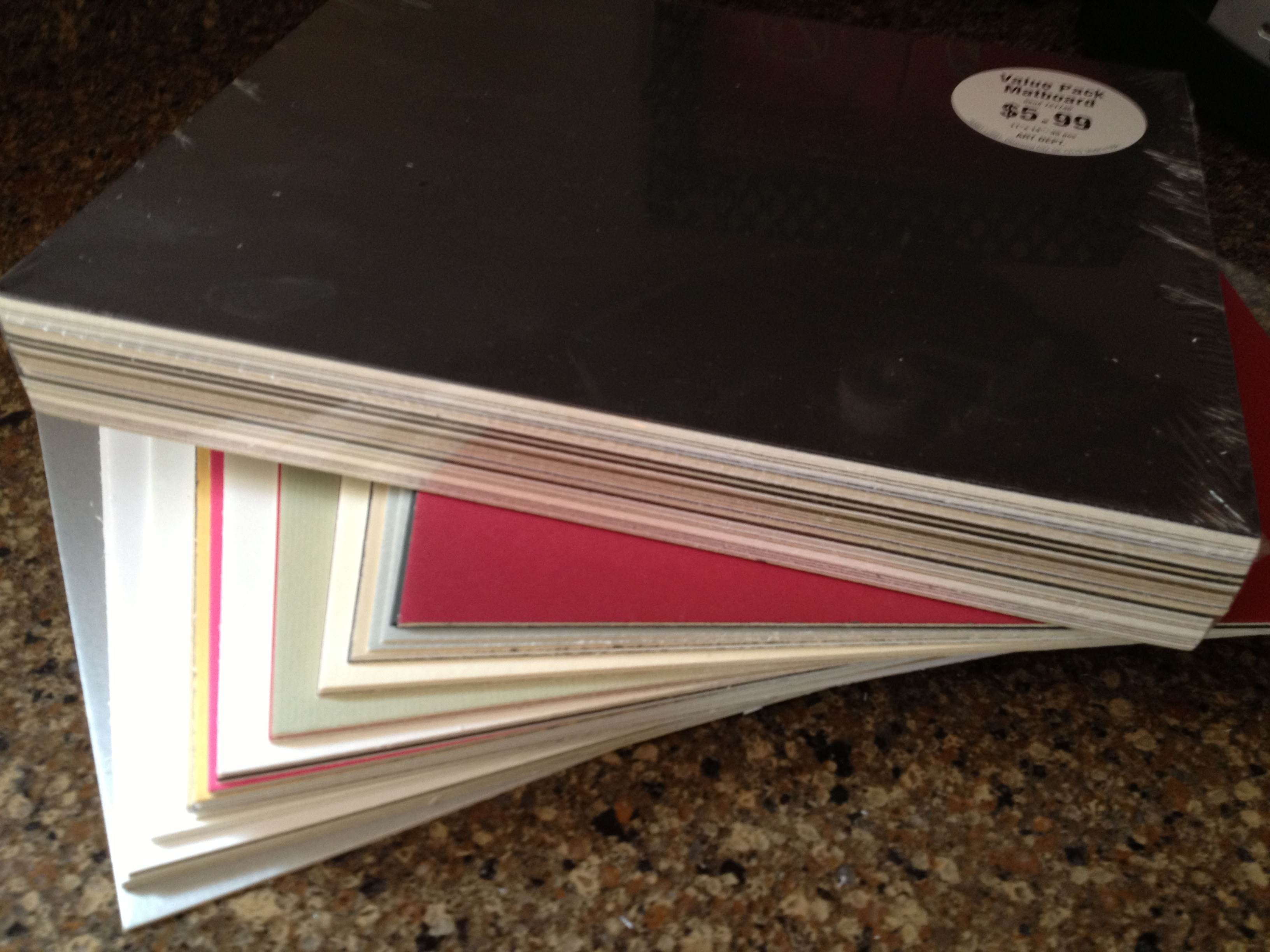
On the topic of matte board, I recently went to Hobby Lobby and purchase two huge packs of “matboard” for $6 each. I got a pack of 12″x12″ and a pack of 11″x14″. These are so cheap that I almost felt like I was stealing. They are just the leftovers from the framing department that were cut out from the boards used to mat pictures/paintings for customers. What a great way for Hobby Lobby to reduce their waste and provide a useful product. Here’s what I got for $12:
So cheap!
The other key tool of my trade is a glue stick. Some people will use standard glue, some will use spray adhesive. I prefer the glue stick to standard glue since it is simple to apply evenly. This is very helpful when trying to make sure that your components are completely glued down.
Now you know a great method for producing chits. If possible, keep them as rectangles rather than circles of hexes. But since we’re on the topic of circles and hexes let’s move on to another excellent tool…
Punches…
There are times when you don’t want rectangular components. Perhaps your game is a map building game with hex tiles. Or perhaps you require special discs for your game. If that’s the case, then I strongly urge you consider purchasing a punch.

The hex punches from Fiskars work great!
One thing to keep in mind when purchasing a punch is how thick of paper/board are you wanting to punch. Often these sorts of punches are used by scrapbookers who are only punching paper. That means they may not be able to punch through matte board. Sometimes you can only find out after you’ve bought the punch. Bummer.
Here are some recommendations, keeping in mind that I don’t know specifically how thick they can punch. OR you can just do a search for “hobby punch” and find one you’d like.
- Fiskars Squeeze Hex Punches
- Creative Memories Punches
- Older Creative Memories Hex Punches on eBay
- And don’t forget the Corner Rounder punch which can be helpful for cards that are printed on nice canvas/linen finish paper.
These can come in really handy. I use a circle punch when creating prototype coins. I have used a hex punch to create stickers for hex tiles. And here is my little tip for punching, which I mentioned in a prototyping article a long while back, but which is worth repeating.
When punching, flip the punch over so you can visually align the part that you want cut.
So now you’ve got the tools to cut out chits and punch out little bits of awesomeness! What about cards?
Sleeves…
Many game designers come across the need for cards in their game designs. I have made cards numerous times. Early on I would buy 60lb. paper and just cut out rectangles. But there is a problem with that. The edges of the rectangles can be slightly bent from cutting, which leads to great difficulty in shuffling the cards.

Mayday sleeves are convenient and cost effective!
The way to prevent that while also protecting the cards is to purchase card sleeves. These inexpensive beauties will be a little lifesaver by removing anguish from your prototypes. Plus, you can get awesome one’s like the one shown here with a kitten running through a field!
If you want a good go-to source for sleeves then look no further than Mayday Games. Here is a series of links to the sizes you may be looking for:
- Euro Cards (59×92 mm)
- Mini Euro Cards (45×68 mm)
- Card Game (63.5×88 mm)
- Standard USA Cards (56×87 mm)
- Magnum Ultra Fit for 7-Wonders (65×100 mm)
Those should offer some help. They definitely help with being able to shuffle your cards. The only downside is that when stacked they can be really slippery and your stack may tumble over.
Speaking of tumbling…
Dice…
Sometimes it becomes necessary for a game designer to create their own set of dice. Sure, you could always just make a cheat-sheet conversion table, but that can be a huge burden for your playtesters who would constantly have to recheck the sheet. So one of the tools of the trade is to purchase blank, sticker-able dice.

Just think of the potential here!
Look no further than Indented Blank Dice. The best part of their site is that they have labels that you can purchase and print on rather than having to buy blank label paper and try to cut/punch out your own labels and then peel them off.
Don’t buy blank label paper. Don’t cut/punch out stickers. Don’t try to peel them.
Just buy the sticker label paper and save yourself from the frustration.
So this concludes my little article about Prototyping Tools of the Trade. Next week I will be posting a follow-up article on Sourcing Components for Prototyping. It will cover where to purchase boards, bits, and more. So stay tuned!
Game Concept: Conclave

Of course I’ve already designed a logo!
So there I was, working on Trading Post, watching the Dan Brown movie Angels & Demons when all of a sudden a new game design hit me. I thought to myself wouldn’t a game about electing a pope be kind of fun? So I changed course and laid the groundwork for a game design I am calling Conclave. (It could also be called Preferiti, Triregnum, Habemus Papem – which is already used for a game, or Fumata Bianca).
That was back in 2011. I had the idea for the game and a sheet of paper with a few details, but, like so many other game concepts, it sat on my shelf for nearly two years.
While again working on Trading Post a few weeks ago, and yes, while watching Angels & Demons (I guess I have a liking for that movie) I again was drawn to the idea of a game about electing a pope. So this time, since Trading Post is my white whale, I diverted my attention to actually conceptualizing Conclave.
Papal Conclave: What is it?
In the Catholic Church the pope is the person elected to succeed the line of Saint Peter, Jesus’ disciple. Since the dawn of Christianity there has been a leader of the Christian Church. And the Catholic Church has referred to that leader as the Supreme Pontiff, or more simply, the Pope.
Conclave is all about electing a new pope. The word Conclave is a conjunction of two Latin words, cum (“with”), and clave (“the key”). The interpretation of the word conclave is “sealed with a key.” In 1274, due to several elections taking years to decide the next pope, it was decreed by Pope Gregory X that the elections should take place inside a sealed room. This way the college of cardinals would have to elect a pope while basically being sequestered and given small rations of food and water.
Since 1846 all conclaves have taken place in the Sistine Chapel, in the Vatican City.
During conclave the cardinals of the Catholic church are locked in the Sistine chapel. They will cast their first vote in the afternoon of the first day. To elect a pope requires a 2/3rds majority for any single candidate not including that candidate’s vote. If the vote does not result in a newly elected pope, the ballots will be burned with chemicals that result in black smoke emanating from the Sistine Chapel smoke stack. Each subsequent day the cardinals will take a vote in the morning and another vote in the afternoon. Black smoke will be displayed each vote until a pope is elected. Once a pope is elected then the smoke will be white, thus informing the world that a new leader of the Catholic church has been elected.

How are you going to earn their votes?
While this Scrutinium method (secret ballot) of electing the pope is a standard method there are three others: Compromissum, Accessus, and Quasi-Inspiratio. This game design is focused on Scrutinium.
How does the Game Work?
During a game of Conclave you represent one of the Preferiti, the preferred cardinals for the papacy. It is your objective throughout the game to manipulate the college of cardinals such that you earn their votes and get elected as the next pope.
This game is all about area influence. The game will be played using cards that represent each of the players. Each player will have their own deck of cards. Half of the cards are your own player color. The other half match the colors of the other players.
The first portion of the game represents the first afternoon vote on the first day of Conclave. During this portion of the game players take turns playing cards onto each cardinal to set their initial vote. Once all the votes are in, assuming no player has a 2/3rds majority (which is physically impossible in the first round with how I’ve designed the game), then the second phase of the game begins.
The second phase is the manipulation portion of the game. One your turn you can perform one of several types of miracles/charities, each basically giving you a specific action. These are listed here:
- Miracle of Feeding: Flip the cards of any one cardinal.
- Miracle of Healing: Swap the top cards of any two cardinals.
- Acts of Service: Lock any one cardinals vote.
- Acts of Mercy: Examine the bottom card of up to three cardinals.
So I’ve mentioned cards and tables. Let’s explain. During the first phase of the game (the first afternoon vote) players will take turns placing cards on each of the cardinals. They will place one card face down, and one card face up. The face up card is the only one that matters when counting the votes. The bottom card represents the bias that the cardinal has toward another Preferiti. So when players choose Miracle of Feeding they will flip any one cardinal’s vote over to the other card.
When players choose the Miracle of Healing they will take the top cards from any two cardinals at any tables and swap them.
Acts of Service allows for any one cardinal’s vote to be locked in for the rest of the game. This cardinal can no longer be swayed. But beware, each player has only so many “locking cubes” that they can use to lock cardinals.
And Acts of Mercy allows a player to look at the bottom cards of up to three different cardinals to see which way they might be leaning. This will help players know when it might be beneficial to choose the Miracle of Feeding (flip cards) action.
How do you win?
The game board basically represents the locked down Sistine Chapel. Your objective is not to earn a straight up 2/3rds vote as that would be boring for a game. Rather, you are trying to win different tables within the Sistine Chapel. It’s an electoral college of sorts. There are tables of 3, 5, and 7 cardinals. If you possess the majority of votes at any table, then you receive a number of votes equal to the number of cardinals at that table.
So if a table of 3 cardinals has two green votes and one blue vote, the green player would currently have 3 votes. It is an all-or-nothing system.
Players play to a certain number of votes depending on how many players are playing. Once a player has successfully manipulated their way to the right number of votes then they are elected as the new pope and the game is over.
Current State of the Game…
Currently the game is in the prototype phase. I basically have it ready for solo playtesting. Right now it is a pretty simple concept and is easy to prototype. But I’m exploring a few things that could make it both more interesting from a gameplay perspective and more difficult to prototype at the same time. So for now I’ll keep it simple. My goal is to solo it this weekend and get a better idea about how to move forward with the concept.
I’ll post more about Conclave in the future, but until then check out this awesome infographic from image-illustration.net: (click to embiggen)

Trading Post Part 3: Hiatus and Redesign

Redesigned Logo… Let’s just redesign everything!
I have a new game design I’m working on and today I am posting the third of 4 articles about it. This is the third article about the game from it’s creation to the present state. Here are the four articles in this series:
- 5-16-13: Origins of Trading Post
- 5-23-13: Early Prototying
- Today 5-30-13: Hiatus and Re-design
- 6-6-13: Path to GenCon
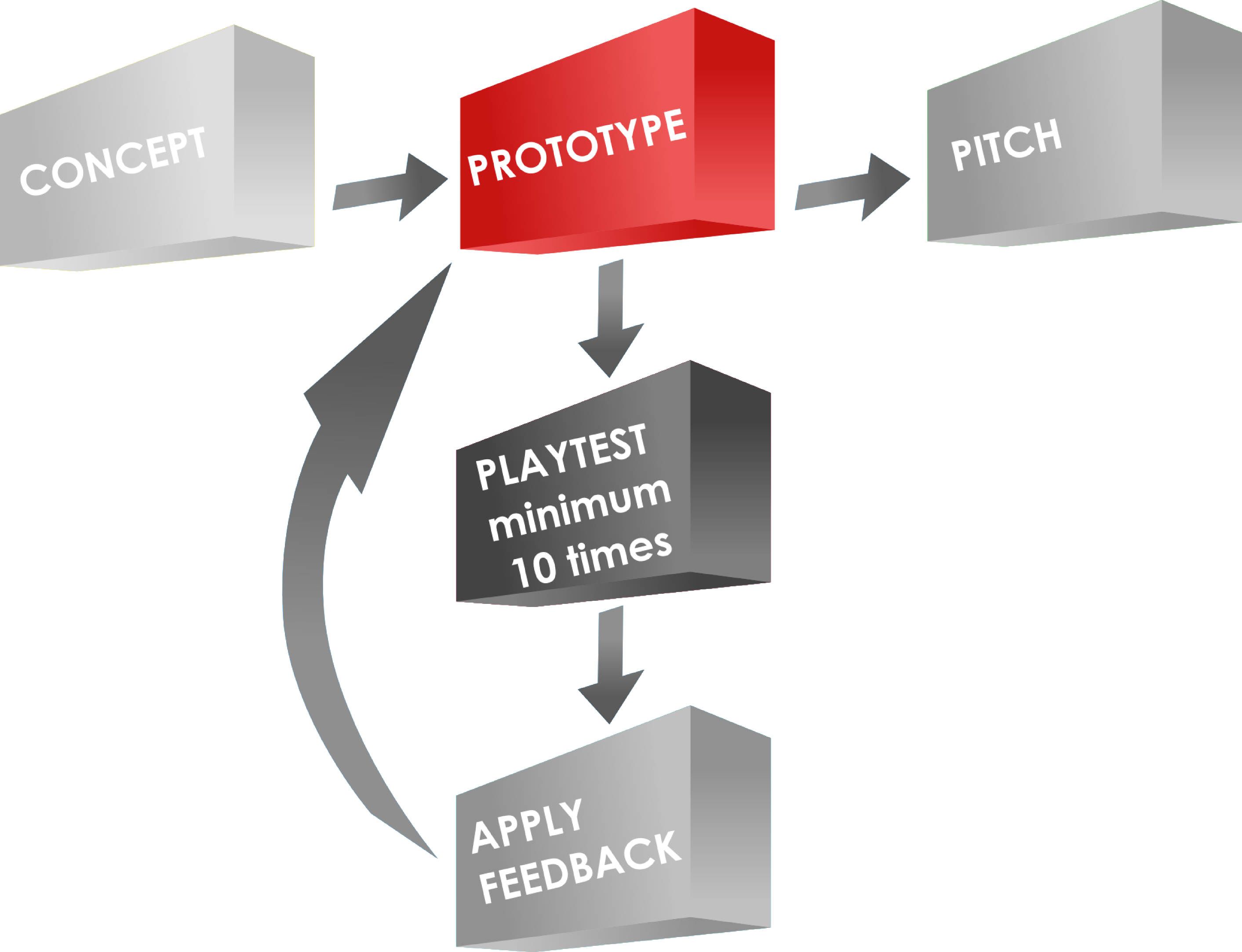
Today we’re looking at the current state of the game, and how I got there. In my opinion today’s article covers the most important details of game design. Let’s call it “distilling” and “skimming.” But first let’s look at why I took a break from the game.
The Hiatus, or “This game stinks… let’s take a break!”
 If you’ve read the past two articles on Trading Post then you’ve learned what I want the game to be like (week 1 – Origins), and you’ve learned how I don’t want to be (Week 2 – Early Prototyping). At its heart I want Trading Post to be a competitive game about exploration and development of a western Trading Post. I want the game to flow smoothly, create tense decisions, feel thematic, and be easy to teach/learn.
My previous version was none of those. I had spent a lot of time on this game. I thought I had something very thematic. But I realized that I had a big pile of garbage that didn’t work together. It had several things in it that felt like busywork rather than a game. And ultimately it was not any fun. That’s a huge problem. Remember that we are game designers and games are supposed to be fun!
So I decided to put Trading Post on the shelf. That must have been early in 2012. At the time it was a pretty easy decision because I really didn’t know how to move forward with the game. I could easily have abandoned the project overall.
During the hiatus I worked on a few other games. The most notable (at this point) was my card game Dam It! But I was working on another game with a level 1 friend. It used several of the same elements of Trading Post but in a more thematic and historical context. Ultimately I realized that Trading Post was a game I wanted to bring back. To resurrect.
So after having Scoville turn in to the PnP behemoth that it has I figured now would be a good time to try and bring back Trading Post from the dust in my basement.
A Fresh Start – Land Exploration
There were certain elements that I thought would be good to carry over from the first version of the game. And there were others that I knew I should ditch. I figured a good way to redesign the game would be to start with the elements I wanted and add from there. I could then completely ignore the bad things from version one.
My starting point was the land exploration portion of the game. I knew that this could be dramatically simplified. To get things more simple I decided that the game would have only four natural resources – Water, Lumber, Stone, and Gold. The previous version had more – Lumber, Grain, Animals, Fruit, Cotton, Steel/Iron, and Water. That was too many. And four would allow me to do what I want with the game.
So I set up a way to make things be as equal as possible, without forcing identical conditions on players. I devised a set of ten tiles that each player would have. Throughout the game, as they explore their territory, they would draw seven of the ten tiles. It was designed at that number so that no player would be without any of the resources. Here are the ten tiles from which each player draws when they explore:
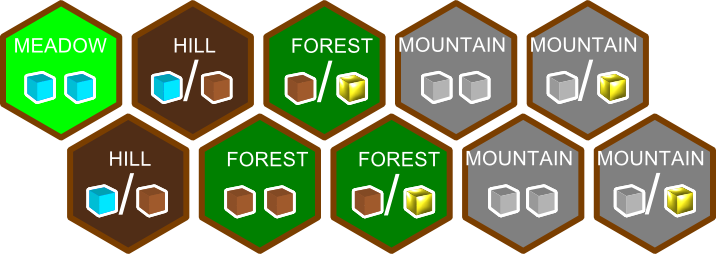
Each player has a set of these ten tiles, 7 of which will fill their territory.
Players will add these to their portion of land that the Trading Post has given them to explore. Each player starts with a Meadow (1 Water) and a Hill (One Water OR One Lumber).
With this design players will always have access to all of the resources. Sometimes players may end up with all four mountain tiles and thus a bunch of stone. Likewise players may end up with only one mountain tile and thus very little stone.
Here’s a look at the starting region for each player:
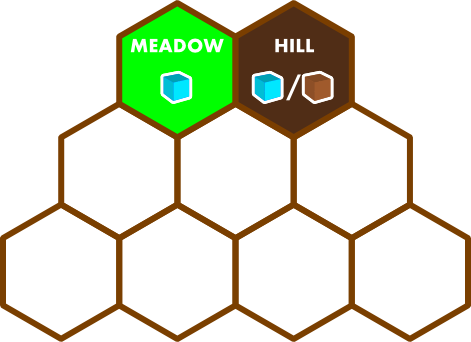
Each player starts with a meadow and a hill. Therefore they have access to water and lumber.
With the understanding that some players may have only one gold tile or stone tile while others may have four stone tiles or four gold tiles I knew that I’d have to design the game so that you can win under any of those conditions. That leads me to my next design element that has carried over from version 1… the buildings.
Building Buildings!?!
In the original version of the game the buildings only entered into the mix late in the game. They acted the same way as the Orders – that is, they came out four per year and you could fulfill them from the pool of face up cards. I didn’t like that.
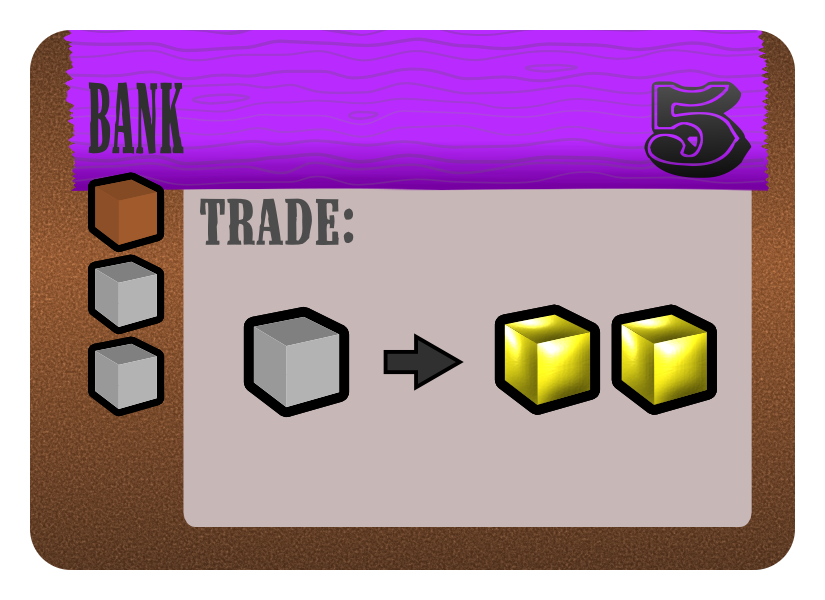
Bank costs 1 lumber and 2 stone. Can trade 1 stone for 2 gold. Builder earns 5 points when Bank is built.
So I decided to make buildings a more integrated part of the game by allowing them to be entered for some benefit to a player. Also, I decided that buildings should be available from the start of the game. Thematically the idea of building buildings is that you are developing the Trading Post so that it offers more to any guests that may visit. So buildings are a part of the game play from the get go.
There are 14 different buildings in the game. Each building offers players some sort of trading opportunity. Players can purchase buildings and build them on their land. Once they build a building they will earn points for building it, but will also cover up the natural resources that they could produce on that territory tile.
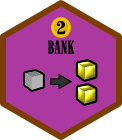 When a player purchases a building they will take the associated hex for that building and place it onto a section of their territory that they have already prepared for a building. Note: preparing land is a separate action.
Whenever another player enters the bank tile, the owner is to be paid two coins as a sort of “trade fee.” These buildings will be critical to success in the game. You want to own them, but you also don’t want to give up the resources of the land that they are covering. It’s a sort of Catch-22. But that’s part of the fun of a game, right?
My objective with the design of the buildings was to utilize both stone and gold equally. This would aid the differing land resource conditions that I mentioned above. As an example, there is another building where you can trade one gold for two stone. Imagine owning both that building and the bank! You’d be able to create a huge supply of both stone and gold.
Now that I had redesigned the buildings in a much simpler manner that will be more integrated into the game play it was time to give players options for scoring points. And it made me ask the very important question that I seem to neglect until the late stages of game design: How do you win the game?
Let’s Get to the Point(s)!
I struggled a lot with how I wanted scoring to be handled in Trading Post. So far we’ve only discussed earning points via buildings. In the previous version of the game players could earn points from fulfilling orders. I wanted that element to remain in the game.
But I also wanted more opportunity for scoring. And I wanted that scoring to be hidden. This mechanic is the core of the famous game Ticket to Ride. In that game players play the game and attempt to complete routes from one city to another. They are the only person who knows the route. At the end of the game the routes are revealed and players score positive or negative points based on whether or not they connected the two cities.
You Can’t Order Me Around!
So I decided to distill my original set of Orders from the first version of the game. Maybe now is a good time for me to explain what I mean by distill. Here’s a definition of the word “distill:”
to extract the essential elements of; refine;
That is exactly what I’ve been doing with these game elements. I am extracting the parts of the elements that make sense and work as a game. You could also look at it like separating the wheat from the chaff. Version 1 had a lot of chaff and very little wheat. But the wheat that was there was very good wheat. I recommend to all game designers who have projects that they’ve shelved to try and distill them. This is a great way to get back to the core elements that you originally desired while removing the garbage that you added needlessly.
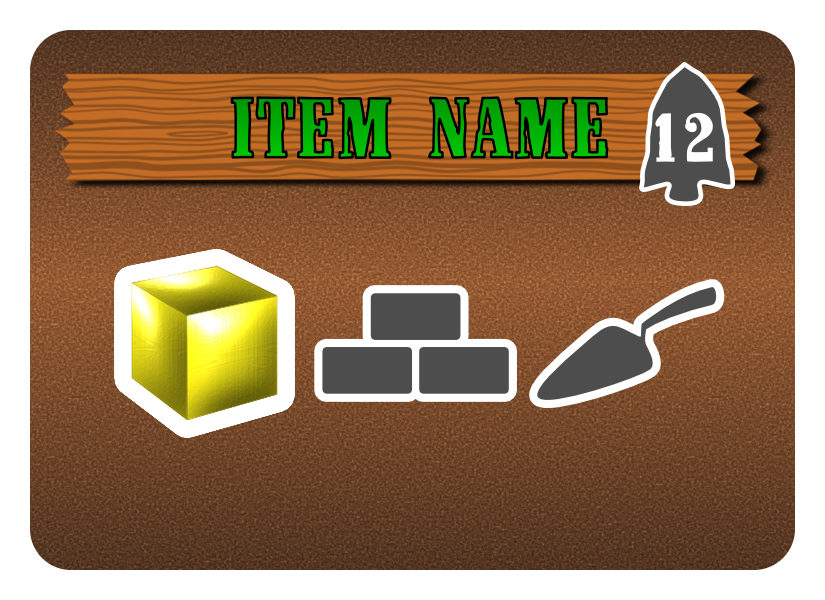
Fulfilling this order requires 1 gold, 1 bricks, and 1 trowel.
So I took the concept of orders and basically “Mathified” it. What I mean by that is I basically designed the orders to be different combinations of the resources used in the game.
Version 1 had a huge list like the spreadsheet that I showed last week. These were things like hats, pies, and musketballs. I decided that with the redesign I would ignore the naming of the items and just use the mathy combination of things.
So there are orders that cost 1 wood or 1 lumber or 1 stone or 1 gold. Then there are orders that cost any combination of two of those resources. Then there are orders that add in the secondary resources (hammer/nails/bricks/trowel). And it gets more complicated from there.
The design has a scale for how many points each order should be worth based on the costs. In the example shown the gold may be worth 2 and the bricks and trowel each worth 5 to get to a total of 12 points. So players are able to earn points during the game by fulfilling orders. (I know… that seems similar to Scoville. Oh well.)
You’ve Got a Hidden Agenda!
The other scoring I mentioned is hidden scoring. There are many games that have scoring conditions that are revealed at the end of the game. So I’m not doing anything groundbreaking here. But having hidden scoring conditions that only get revealed at the end of the game is a great way for players to never feel out of a game!
So I designed a set of scoring condition cards that have a two-fold purpose:
- Give players hope.
- Give players goals.
Hope is a big deal in board games. If a player doesn’t think they can win they may as well give up. I’ve seen players who know they can’t win start to help their favorite player win the game. I do not like that in a game. If a player has hope that they are doing a great job meeting their own scoring conditions then they have hope that they could pull it out in the end. Games like this include Stone Age, Archipelago, Ticket to Ride, and Suburbia to name a few.
Goals are also important. It helps guide a player’s strategy. It gives a player something to plan for. And it can help eliminate analysis paralysis. One of the newer games that has goals that definitely guide my strategy is 7 Wonders. In 7 Wonders each player has their own “Wonder” which is shown on a player mat in front of them. Each of these is different and provides some sort of bonus. The wonder that you receive can steer your strategy in the game.
I designed a deck of scoring condition cards to meet those requirements. These include having certain sets of buildings or certain combinations of fulfilled orders. So players can have hope throughout the game and never feel completely out of it. They may not be totally thematic, but I can give up a little theme for a better game. If players want to think of these scoring conditions more thematically then they can think of them as private commissions from the Trading Post.
Here are two examples of scoring conditions. The card on the left would award points to the player only if they managed to own two blue buildings and a green building. The card on the right would award different numbers of points based on how many orange orders they fulfilled.
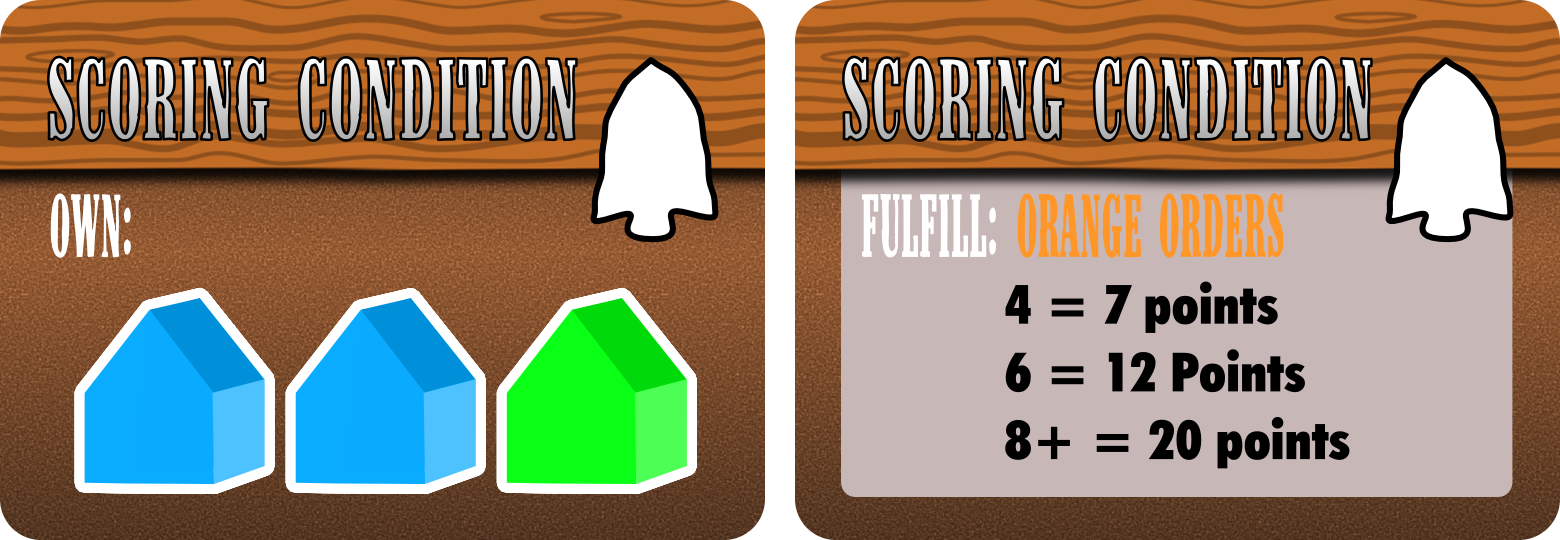
Left: a “Buildings” scoring condition. Right: an “Orders” scoring condition.
But How Do You Play?
Ironically this is probably the one question to which I don’t know the answer. I am debating about having the game play several different ways. Options include:
- Role Selection a la Puerto Rico, Race for the Galaxy, Carson City.
- Turn based game play with players choosing one thing to do per turn.
- Turn based with an action point allowance system.
- Rounds where players each do action A, then action B, and so on.
I truly have not decided which is the best approach for this game. I may end up testing all four options and seeing which works best. Here are the things I am trying to design for in the game:
- Minimal downtime
- No runaway winner
- Tense decisions
- Ramping up of awesomeness
- Accessibility – Easy to learn, easy to teach, easy to play
So I’m going to choose the game play option that best fits those game design goals. I am initially leaning toward the role selection option but making it less about a role and more about providing a specific set of actions that a player can do. I’m not sure that makes sense.
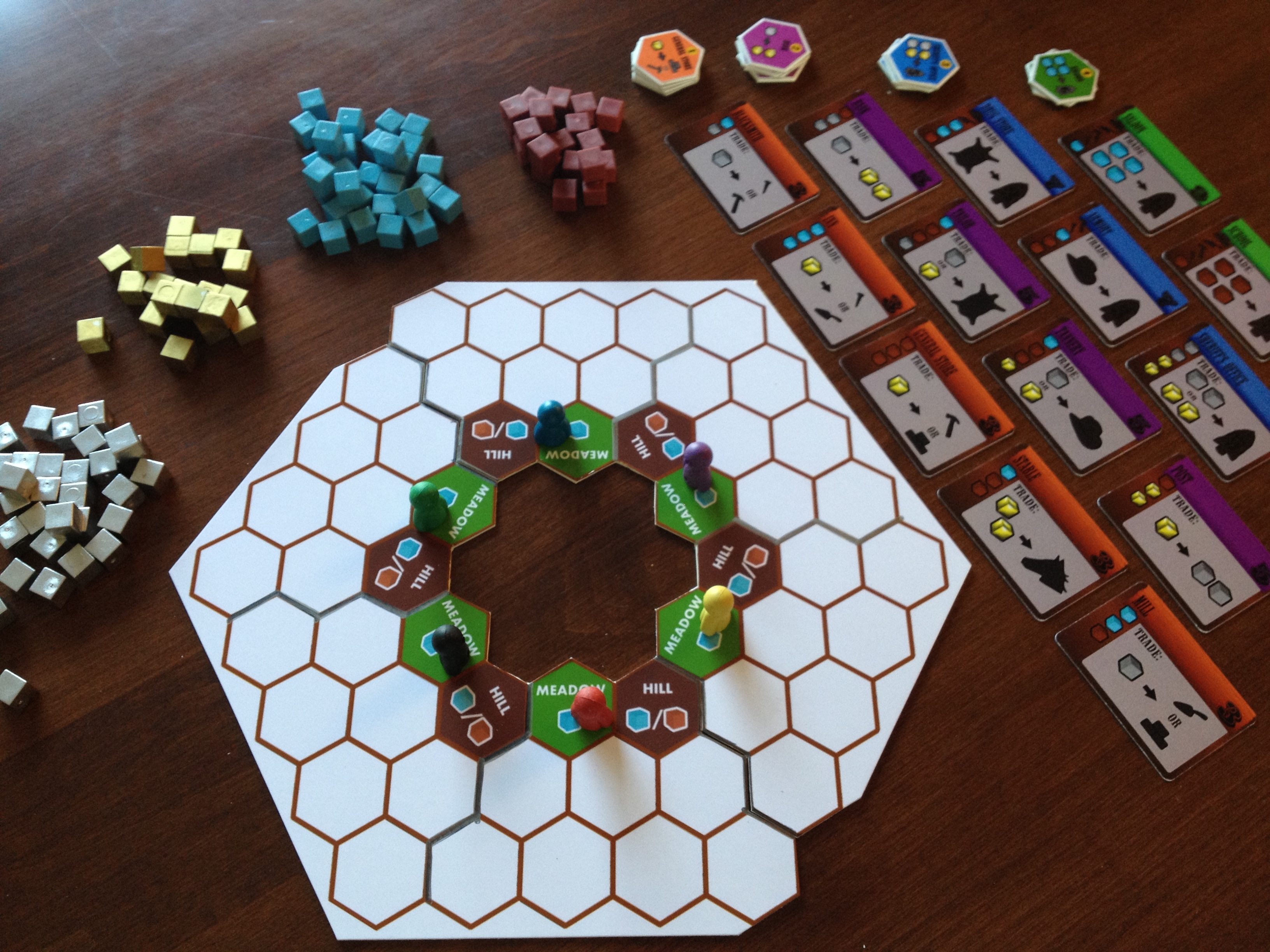
The current state of Trading Post minus half the components.
The bottom line is that I have several game play concepts within the game but I don’t have an overall picture of the game play. That’s what I’ll be discussing more in depth in next week’s article about my path to GenCon with Trading Post.
So next week I’ll cover the game play options for the game. I’ll also cover how to get this game ready to potentially pitch it to publishers at GenCon. Stay tuned! As usual, your comments are welcome. I’d love to hear what people think about this game design.
Trading Post Part 2: Early Prototyping

Trading Post Logo… for now.
I have a new game design I’m working on and today I am posting the second of 4 articles about it. Including last week, today, and the next two Thursdays, I’ll be writing about the game from it’s creation to the present state. Here’s the four articles in this series:
- 5-16-13: Origins of Trading Post
- TODAY 5-23-13: Prototyping Early Versions
- 5-30-13: Hiatus and Re-design
- 6-6-13: Path to GenCon
So today let’s again jump back in time a few years and take a look at my early prototyping attempts, from when I didn’t know anything about prototyping games!
The Board:
One of the first things I attempted to make when I thought I had the design “together” enough was a board. I figured black and white was a great place to start. So I drew a few sketches about the layout and then opened The Gimp.
For those of you who don’t know what The Gimp is, here’s where you can go to learn more: http://www.gimp.org/
It is an open source image editing software. While it used to be my weapon of choice for image editing and graphic design, I now use Inkscape since it is a vector graphics software (and still free).
So in The Gimp I got a 21″ x 21″ file open and began by creating the main hex grid. Last week I wrote about a grid of squares with truncated corners where cubes could fit. Well, that was gone by the time I decided to make a prototype. So here we are already discussing a hex grid map with square tiles. In the earliest designs all the tiles were going to be 1″ squares. So the board reflected that. You’ll understand why I went with squares a little more in the discussion about components below.
The hex shaped grid for player territories was a beast to design. I actually had to do math to get the grid to be a hex in The Gimp. This would have been relatively easy in Inkscape. But it wasn’t very fun in The Gimp.
After wrestling with the hex grid territory region I added a few other smallish things to the board. This included the title, resource areas, a time track, and a spot for cards. After spending a completely ridiculous amount of time on a board for a prototype that hadn’t even been played, here’s what I ended up with:
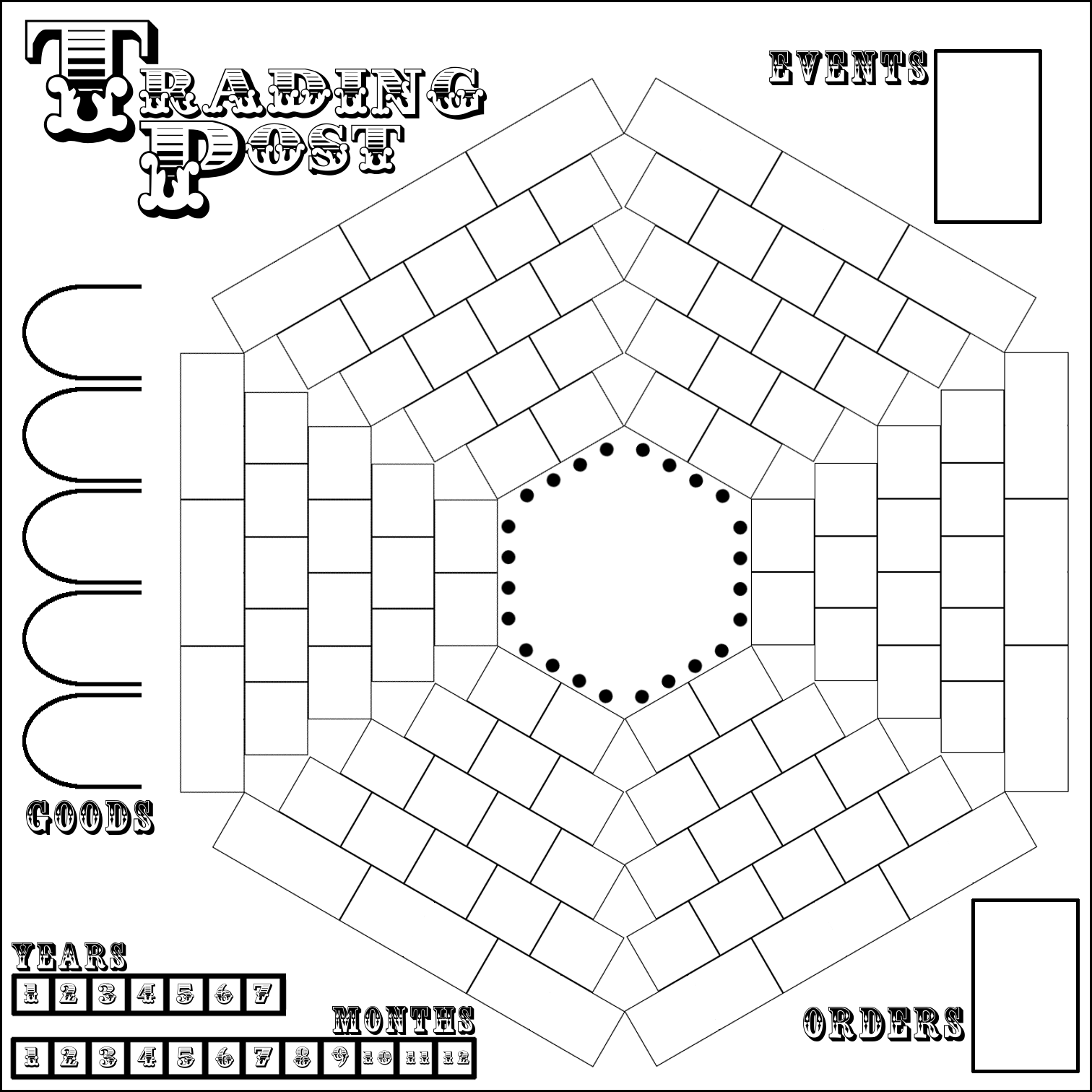
Well, it’s better than nothing, right?
As you can see it values function over form. Ugly though it be, it would still get the job done. So I printed it on 9 different sheets of paper and tried to get all the edges lined up. Maybe my struggles with creating a full size game board when working on Trading Post are what subconsciously led me to not having a full size board for Scoville.
The Territory Tiles:
The main concept of the design involves exploration of your territory. Players start with their pawns in the center and eventually should try to explore all of their territory. So I had to make tiles to put on the sections of your territory as you would discover them.
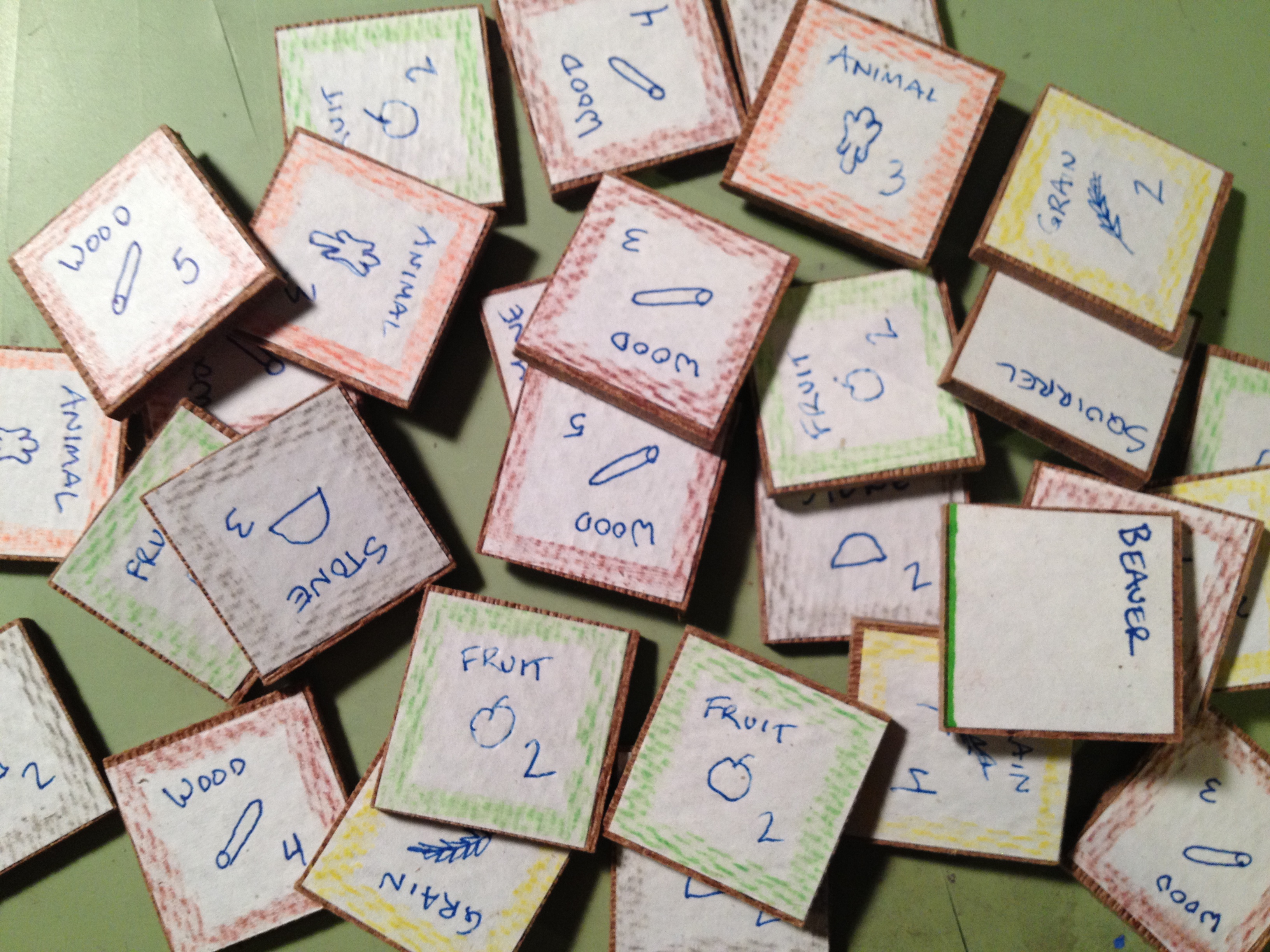
Wood tiles with hand drawn icons and colored pencil edges. Wow.
These tiles would represent different resources that could be available, AND the amount of that resource that the piece of land would produce… for the rest of the game. This included things like Wood, Stone, Fruit, Grain, and more.
Here is a lesson I learned when prototyping the territory tiles: Just buy chipboard components from someone like Printplaygames.com. For the cost you can get just about everything you would need to get your game to the prototype phase.
Did I make such a wise decision? Not even close. I actually bought a wood board and went to a friend’s house to use their table saw to cut 1″ square tiles. Then I cut out square pieces of paper. The paper got glued to the tiles. Then I drew little icons on each one and colored the edges to match the icon. Here’s a recommendation: Don’t do it like that!
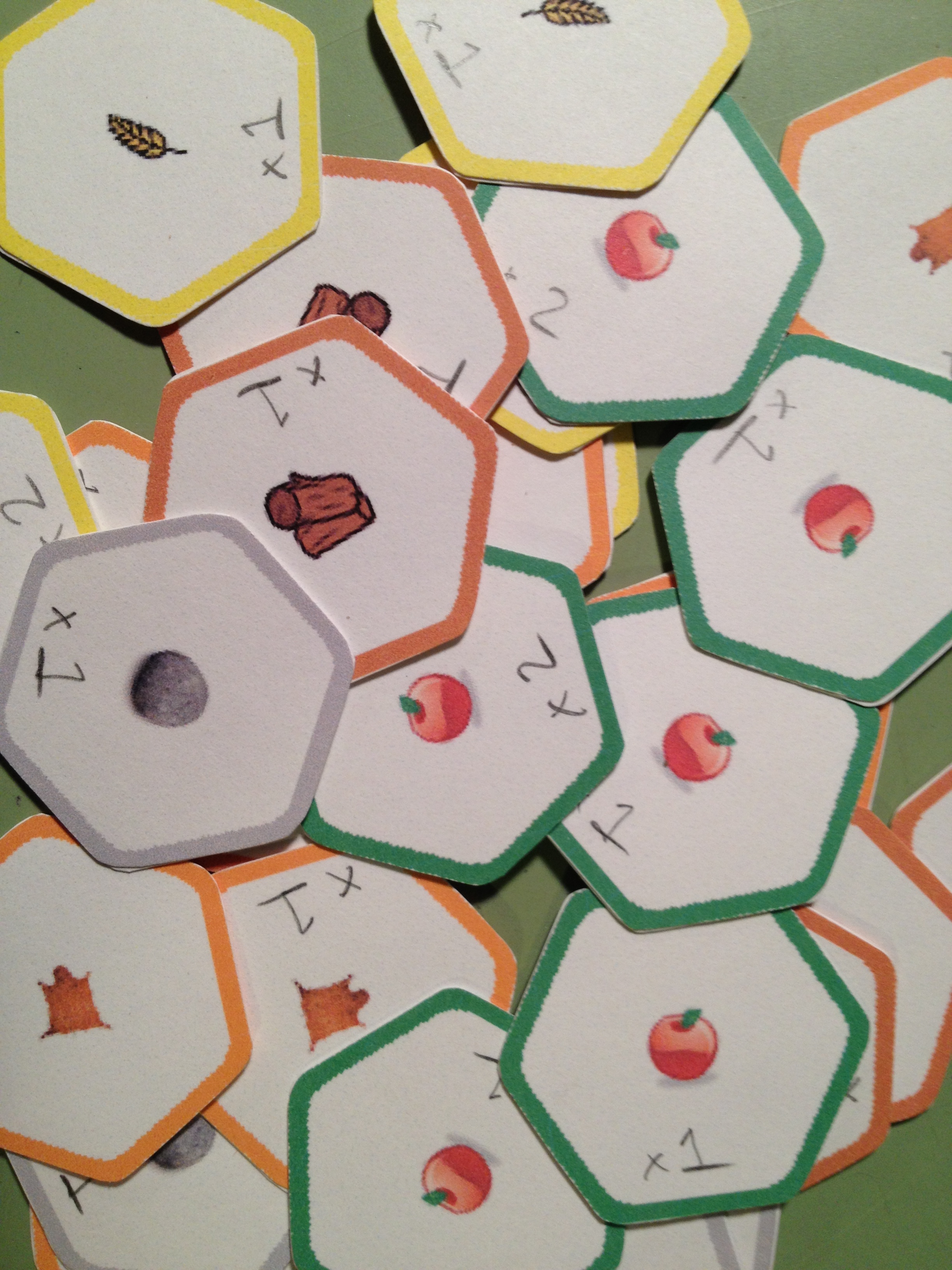
Hex punched, corners rounded, glued back to back. Aye!
Eventually I got to the point where a hex-based grid seemed like a better idea and I began to work toward a hex-based prototype. I used a computer aided drafting software called SolidWorks to render a hex grid that I could print out for the hex-based prototype. I don’t recommend using CAD software for board game design unless you’re making minis. The main problem is that the CAD software typically doesn’t allow you to save images in high quality. The downside of the change to a hex-based system was that all the effort I put into the wooden square tiles was now wasted. (I can say that it was wasted because it was never even used in a playtest).
The hex-based system didn’t change how the game was played. It just made things fit a little better and look neater & tidier on the board. It was at this point in my board game design career that I decided to purchase a hex-punch. I bought a Creative Memories Double Hex Punch off eBay for about $8. It turns out that that’s a crazy awesome price! Despite the price I recommend buying a variety of punches, especially circles. I just searched and found a few of the Creative Memories hex punches on eBay for about $37. Another free designer tip:
Punches can be your best friend!
Here is a link for punches from Fiskars. I would recommend starting on eBay, though.
Ugh. Looking back on all of this makes me wish I had been familiar with Inkscape at the time I was working on this design. All of the art and tiles could have been made with Inkscape so much more easily than what I was doing.
Well I now had my territory tiles made. Now it was time to add the other unnecessary ingredients in this poor game design…
The Event & Order Cards:
After reading the article about what makes a game good (Note: here’s the article I mentioned in last week’s Trading Post article, thanks to Neil Roberts who found the link – What Makes a Game Good?) I knew that I wanted to especially avoid monotony in the game design. I already had a random draw for territory exploration. But how else could I increase variability and replayability?
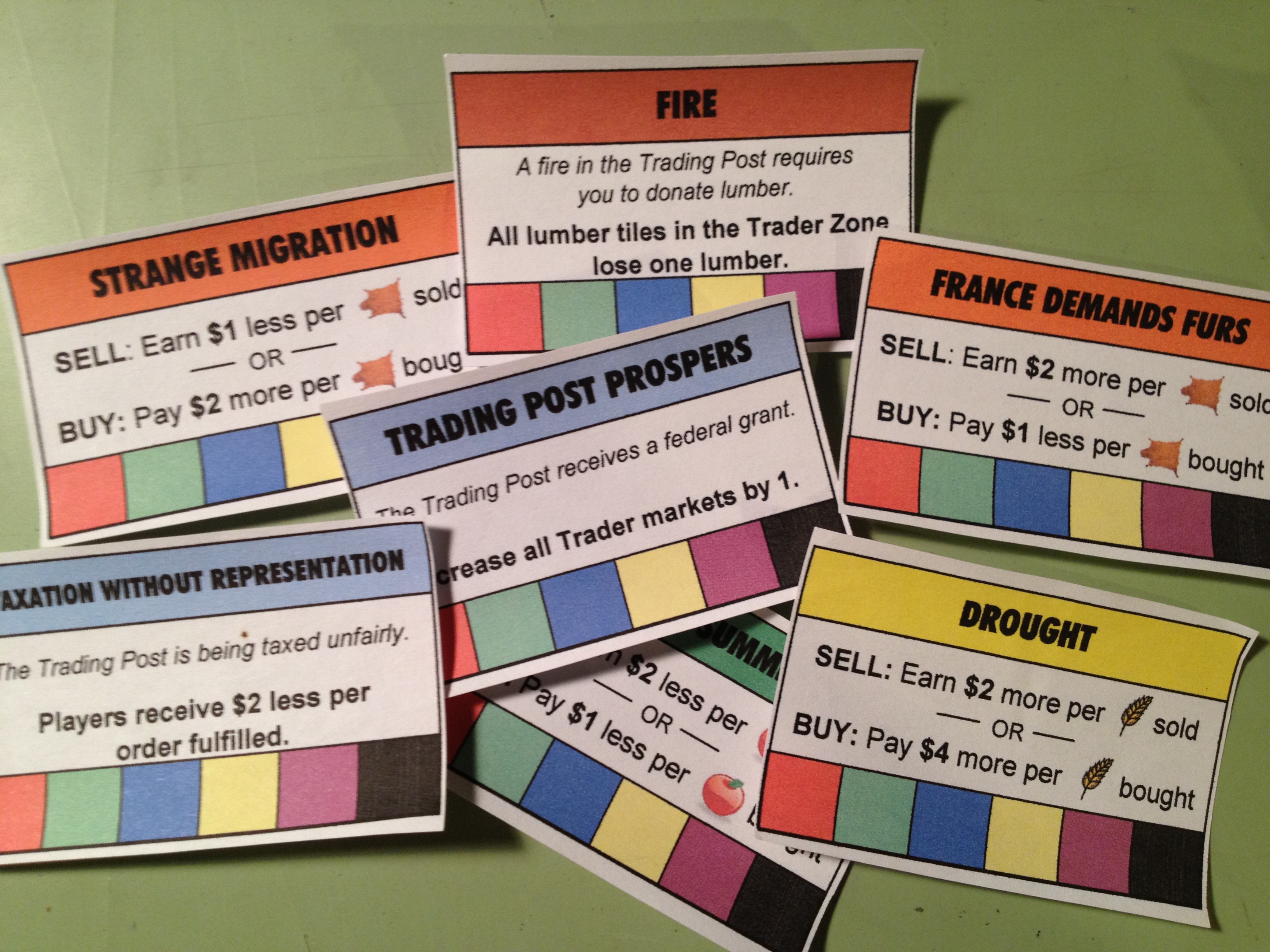
My poor attempt at adding replayability.
I came up with the idea that each “year” in the game would have something different going on. I called these “Event” cards. They typically affected how the market worked for different goods. But they also could positively or negatively affect all players. A few of the event cards are shown here on the right.
These were masterfully made in Excel. The bottom row of the event cards is a spot for players to put a cube of their player color when the card affected them to show that it had done so. Cards could only affect a player once. The top box on the cards is also color coded. The DROUGHT card in the image affects GRAIN and thus matches the yellow color of the grain. Pretty awesome, huh?
But this wasn’t enough! Another free designer tip:
Don’t add complications until the game needs it!
At the time I was designing Trading Post I hadn’t learned that lesson. So I added ORDER cards in a seemingly theme-less way to make each game different. I guess I was really worried that people would be bored with Trading Post after one or two plays.
Thematically the ORDER cards represented things the Trading Post needed during that year. That at least made sense. These things included blankets, hats, pies, buildings, flagpoles, and on and on. I struggled to make a list long enough of the sorts of things that a Trading Post might need. But eventually I got them all together and started making more “awesomeness” in Excel. Here’s a glimpse of the result:
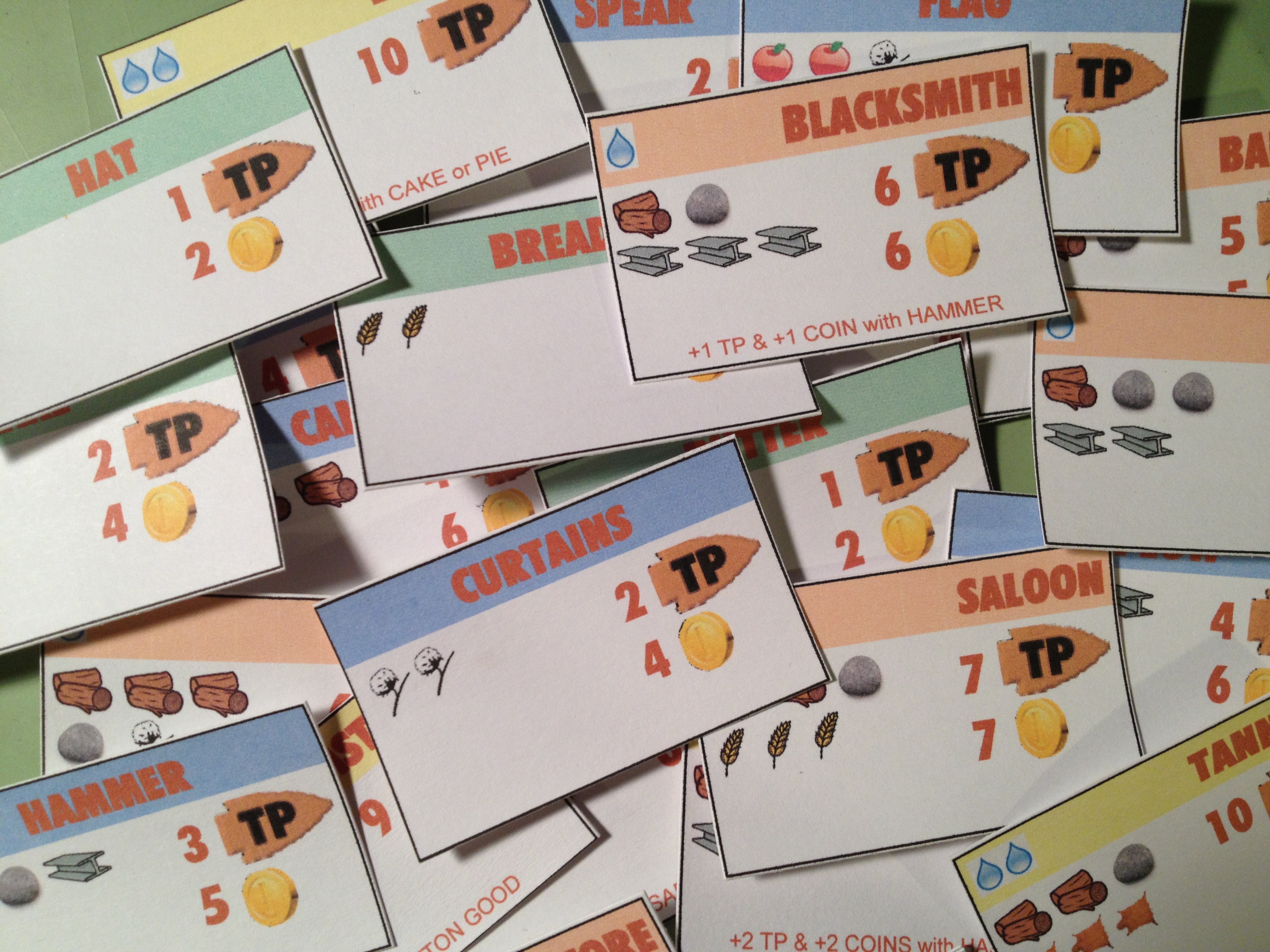
Trading Post Order Cards. Excel is NOT a graphic design tool!
So made a stack of about 50 order cards that would come out randomly, four per year. These would be available on a first come-first serve basis. The cost is shown on the left. In the image above, for example, the curtains would cost 2 cotton. The reward is on the right. In the same curtains example the reward was 2 Trading Points and 4 coins. I even added further complication by having some order cards provide a bonus if the owner already had fulfilled a prerequisite. In the image above an example is the BLACKSMITH. If you had fulfilled the HAMMER order card for the Trading Post and then fulfill the Blacksmith card you would earn an extra point and an extra coin. I suppose I added this to the design to produce a more guided decision tree to players.
In most of these images the way the prototype components were made was by printing on normal paper and glue-sticking them to 60lb. paper. The problem with this method is warping. And it was a big problem with the original Trading Post components. This is one reason that I have moved on to gluing stuff to matte board or chip board.
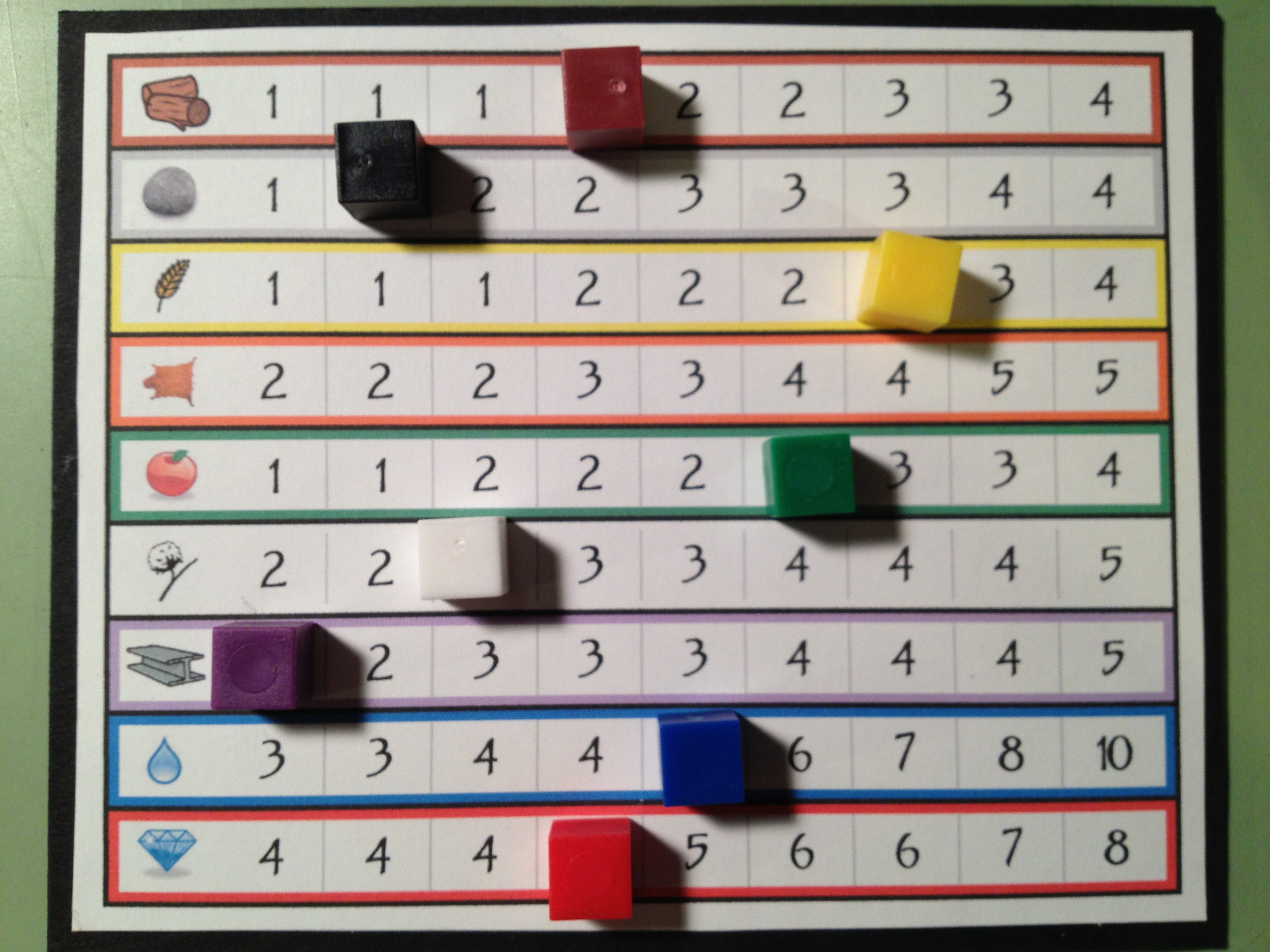
The market.
By this point in the design I had the board, the territory tiles, the event cards, and the orders. A market board was also built for the game to allow people to trade for different goods. This would be the driving economic factor of the game, but would also allow players to obtain goods that their randomly seeded territory did not produce. With all those components in place it was time to focus on what was in front of me… the player mat!
The Player Mats:
Since I knew that I wanted a main concept of the game to revolve around exploration I decided that upgrading your ability as an explorer would be critical. Thematically that meant going from a “trader” to a “trader with a horse” and eventually to a “trader with a wagon.” From early on in the design I limited the explorable zone for a “trader” to the first two rows out from the Trading Post. The idea behind this that fit the theme was that a man or woman could only walk, explore, and carry enough food for an expedition two rows out from the Trading post. By upgrading and purchasing a horse you’d be able to move faster and thus could explore more territory on the same rations. So when you purchased a horse you would be able to explore rows three and four away from the Trading Post. Finally, if you wanted to explore the outer most regions you would need to build a wagon.
So there is a side objective of all players in the game to be collecting the components they needed to be able to build their wagon. In the design I set it up so that you had to procure certain items. Once you had all these items you had a de-facto wagon. The wagon would allow you to explore the fifth row from the Trading Post.
I designed the player mats to show how far you could move and how much you could carry based on your status. And I included a Wagon Construction Area showing your progress toward a wagon. Here’s a look at the first and second versions of the player mats:

The top shows the original version. The bottom shows the cleaner, more user-friendly second version.
The cool thing, or at least what I thought was cool, was that in the second version you would actually be building your wagon by placing the pieces on top of the illustration.
One other thing to point out about how the game worked is illustrated in the second version of the player mats. There is a row for INCOME and a separate row for MONEY. Thematically the INCOME row represented any money earned during your turn. This would be like getting a paycheck. The way it worked was that after your turn, your income would be added to your money and then the income track would be set to zero. This means that any money earned on your turn isn’t available until the next turn.
I would say that through this whole prototyping process, which occurred in mid-2011, my favorite components were the player mats.
Overall Prototyping Experience:
The best possible tip I could provide to designers regarding prototyping would be this:
Just make something functional and test it. Only put in the effort to make it look good once you know it’s working.
Next week you’ll see that I don’t heed my own advice. But I’m inhibited by my desire to make things look good. And now that I know how to use Inkscape it takes much less effort to produce something that looks good.
Looking back at all the things I did for Trading Post I’ve realized that I wasted a lot of time. I built spreadsheets. I wasted hours using The Gimp to make that board. I added needless complexity, which then required me to make more components.
The game was only attempted to be playtested in its previous form twice. The effort to playtest ratio for this game is just ridiculous. So next week I’m covering my hiatus from the game, how I’ve advanced as a designer during that hiatus, and now how I’m going about redesigning the game. With that in mind I’ll leave you with one final image, which is a printout of a spreadsheet that I made so I could take notes on. This illustration sums up all the things that I am trying to avoid with the redesign!
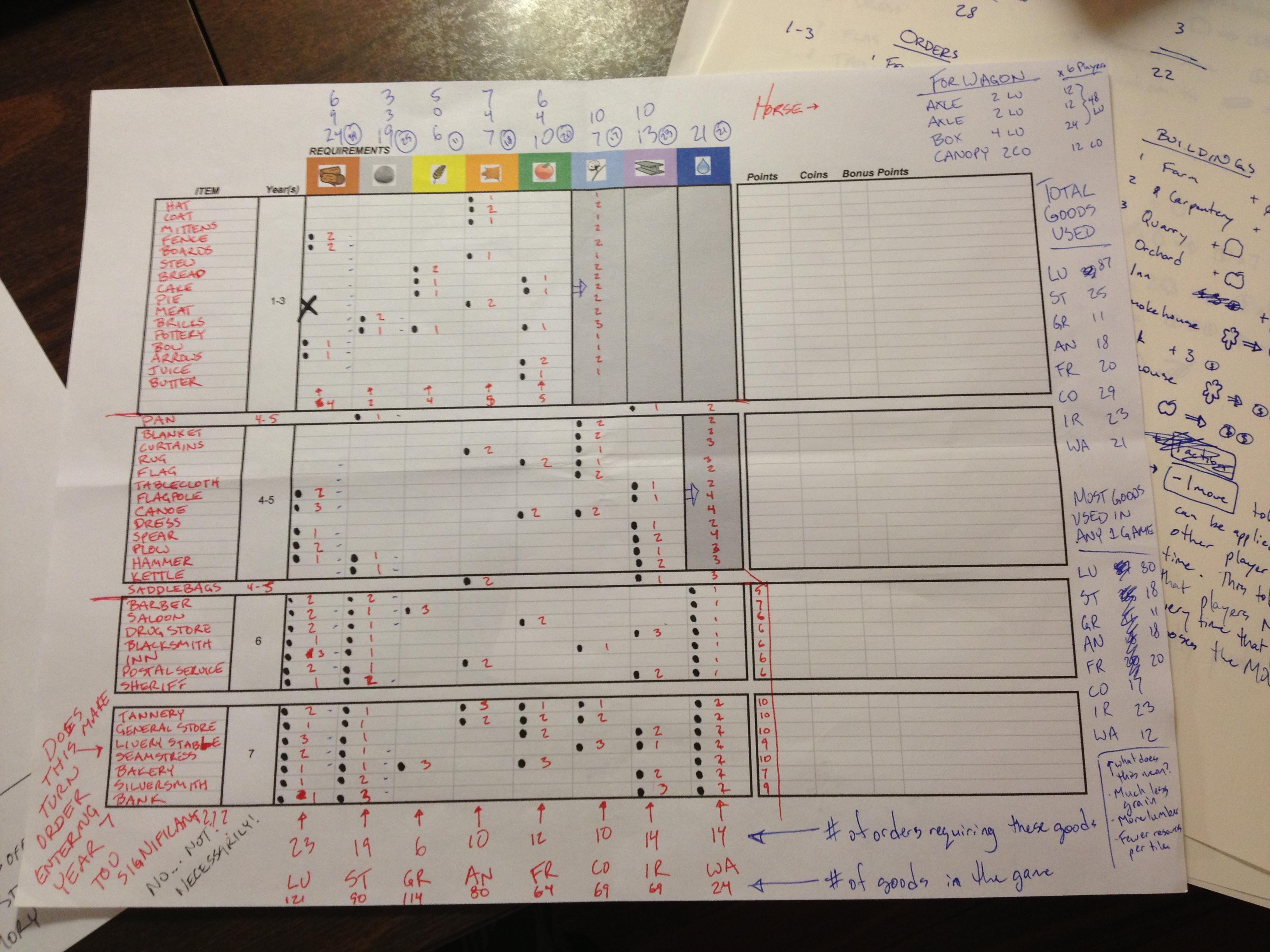
Wow. Just wow. Next week you’ll see dramatic improvements!
Thanks for reading. I’m happy to answer any questions you have about Trading Post and the things I’ve posted so far. Just share your comments below!
 Boards and Barley