Blog Archives

Sourcing Board Game Components: Cards
 This is the first in a series of articles that are meant to help aspiring designers and published designers alike. The goal of these articles is to simply list some of the sources for different components that we designers like to use in our game prototypes. While I have not used all of these different sources, I’ve done my research and feel confident that you’ll receive a decent quality production from any of these sources.
Today’s post is about sourcing cards for your prototypes. But over the next few Thursdays I’ll be posting articles about other components:
- Meeples
- Chits
- Dice
They won’t be dreadfully exciting articles, but I hope they can help you out as your on your way toward a high quality prototype. But first, my inspiration comes from this post:
That is a way better list than I’m going to make. But my sources seem to be some of the more mainstream sources. If there are component sources that you use, and like, that I have not mentioned in these articles, please let me know and I’d be happy to keep these articles up to date.
So let’s get to the sources I would use for cards… Note: The Game Crafter is my go-to source, and thus they are listed first.

The Game Crafter
 This is the one source that I have used. They have a large number of sizes available. They provide a template for each size. And overall I have never had any problems with my cards. They are not going to be the highest quality, linen finish, and all that, but they are great for putting together a quality prototype that you could feel confident pitching to a publisher.
Here’s the details about sizing and pricing (click the link to go to the template page for each item):
| Printed Item | Cost Per Sheet | Cost Per Item | Items Per Sheet | Image Size (in pixels) | Finished Size (in inches) |
|---|---|---|---|---|---|
| Bridge Deck | $1.56 | $0.09 | 18 | 750×1125 | 2.25 x 3.5 |
| Business Deck | $1.89 | $0.09 | 21 | 675×1125 | 2.0 x 3.5 |
| Hex Deck | $2.29 | $0.19 | 12 | 1200×1050 | 3.75 x 3.25 |
| Jumbo Deck | $1.25 | $0.21 | 6 | 1125×1725 | 3.5 x 5.5 |
| Micro Deck | $3.99 | $0.07 | 56 | 450×600 | 1.25 x 1.75 |
| Mini Deck | $2.89 | $0.09 | 32 | 600×825 | 1.75 x 2.5 |
| Poker Deck | $1.56 | $0.09 | 18 | 825×1125 | 2.5 x 3.5 |
| Square Deck | $2.29 | $0.19 | 12 | 1125×1125 | 3.5 x 3.5 |
| Tarot Deck | $1.89 | $0.19 | 10 | 900×1500 | 2.75 x 4.75 |
When you upload files you can upload a bunch at once, or one at a time. When you are ready to have them printed, you’ll have to “proof” each one. When I order cards I usually go with the Mini Deck since you can get them for a pretty good price. They are also one of my favorite sizes for games in general. They are large enough to hold a lot of information, but small enough to not be a nuisance.
ARTSCOW
 My wife has used ArtsCow for a few scrapbooking things, so I can attest to the quality of those. However, I have not used ArtsCow for any cards. So take this for what it’s worth.
On the ArtsCow page you can choose from custom playing cards, cards shaped like circles, and cards shaped like hearts. While ArtsCow doesn’t seem to have the game designer in mind with their products, I think people have had success with ordering customized cards.
The best option I’ve seen for custom double sided cards is the “Multi-Purpose Cards.” This seems like the best option for custom double sided cards from ArtsCow. They measure 2.5″ x 3.5″ and start at $10.99 for a 54 card deck, which seems quite high for 280 gsm matte paper. But like I mentioned, they don’t think like game designers.
Printer’s Studio
 I have not used Printer’s Studio for any cards, but I know people who have. Like ArtsCow most of their options for cards are decks of custom playing cards. But they do have a page for blank playing cards that can be fully customized as well.
Sizes include:
- Mini Size (1.75″ x 2.5″) starting at $4.39 for up to a 64 card deck
- Bridge Size (2.25″ x 3.5″) starting at $7.99 for up to a 54 card deck
- Poker Size (2.5″ x 3.5″) starting at $7.99 for up to a 54 card deck
- Tarot Size (2.75″ x 4.75″) starting at $1.89 for up to a 10 card deck
- Large Size (3.5″ x 5.75″) starting at $13.99 for up to a 54 card deck
Those prices seem a little high to me, but these are for 300 gsm card stock. Each card size also has an option for 310 gsm linen finish.

Print & Play Productions
 While I have not ordered cards from Print & Play, I have ordered hex chits. I was very pleased with their quality, so I would likely be pleased with the quality of the cards as well. But that’s not a guarantee.
Print & Play offers several sizes of blank or custom printed cards:
- 1.75″ x 2.5″ 270 gsm starting at $2.00 for 32 cards printed on both sides
- 1.75″ x 2.5″ 270 gsm starting at $2.25 for 78 blank cards
- 2.5″ x 3.5″ 270 gsm starting at $2.00 for 18 cards printed on both sides
- 2.5″ x 3.5″ 270 gsm starting at $2.00 for 52 blank cards
They also have an option for a letter size sheet of custom cards starting at $1.25 for double sided printing.
Other Sources: EAI / Amazon
If all you’re looking for is blank cards from which you can make a prototype, then perhaps EAI or Amazon is your best bet. Here are the details:
EAI: Single deck of 54 blank playing cards is currently $0.99 per deck (regular price = $1.55 per deck)
Amazon: 500 Blank cards for $13.50
***
So those are the sources that I am most familiar with for blank cards. The other option is to use something like nanDECK and create/print your own cards that you could then sleeve. I haven’t had much luck trying to use nanDECK, so good luck with that.
Please let me know if you use someone else. I’d love to add it to this list and make it more complete. Thanks for reading. I hope this list and the next three covering meeples, chits, and dice will be helpful to you as a designer!
My 2013 GenCon Experience
Yesterday I posted a gallery with 40 pictures from GenCon. Today I am giving a more prose-y account of my experiences at GenCon. But with having only 15 hours of sleep total during GenCon I may not remember all the details. So bear with me as I blab through this.
Scoville and my approach to GenCon 2013

Ahead of Schedule!
When the calendar flipped from 2012 to 2013 I made a list of goals for the year. One of those goals proclaimed this year the “Year of Manliness,” which we won’t get into here. 🙂 Another goal was to design and playtest Scoville so that it was ready to pitch at GenCon. If you follow this blog at all then you likely know that I didn’t have to pitch Scoville last week at GenCon since it was already picked up by Tasty Minstrel Games. Yay!
So I figured I could try and get another game ready to pitch for GenCon. But that didn’t happen. Games don’t just develop themselves. While I brought a copy of Trading Post and a copy of Conclave, neither were to the point where I felt comfortable putting them on the table with other people besides myself. I showed Conclave to a few people who seemed to like the concept. But the bottom line was that since Scoville was signed and I had nothing else to show I was basically free of stress at GenCon 2013.
So my approach was to cultivate, enhance, and develop professional relationships with designers and publishers. Basically I just wanted to meet as many people as possible. That’s a pretty nice approach to be able to take. I always have to keep in mind that while board games and board game design are my hobby, they are the real-life day to day jobs of a lot of the publishing companies. It’s easy for me to just go up to them and joke around and have fun, but I have to remember that these are professional relationships and I should try to treat it as such. So don’t act like a jerk and do stupid stuff since these are the people that you could be working with in the future.
I brought along the business cards that I had made for Protospiel-Milwaukee. I think I handed out about 30 of those over the course of the convention. I also was able to gather a few business cards from other people. I’ve gained a few new Twitter followers as well, which is always great. So overall I’m pretty happy with the business relationships that I formed.
Thursday Recap

On the road to GenCon!
Our 5 person cadre hit the road from Madison around 5am. That felt really early, but we powered through and it felt great to be hanging out on the way to GenCon.
Our drive had a few highlights, and thankfully no lowlights. Along the way we made two pit stops. The first was in the beautiful small town of Tonica, Illinois. Unforunately we had to drive like two or three miles off the freeway just to find the gas station. But at least when we found it, it lived up to the expectations of a small town gas station in Illinois.
At the second gas station we stopped at we were pleased to see 10 police cars with cops surrounding a car at a gas pump. We weren’t sure if we were safe, but we gawked for a while anyway. But let’s keep going with this recap.
On the road we played one scenario of Sherlock Holmes: Consulting Detective. I had not played a game like this before but I really enjoyed it. It’s basically a thinky game where people talk through the scenario and try to figure out the Who-Dun-It type thing. We ultimately got the answers right, but we used way more leads than Sherlock did.
Another thing we did during the ride was design a game together. We even pitched it to a publisher later in the con, but I don’t think we were able to really portray the potential of the game. These are all the details I can give, but I think this game has a lot of potential.
We rolled into Indy around lunch time and headed to a restaurant called Yats. Ben had spoken so highly of it last year that we figured we should start our GenCon with it this year. It was delicious.
Then we hit the hotel and then hopped in line for our GenCon passes in Will Call. The excitement was abundant! To the exhibit hall we went, ready to buy games and meet people!
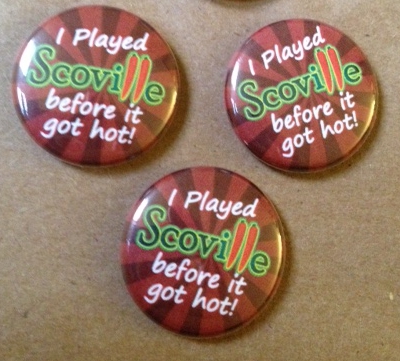
Thanks Ken!
The first person I met was Ken Grazier of Geek-Craft.com. He had made some Scoville buttons for me and so I traded a small amount of cash for them. They turned out great and I’m thankful to Ken for his button making prowess.
Then we headed to a few specific booths to try and snag some stuff. Thursday isn’t our main exhibit hall day, so we jumped from booth to booth.
An obvious stop for me was the Tasty Minstrel Games booth. I connected with the TMG guys and met the awesome Brian Frahm, who was demoing Dungeon Roll a ton over the convention. Brian is a great guy and it was a pleasure to meet him.
We also stopped at the Cool Stuff Inc. booth because they usually have great deals on board games. We then stopped at the Alderac booth to grab Trains. Then we jumped over to the Asmodee booth to snag Spyrium. And then we hit up the Queen Games booth where we got the new Kingdom Builder expansion and Via Appia. We also stopped at the Game Salute booth to grab Keyflower and The Little Prince and check out Nothing Personal. Overall we got a nice lot of games on our first day:
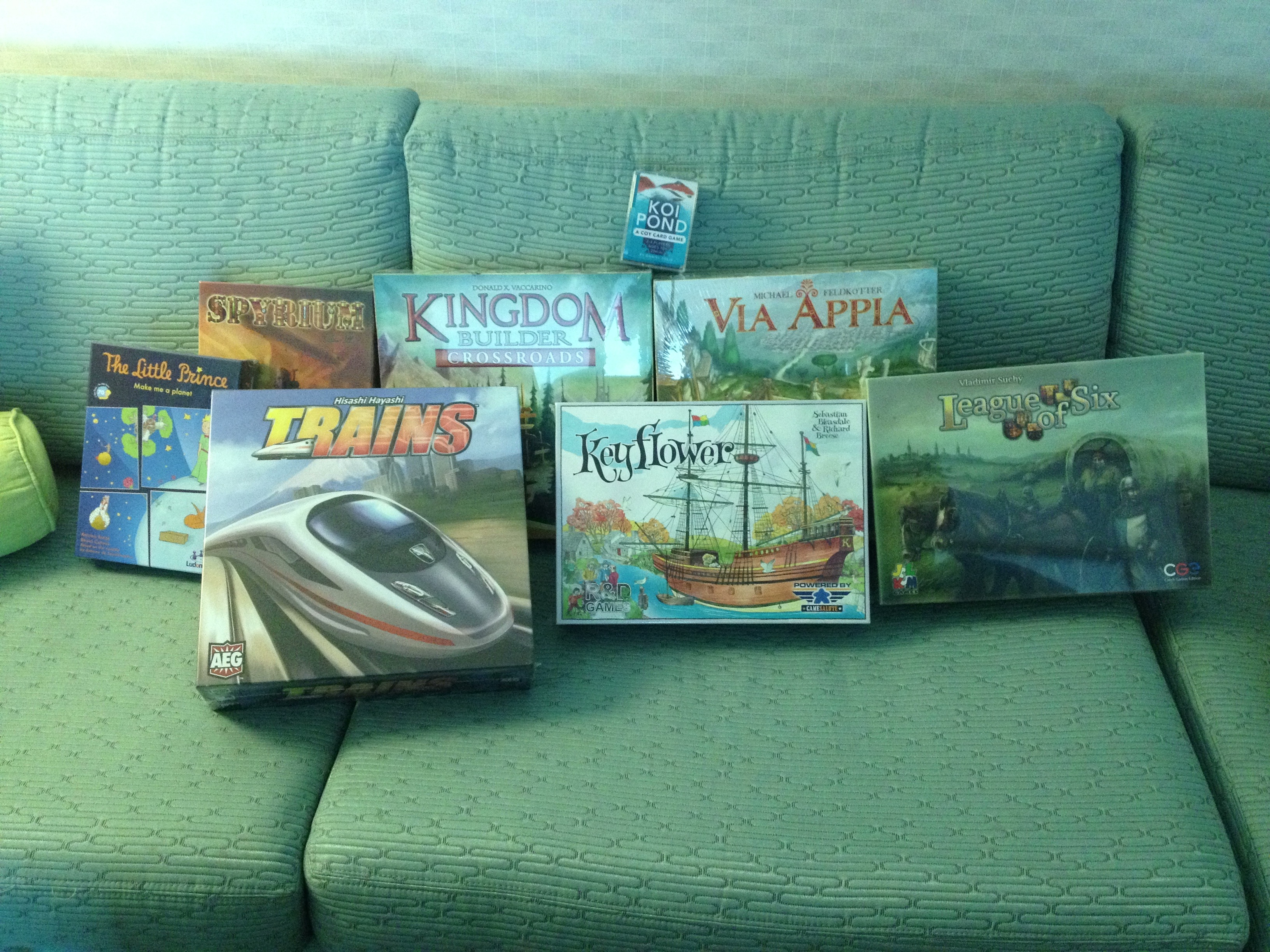
First Day Haul at GenCon!
In the picture it should be noted that League of Six was obtained via trade.
Then we headed to our hotel room to unwind a bit and decided to head to the bar for a game. We played The Little Prince, which I’ll be reviewing on Friday. Then we headed to dinner where we got in a game of Love Letter.
Overall I was able to connect with a bunch of people on Thursday, which was awesome. Here are the games I played on Thursday:
- Sherlock Holmes: Consulting Detective (The Cryptic Curse scenario)
- The Little Prince
- Love Letter
- Piñata
- Skyline
- Spyrium
- Super Awesome Thing (prototype)
- Coloretto
- Coup
As for the Barley side of things Thursday included a sample of the GenCon brew “Flagon Slayer,” a Rock Bottom Honey Ale, and the brown ale at the JW Marriott.
Friday Recap
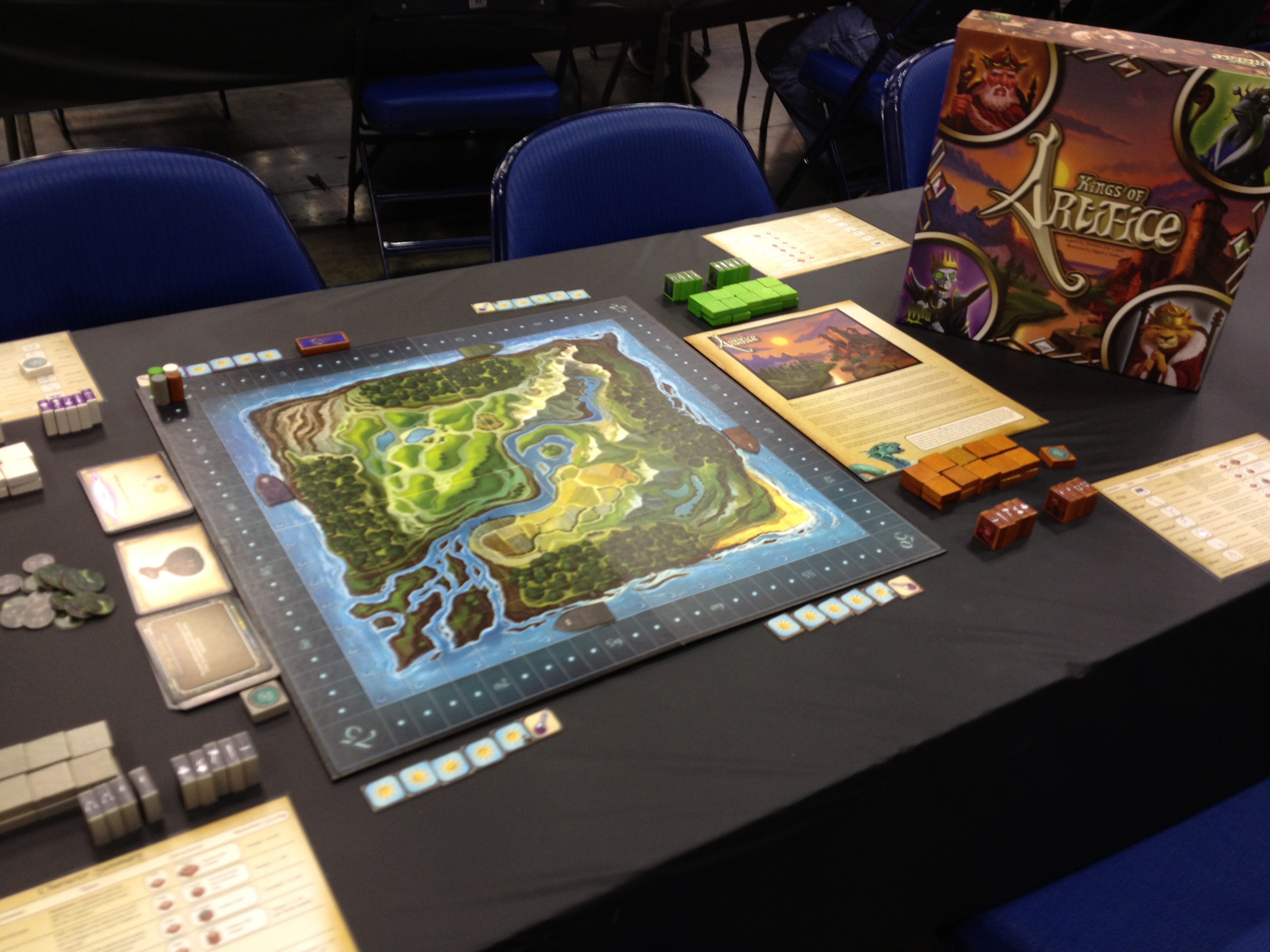
Kings of Artifice by Wyrd Games
Friday is our main Exhibit hall day. On the way to the exhibit hall we noticed a game called Kings of Artifice that none of us had heard of. This was being demoed in Hall C (I think) by the publishing company called Wyrd Games. It had an interesting mechanic of summoning people onto the land and using them to the best advantage. You could be conservative and focus on building your little part of a kingdom, or you could be aggressive and try to wipe out your opponents. It seemed like an interesting game but wasn’t something our group ended up buying. While we were demoing I received a message from the honorable Matt Worden. It was an invitation to speak in a panel discussion on Protospiel. My awesome friends had no reservations about me going to partake in the panel.
So I went over to the Crowne Plaza and joined some esteemed designers for the panel discussion. That was the awesome part. The downside was that there were only six attenders. We had as many people on the panel as there were people attending the panel. Apparently they had 45 attenders last year. I think that since it was in the Crowne Plaza, people weren’t willing to leave the convention center to come over and attend. But I was honored that Matt would invite me to come speak on the panel. Thanks Matt!
The other downside was that I was really looking forward to walking through the exhibit hall. I figured my guys were already halfway through it. But when I came back and found them in Hall D playing a game I was greatly pleased that they had not yet gone into the hall. They chose to play a game and wait for me instead. That was awesome!
So we started walking aisle by aisle through the hall. It’s such an experience to do that. If you’ve never been to GenCon it’s hard to understand the massiveness of the exhibit hall. We bought a few more games before three of the five of us headed out for a talk on Evil Villains by author Brandon Sanderson. One of the fun things about the exhibit hall is sitting down and trying games. One of my favorite games to play was Weykick. It’s basically a magnetic take on air hockey, but it’s very enjoyable. I got owned by Jeremy. We also tried Crokinole, which is a game we’d like to build for ourselves. It’s a fun flicking game on a big round wooden board.
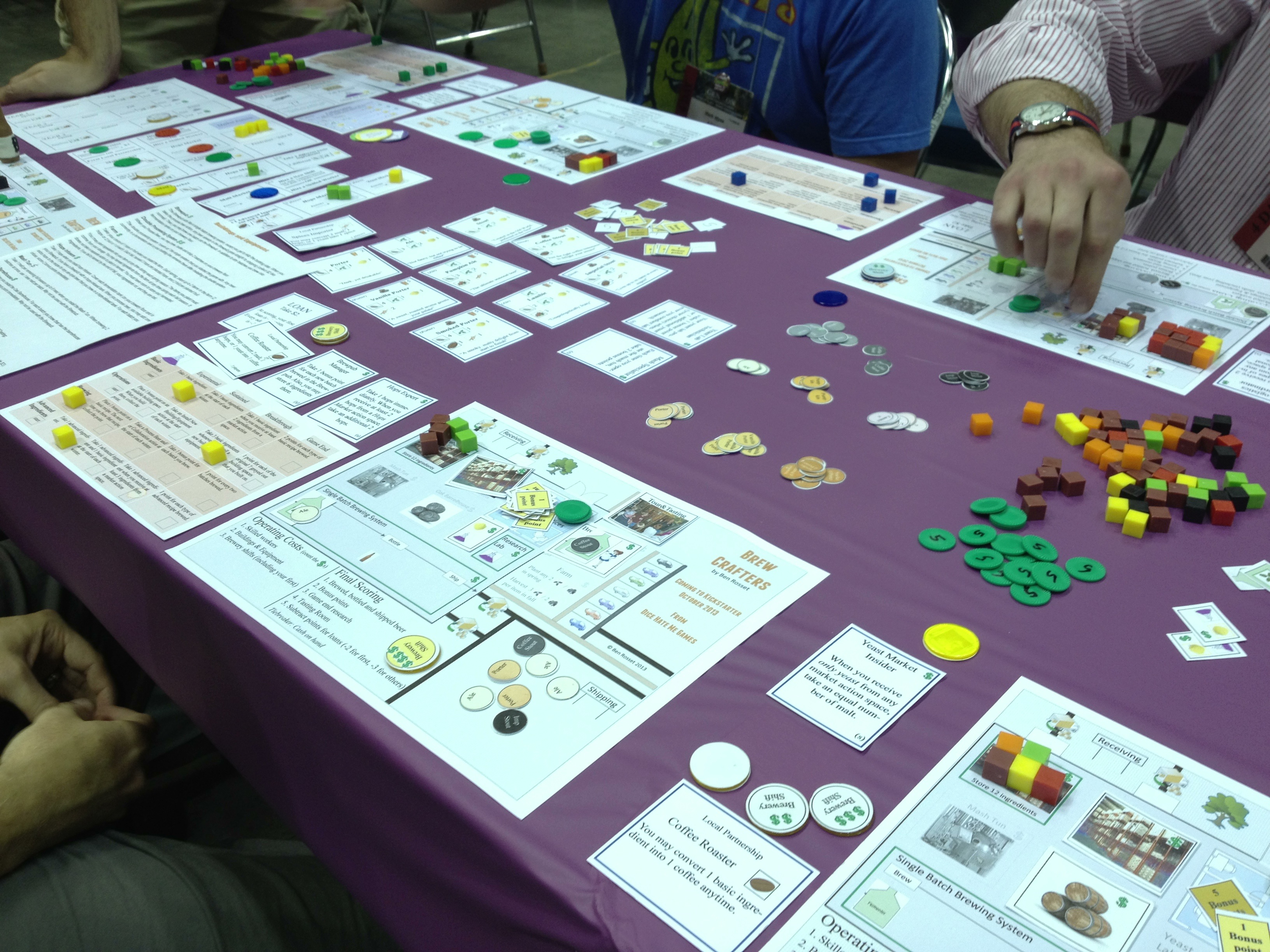
Brew Crafters is awesome!
We finished in the hall in time to grab some food at Chick-Fil-A in the mall before a demo. We successfully avoided the two hour lines at the food trucks this year! Lunch in hand, we joined up with our guys at a demo for Dice Hate Me Games‘ upcoming game Brew Crafters by designer Ben Rosset. I’d go into a review of the game but I might save that for a session report on BGG. The bottom line is that this is a great game, and not simply because it is a perfect fit for Boards & Barley! It worked really well, the decisions in the game all seemed important and made sense, the theme was awesome, and, most importantly, it was a lot of fun! I’m looking forward to seeing this one on Kickstarter! Ben is a very nice guy and it was a pleasure to meet him. Check out his other game, Mars Needs Mechanics, available from Nevermore Games.
After that we went to the Rathskellar for an awesome time in the beer garden. There were German beers on tap, pretzels to consume, and a plate of sausage that tasted delicious. On top of there there was a really good band that had a great sound. Hanging in the beer garden was one of the highlights of GenCon 2013.
Late that night we headed back to Hall D with a latte. I had the pleasure of teaching Scoville to several new players. It seemed well received and I was happy to give away some of the buttons. It was also cool to have two simultaneous games running. At the same time we were able to chat with Michael Mindes, owner of Tasty Minstrel Games. I also had the privilege to meet Rob Lundy, artist/graphic designer for Dungeon Roll. He’s a home brewer, too!
After all was said and done I rolled/slumped into bed around 3:30am. I’ve been told that’s typical of GenConners.
Friday games I played were these (Not very many):
- Kings of Artifice
- Dread Curse
- Weykick
- Crokinole
- Brew Crafters (prototype signed with Dice Hate Me Games)
And Friday’s Barley choices included two (large) Spaten Optimators.
Saturday Recap
Saturday is our last day of GenCon since we normally depart early Sunday morning. We started things off with a demo of Rialto by Stefan Feld. I had already picked it up from the Tasty Minstrel booth because of the great price ($30). It was nice to have someone teach us the game though. It was an enjoyable play and the game seems like a nice lightish Feld game. I was happy to have picked it up.
We then wandered the hall a little more to make sure we didn’t miss anything and to pick up a few other things. I snagged Targi for $20 which seemed like a good find. Then we had lunch and made our way to the GenCon Library room.
In the Library we had scheduled a demo of Francis Drake by Eagle/Gryphon Games. I was a little hesitant about trying this out because it seemed primed to be a 3 hour dry and boring Euro. Boy was I wrong. This game was really fun. There is a nice resource procurement track that worked really well. After goods are obtained you then ship off for a trip to central America where you can pick up trade goods, battle against villages and forts, and attempt to battle another ship. This game was very solid and was really enjoyable. I was very surprised by how fun it was and how not-dry or boring it was.
After dinner at Rock Bottom we made our way to Hall D again where we got in a game of Flick Wars coming soon by Andrew Tullsen and Print & Play Productions. I personally enjoy flicking games like Bisikle, Crokinole, and others. This was also a fun flicking game. I believe Andrew will be putting it on Kickstarter in the near future.
We also got to play Lagoon by David Chott, which should be coming to Kickstarter by his company, 3 Hares Games. While the fantasy theme wasn’t really my thing, the gameplay was very interesting and enjoyable. There are some really interesting combos you can do in the game, which make the decisions really awesome. There is a nice balance of trying to aim for combos to set something up for a future turn versus simply trying to score a tile on the present turn. I think this game was well done and I wish David the best with it.
After that I was fortunate to have a few more players for Scoville. And I was able to sit down for the game as well. It went well and I heard something that really humbled me. One of the players said after the play that it’s in his top ten games. That was amazing.
The night ended with a play of Alex Kevern‘s Gold West prototype. And I had the privilege of playing it with him, Ben Pinchback (Co-Designer of the award winning game Fleet, currently with an expansion on Kickstarter), and the honorable TC Petty III (Designer of the awesome game VivaJava). It was great to meet them and game with them. They are all outstanding people.
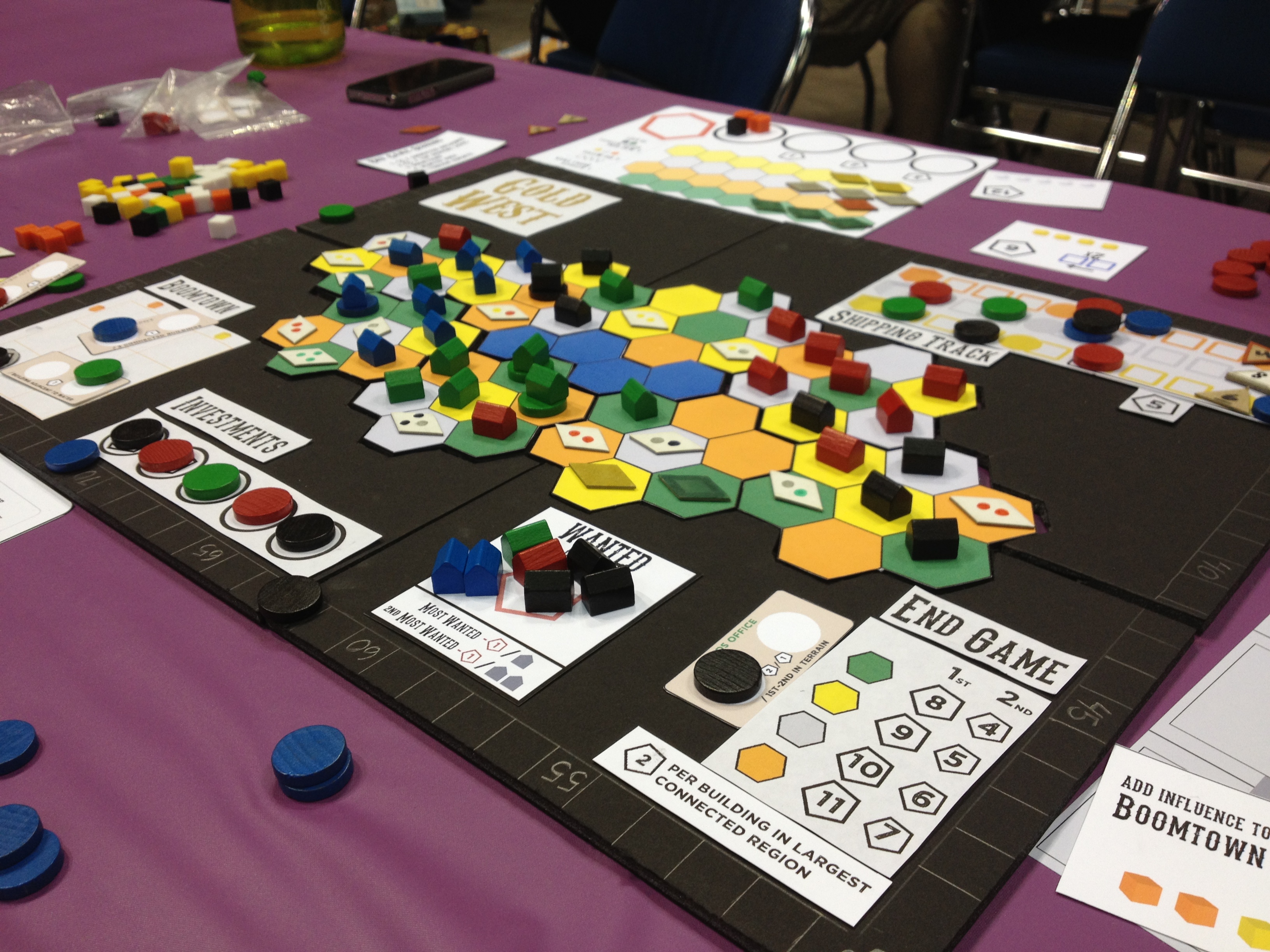
Alex Kevern’s Gold West
Gold West is a great game. There is a really cool take on the Mancala mechanic that you really need to think about to maximize what you can do on your turns. In the game you are helping to develop a western town. You obtain metals and building materials that you have to figure out how best to use. Each turn you can place a building onto the territory and claim the goods from that piece of land. Once you have the goods, you need to place them into one of the Mancala spots on your player board. This is the tricky part of the game. On any given turn you can only use the resources that are placed into the last spot after taking a Mancala action. So you have to plan accordingly. This is a sweet use of the Mancala mechanic and made the decisions in the game very interesting. The other part of the game that I really enjoyed was how to use the resources once they are available. You can ship off the metals, use them to develop the boom town, or fulfill investments for big points. Each of these mechanics works really well together and I was happy to be able to play the game. It was fun and strategic while also being accessible and easy to teach. And it only took about 55 minutes for four players to finish the game. That’s awesome!
The games I played on Saturday were these:
- Rialto
- The Downfall of Pompeii
- Francis Drake
- Love Letter
- Flick Wars (prototype)
- Lagoon (prototype)
- Scoville
- Gold West (prototype)
The barley I consumed were a pair of Rock Bottom brews: Red Ale and Kolsch.
Saturday was over and Sunday meant waking up early and hitting the road. So here are my final thoughts from GenCon 2013:
Top Games Played During GenCon:
My favorite unpublished games were Brew Crafters and Gold West. Those games are both games I would have bought at the convention if they were available. I’ll definitely be watching the development of both of them.
My favorite published games (or soon to be released) were The Little Prince, Spyrium, and Francis Drake. These three games were my most enjoyable plays of the convention.
I also reconnected with or introduced myself to about 50 people. That was great since I had only previously known people through online connections. For aspiring designers who want to get in the game I highly recommend getting on Twitter and starting to develop relationships with the awesome people in the industry. I’ll see you all next year! (Hopefully sooner)
Biggest Disappointments:
I was really hoping to pick up Bruges at GenCon. But Z-Man games only brought a few copies and it was sold out after a half hour. That was well before we arrived on Thursday. That was really disappointing.
The other disappointments had to do with prototype games that I didn’t have a chance to play. I really wanted to try Gyre by Eric Leath (and I’ll likely PNP it), VivaJava Dice by TC Petty III (but it was 3am by the time TC had a chance to show me), Belle of the Ball by Daniel Solis (I think Dice Hate Me had a copy available), and Pay Dirt by Tory Kniemann (designer of Alien Frontiers). Those are all games I had hoped to play but didn’t get the chance.
Next year I think I’ll try and schedule more appointments with people so I can try out their games rather than simply trying to connect randomly.
Overall, though, for these to be the big disappointments means that my 2013 GenCon experience was pretty awesome!
Conclave Conversation

Are you the next Pope?
Welcome to Boards & Barley. Last week I mentioned that I’d be posting an article about sourcing components for board game prototypes. Well, with GenCon so nigh I figured that article wouldn’t be of much help to fellow designers anyway. So I’m postponing that article until after GenCon, at a time when many designers will likely be looking to purchase new components for their game designs that require revisions. So today I’m discussing Conclave.
Since Trading Post is my white whale and I doubt I’ll ever actually get it to a playable point I’ve been spending my time making excellent progress on Conclave.
In Conclave players take on the role of a Cardinal who is hoping to become the next pope. For those not familiar with the process of electing a pope I will give a brief background. To elect a new pope the college of cardinals, those of high standing in the Catholic hierarchy, are locked in the Sistine Chapel after the death or resignation of the previous pope. They will perform voting rounds each day until a new pope is elected. Pretty simple.
So today I want to give you an update as to my progress on the game. Let’s start with the cards, and what they do…
The Orders of Catholicism
The game is designed to play from 2 to 4 players. Those players will represent one of four different Catholic Orders: Franciscans, Jesuits (Society of Jesus), Dominicans, or Benedictines. While I’d ultimately like each of these orders to have some sort of special ability, almost like factions, they currently are all equal and are simply a better way to represent the player colors. Here’s a look at the cards (From The Game Crafter) with the icons for the different orders:
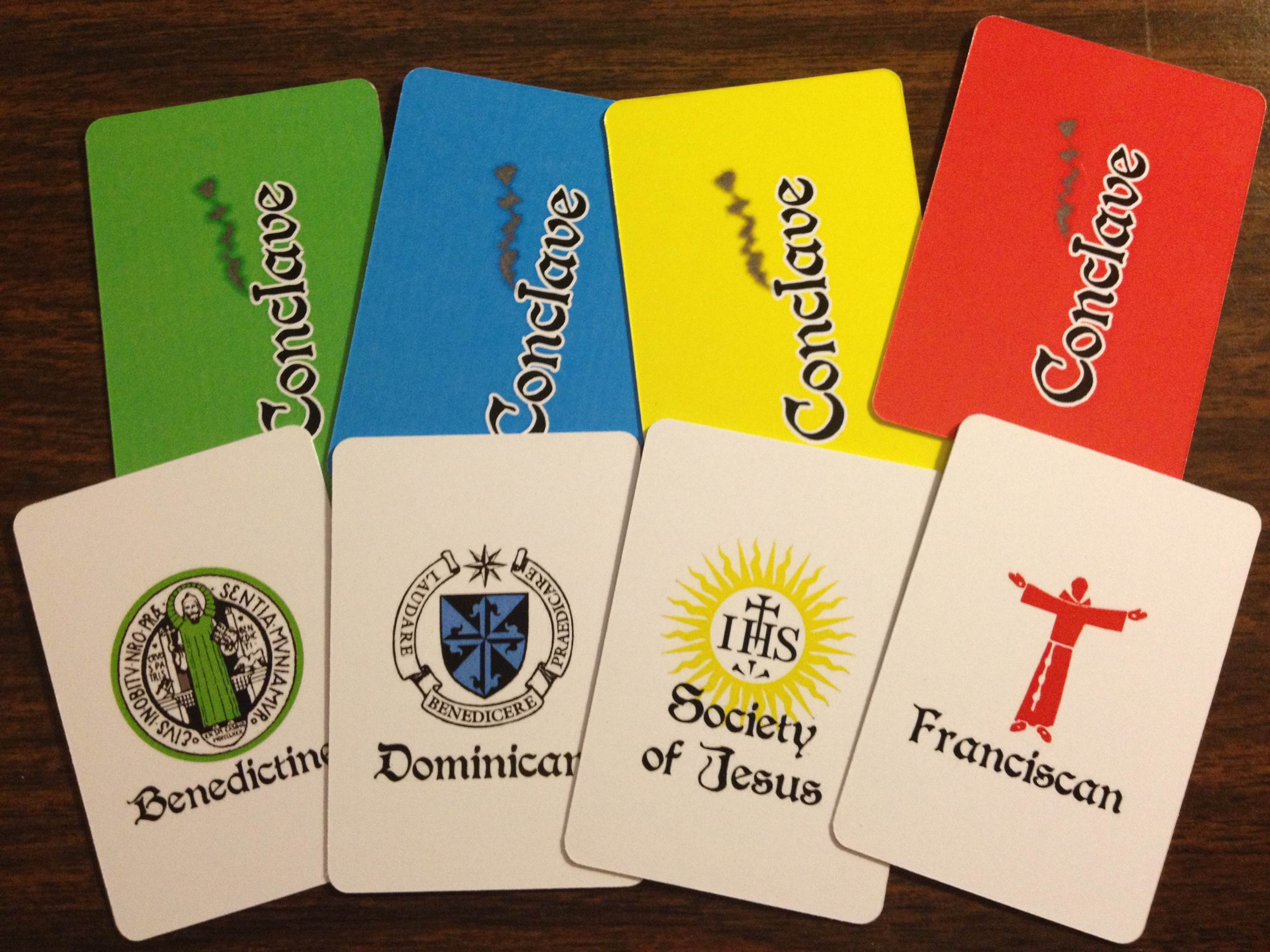
These could easily be labeled by their color, but the icons seem more real.
The cool part is that once I’ve tested the base game it would be relatively easy to add in specific traits for each of the Catholic Orders. That would allow each player to have some special ability that they could try to use to their advantage in the game.
Inside the Sistine Chapel

Sistine Chapel prior to Conclave.
Conclave is a game about area control. The areas are represented by the different tables in the Sistine Chapel. In a real conclave it looks like the setup on the right. That setup has long tables of equal numbers of Cardinals.
In the real conclave each vote counts individually. That’s not much fun from a game design perspective. So as the designer I am utilizing my creative license and splitting the tables up.
So in the game there will be anywhere from 6 to 9 tables that include from 1 to 6 cardinals. Each table will work like an electorate. Basically, whomever holds the majority of votes at any given table earns the full table’s worth of votes.
This is a decent way to mix things up. So players will be attempting to hold the majority at tables rather than focusing on any individual Cardinal’s vote.
Therefore the table with only 1 Cardinal is worth 1 total vote. But a table of 5 Cardinals, though worth 5 votes, can be won with 3 cards in place to win the majority.
So ultimately I’ve designed this to work like an electoral college where tables are worth electoral votes and a certain number of electoral votes are needed to win the Papacy. Perhaps I should switch themes to be a Presidential election in the US.
The Tables
Two nights ago I mocked up some beta artwork for the tables, mostly based on the picture above. My previous prototype had these large, cumbersome boards that were really just too large to be any good. So these new table boards are based on the mini cards from The Game Crafter (1.75″x2.5″).
Here is a mock up of a Five Cardinal table:
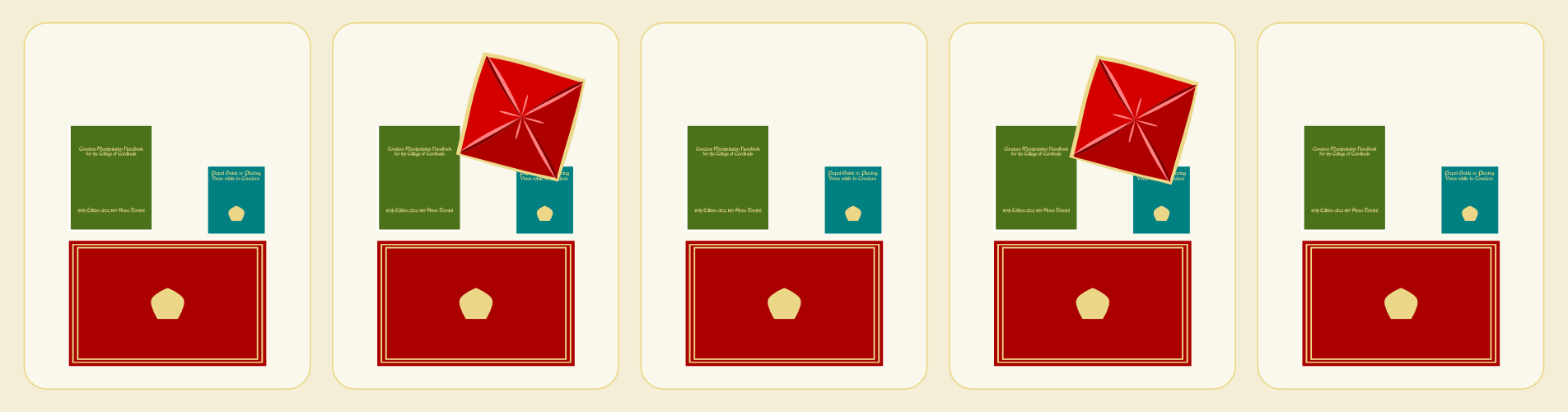
Having a majority here is worth 5 votes.
First, I need to apologize to anyone who enjoys anything about culture. It is almost blasphemous that I am designing a game that basically involves the Sistine Chapel and all I’m showing are the tables at which the Cardinals sit. How can I justify not including any imagery of the beautiful, if not scary, artwork included in one of the most historical rooms in the world?

The red box thingy in my artwork represents the papally awesome swag bags on the tables.
Second, the two spots with the weird angled red box thingy are special spots. At the very start of the game a certain number of cards are randomly drawn from each player’s deck. Those cards are distributed evenly to the spots with the weird red box thing. The red box just denotes which Cardinals receive a face up, randomly drawn card.
Once the randomly drawn cards are placed then players will take turns influencing the Cardinals. On their turn they will place one card face down on any Cardinal of their choosing. Then they will also place one card from their hand face up on that same Cardinal. The thematic idea here is that these Cardinals are voting for the face-up player, but could be persuaded to vote for the face-down player.
Play continues in this psuedo-setup phase until all the Cardinals have cards on them.
Manipulating the College of Cardinals
After all the Cardinals have cards to represent their votes then the real game begins. This phase of the game is all about manipulating the Cardinals to get them to vote for you. There are four actions you can choose and you can perform any two of them on your turn. These actions are represented by these hastily produced icons here:
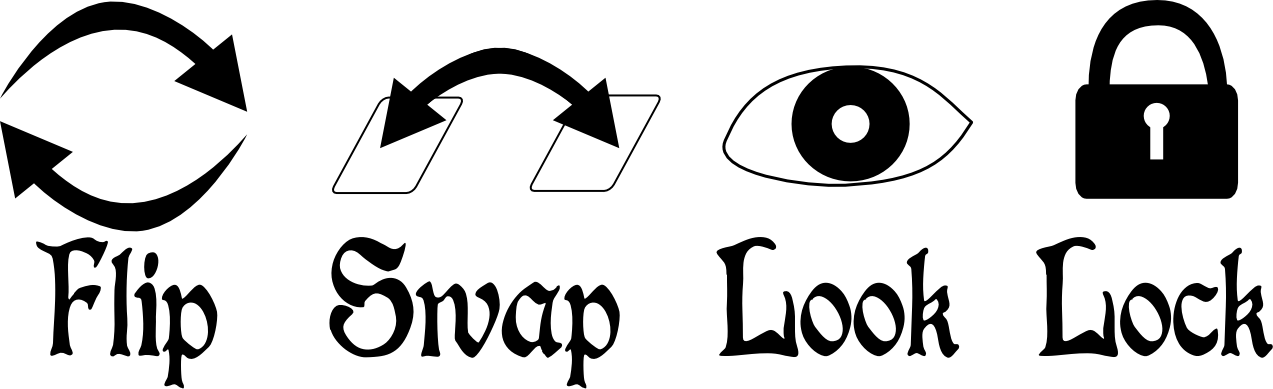 FLIP: This action allows a player to flip any one Cardinals cards over. The result is that this Cardinal will now be voting for whichever card had previously been the face-down card.
SWAP: This action allows a player to swap the locations of two different face-up cards of any two Cardinals.
LOOK: This action allows a player to investigate the Cardinals by looking at three different face-down cards for any three Cardinals of their choosing.
LOCK: This action allows a player to lock any one Cardinal’s vote into place for the rest of the game. Each player will have four locking cubes and can thus lock four Cardinals over the course of the game.
So on your turn you can perform two actions. They can be the same action if you so choose. The goal is to try and manipulate the tables so that you earn the majority, and thus their votes.
***
So I’ve described the game in a nutshell. This is the basic concept of the game and it is currently playable. My disclaimer is that I have no idea if it is any fun. All the fun so far has been in designing the game. While I think there is a nice strategic component to the game, only time will tell. And by time I mean playtesting. Thanks for reading!
Prototyping Tools of the Trade
Tools of the Trade
One topic that seems to come up a lot is how to make board game prototypes. I’m not talking about coming up with a design. I’m talking about physically creating prototype game components. Game designers are constantly trying to make their components so that they can get right to the playtesting phase of game design.
Today I want to discuss the tools I use to create my prototypes. At this point you should already have your prototype artwork created if you’re going to be printing anything. Let’s assume it’s already been printed. Now it’s time to make it awesome!
Chits…
One common component that is particularly easy to make for prototypes are chits. These are typically just printed artwork glued onto matte board. But matte board can prove to be difficult to cut.
There’s two ways that I’ll cut my chits out of the matte board.
- Straight edge and utility or X-acto knife (not ideal)
- Rotary cutter (ideal)
What we are doing here is separating the chits from one another. When creating your artwork you should line up the edges of the components so that you only need to make one cut between them.
This will help you keep your fingertips!
The straight edge and knife approach is definitely NOT my approved method and I would never recommend it. However, a lot of people use that approach so I needed to mention it. One recommendation is to use a safety straightedge like the one shown here. You only have 10 fingertips so why not spend a few extra dollars and get a straightedge like this and make sure to not lose any fingertips!
I don’t like this method for a few reasons. The first is that you need a cutting mat to go underneath so you don’t scratch your table. The second is that the blade doesn’t always stay straight as you are cutting the matte board. And that can be really annoying.

Just get this thing instead!
My preferred method is to use a rotary cutter like this Fiskars 12″ Scrapbooking version. It is super easy to use, relatively cheap (especially compared to the $40 safety straightedge), and very reliable. And since most of us don’t have printers that print on anything other than 8.5×11 paper anyway, the 12″ Fiskars tool is perfect!
So I will print my prototype artwork on photo paper, adhere it to matte board, and then cut out the individual components using the rotary cutter. Just a heads up when using matte board though: you’ll likely have to roll the cutter back and forth a few times to cut all the way through. That’s still an easier process than trying to run a blade along the straightedge.
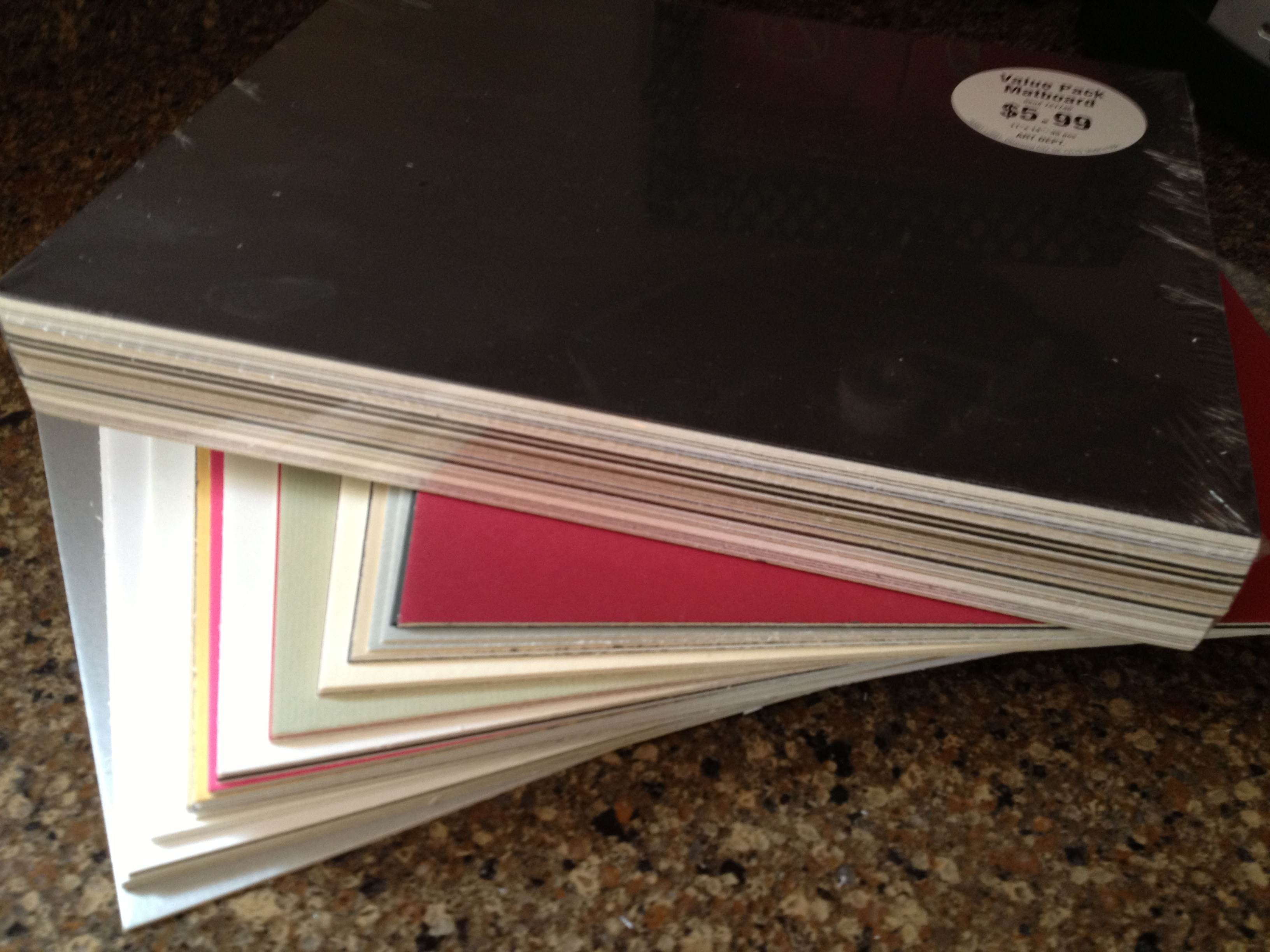
On the topic of matte board, I recently went to Hobby Lobby and purchase two huge packs of “matboard” for $6 each. I got a pack of 12″x12″ and a pack of 11″x14″. These are so cheap that I almost felt like I was stealing. They are just the leftovers from the framing department that were cut out from the boards used to mat pictures/paintings for customers. What a great way for Hobby Lobby to reduce their waste and provide a useful product. Here’s what I got for $12:
So cheap!
The other key tool of my trade is a glue stick. Some people will use standard glue, some will use spray adhesive. I prefer the glue stick to standard glue since it is simple to apply evenly. This is very helpful when trying to make sure that your components are completely glued down.
Now you know a great method for producing chits. If possible, keep them as rectangles rather than circles of hexes. But since we’re on the topic of circles and hexes let’s move on to another excellent tool…
Punches…
There are times when you don’t want rectangular components. Perhaps your game is a map building game with hex tiles. Or perhaps you require special discs for your game. If that’s the case, then I strongly urge you consider purchasing a punch.

The hex punches from Fiskars work great!
One thing to keep in mind when purchasing a punch is how thick of paper/board are you wanting to punch. Often these sorts of punches are used by scrapbookers who are only punching paper. That means they may not be able to punch through matte board. Sometimes you can only find out after you’ve bought the punch. Bummer.
Here are some recommendations, keeping in mind that I don’t know specifically how thick they can punch. OR you can just do a search for “hobby punch” and find one you’d like.
- Fiskars Squeeze Hex Punches
- Creative Memories Punches
- Older Creative Memories Hex Punches on eBay
- And don’t forget the Corner Rounder punch which can be helpful for cards that are printed on nice canvas/linen finish paper.
These can come in really handy. I use a circle punch when creating prototype coins. I have used a hex punch to create stickers for hex tiles. And here is my little tip for punching, which I mentioned in a prototyping article a long while back, but which is worth repeating.
When punching, flip the punch over so you can visually align the part that you want cut.
So now you’ve got the tools to cut out chits and punch out little bits of awesomeness! What about cards?
Sleeves…
Many game designers come across the need for cards in their game designs. I have made cards numerous times. Early on I would buy 60lb. paper and just cut out rectangles. But there is a problem with that. The edges of the rectangles can be slightly bent from cutting, which leads to great difficulty in shuffling the cards.

Mayday sleeves are convenient and cost effective!
The way to prevent that while also protecting the cards is to purchase card sleeves. These inexpensive beauties will be a little lifesaver by removing anguish from your prototypes. Plus, you can get awesome one’s like the one shown here with a kitten running through a field!
If you want a good go-to source for sleeves then look no further than Mayday Games. Here is a series of links to the sizes you may be looking for:
- Euro Cards (59×92 mm)
- Mini Euro Cards (45×68 mm)
- Card Game (63.5×88 mm)
- Standard USA Cards (56×87 mm)
- Magnum Ultra Fit for 7-Wonders (65×100 mm)
Those should offer some help. They definitely help with being able to shuffle your cards. The only downside is that when stacked they can be really slippery and your stack may tumble over.
Speaking of tumbling…
Dice…
Sometimes it becomes necessary for a game designer to create their own set of dice. Sure, you could always just make a cheat-sheet conversion table, but that can be a huge burden for your playtesters who would constantly have to recheck the sheet. So one of the tools of the trade is to purchase blank, sticker-able dice.

Just think of the potential here!
Look no further than Indented Blank Dice. The best part of their site is that they have labels that you can purchase and print on rather than having to buy blank label paper and try to cut/punch out your own labels and then peel them off.
Don’t buy blank label paper. Don’t cut/punch out stickers. Don’t try to peel them.
Just buy the sticker label paper and save yourself from the frustration.
So this concludes my little article about Prototyping Tools of the Trade. Next week I will be posting a follow-up article on Sourcing Components for Prototyping. It will cover where to purchase boards, bits, and more. So stay tuned!
Symmetry in Board Game Design
My recent design, Conclave, initially suffered from a lack of symmetry. After a great playtest session with Jeremy Van Maanen, Adam Buckingham, Corey Young, and Brett Myers I received some great feedback that pointed out how the initial round could greatly influence the game due to the asymmetry. So I balanced the player decks to eliminate that asymmetry. What followed was a nice conversation on Twitter about symmetry versus asymmetry. So I though I’d write a brief guide about putting symmetry into your game design, and where it might be appropriate.
My Definition of Symmetry:
Before discussing where symmetry or asymmetry is important it is necessary for me to define the terms so that you understand what I mean throughout the rest of this article.
SYMMETRY: when conditions within a game are equal for all players.
This could be that all players have the same options on a turn or that they all start with the same cards or they all have the same opportunity to progress. Symmetry is typically only present at the beginning of a game. Once one player has taken a turn, then the game is different for the next player. So games where all players have an equal opportunity to be the first player inherently are symmetric at the start. Games where a random player goes first are not inherently symmetric since by the time the second player goes, the game conditions for that player are different than they were for the first player.
An example of a symmetric game starting condition is one where players simultaneously bid for turn order. Another example is when all players simultaneously make their first move in a game.
ASYMMETRY: when conditions within a game are unequal for all players.
I think of asymmetry as the situations where players have differing decks of cards, or different options on their turn, or different opportunities in the game. But asymmetry also applies to when games change from turn to turn and thus no two players ever face identical game conditions. There are many examples of asymmetry within games. And to provide examples could take a long time. Instead, check out Lewis Pulsipher‘s thread on BoardGameGeek: Looking at Game Design as Ways of Introducing Asymmetry.
Where to design for Symmetry:
There are definitely places within game designs for symmetry. If conditions within a game ever put a game out of balance, where one player has a distinct advantage toward victory through no means of their own, then the design calls for symmetry to remove that lack of balance.
My example, from Conclave, fits perfectly here. The original design provided each player with a 30 card deck. However, during the game not all of the cards were used. This caused a problem with probability. There was a chance that one player may end up only getting cards of their own color to place on the table while another player would only end up getting cards of the other player’s colors. This would then cause the game to be very much in favor of that first player despite them not earning that opportunity. This lack of balance called for adding symmetry to the game.
In this case symmetry refers to all players having the same amount of opportunity on the table. With balanced decks where all players play all of their cards it means all players will have the same opportunity within the remainder of the game.
This is my recommendation:
Apply symmetry where a game could otherwise randomly favor any single player.
This will not only make sure the game is fair, but it will also make sure that players can enjoy the game without feeling like they never had a chance.
Where to design for Asymmetry:
I would recommend designing for asymmetry anywhere and everywhere, as long as it does not conflict with my recommendation above.
Asymmetry for Conclave would mean adding different abilities based on the person you are representing.
Asymmetry can refer to players having unique abilities or different ways to move forward in the game or different cards and thus different opportunities. Examples of asymmetry in games are plentiful. The Settlers of Catan has a beautiful level of asymmetry that depends where players place their initial settlements. Ticket to Ride has asymmetry with the destination tickets, which determine each players individual path to victory.
Asymmetry in a game can add to the variability and replayability of games. And often it can add to the tension of a game as well. One example that comes to mind is Shipyard. In that game there is a great asymmetry in players options on their turn. This is simply due to limiting the options that a player can take on their turn. No two players turns in a row are the same. Yet the asymmetry in player options add a lot of tension and strategy.
I am definitely an advocate for asymmetry in game design.
My Bottom Line:
Now that we’ve briefly discussed symmetry versus asymmetry in game design I want to make my point one more time. When a game design creates an unfair advantage for a player that is not based on the choices of any player, the game requires symmetry and balance. Apply symmetry to a game to balance the game and make it fair. In all other circumstances, feel free to apply asymmetry to your design. It will be harder to design and require more playtesting to balance, but it adds so much to the game.
What are your thoughts about symmetry versus asymmetry in game design? Do you prefer one over the other? How would you define the two? I would love to hear your thoughts. Thanks.
 Boards and Barley