Category Archives: Game Design

Design: The Grand Illusion

Ladies and Gentlemen, I welcome you to the big show. Tonight I will be performing a series of illusions of the highest grandeur. You’ll see things that no human has ever seen before. And then you won’t see them! Tonight it’s all about the magic. For my first trick I’ll need a volunteer…
I came up with a new game design theme a few weeks ago and it’s still rattling around in my brain. So I figure I should try to turn it into a real game design. For some reason I’ve decided to do all the design publicly on this blog. I think this will be a fun way to show people what is all involved with the game design process and I’m also looking for involvement from all of you!
So these design articles, starting today and continuing on Thursdays, are meant to be an open source forum of sorts where I welcome your comments, ideas, suggestions, etc.
Game Theme

I love the look and feel of vintage magician posters from that era.
I love the movie The Prestige. It’s a fascinating movie about competing illusionists in the early 1900s. If you’ve never seen it, I highly recommend it. For me magic has always been an intriguing thing. Last year I had the chance to visit the Harry Houdini museum in Appleton, Wisconsin. It was neat to learn about his story and more about the era as well. It seems like an interesting time to have lived.
So I want to make a game about competing illusionists from that time. Therefore The Grand Illusion is all about magicians and their competition to earn the best reputation.
You are a street magician in the early 1900s beginning your career. You’ve got a few tricks up your sleeve that no one else has mastered. It’s time to build a reputation and become a household name in the field of magicians.
You start small doing a few tricks for small crowds on the street. Do them well and your skills will increase, as will your reputation. When you’ve got enough of a following then it’s time to take your show to a real stage. But beware, the crowd will always be expecting bigger and better!
If you can find a way to continually master new tricks and perform them flawlessly, then you may end up as the greatest magician of all time!
Basic Concepts and Components
My original thoughts for the gameplay involve card drafting and set collection. The concept is that you have to collect sets of cards that allow you to perform certain tricks. The bigger the set, the more likely you are to perform the trick flawlessly.
But there’s a catch. You know the old “Ball and Cup” trick? The idea of the trick is that there will be a ball under one of three cups. Then the magician will move them around and try to get you to lose track of which cup the ball is under. I want to utilize this as a mechanic in the game. If players each contribute a card to a common hand these would represent the cups. Then if there were a special card added to that hand it would represent the cup with the ball. Then players would blindly draft and whomever pulled the cup-ball card would get to perform the best trick. That’s my basic original concept for one of the mechanics in the game.
What I want players to feel throughout the game is a sense of accomplishment while teetering on a sharp edge. Players should attempt tricks and illusions throughout the game but always with some risk of failing and letting down the fans.
Each set of cards used for performing tricks will have several different symbols on them. These symbols represent different illusionary skills such as sleight of hand. When you complete a trick you can increase your skills in any or all of those categories. One emphasis for that decision making process would be that each player has a Grand Illusion that they are working toward completing.
The Grand Illusion
Like a private scoring condition, the Grand Illusion card that each player holds is a trick that could provide a huge boost near the end of the game. It is a trick that can only be attempted once, so players will want to make sure they have a skill set that will help them perform the trick with high success.
The idea is that as players become better magicians and build an audience and a reputation they realize that they have to keep increasing the awesomeness of their tricks or else the audience might go to another magician. So by performing their Grand Illusion it could put them at the top.
What’s Next?
So that’s the current state of the design. It is just a bunch of basic concepts. But that’s where you all come in. What would you like to see in a game about Victorian era magicians? What mechanics, themes, components would you like to see?
Let’s design this together. Please comment on this article or reply on Twitter. I’m looking forward to designing this publicly with all of you. Thanks for reading!

Prototype Art: Alignment in Inkscape
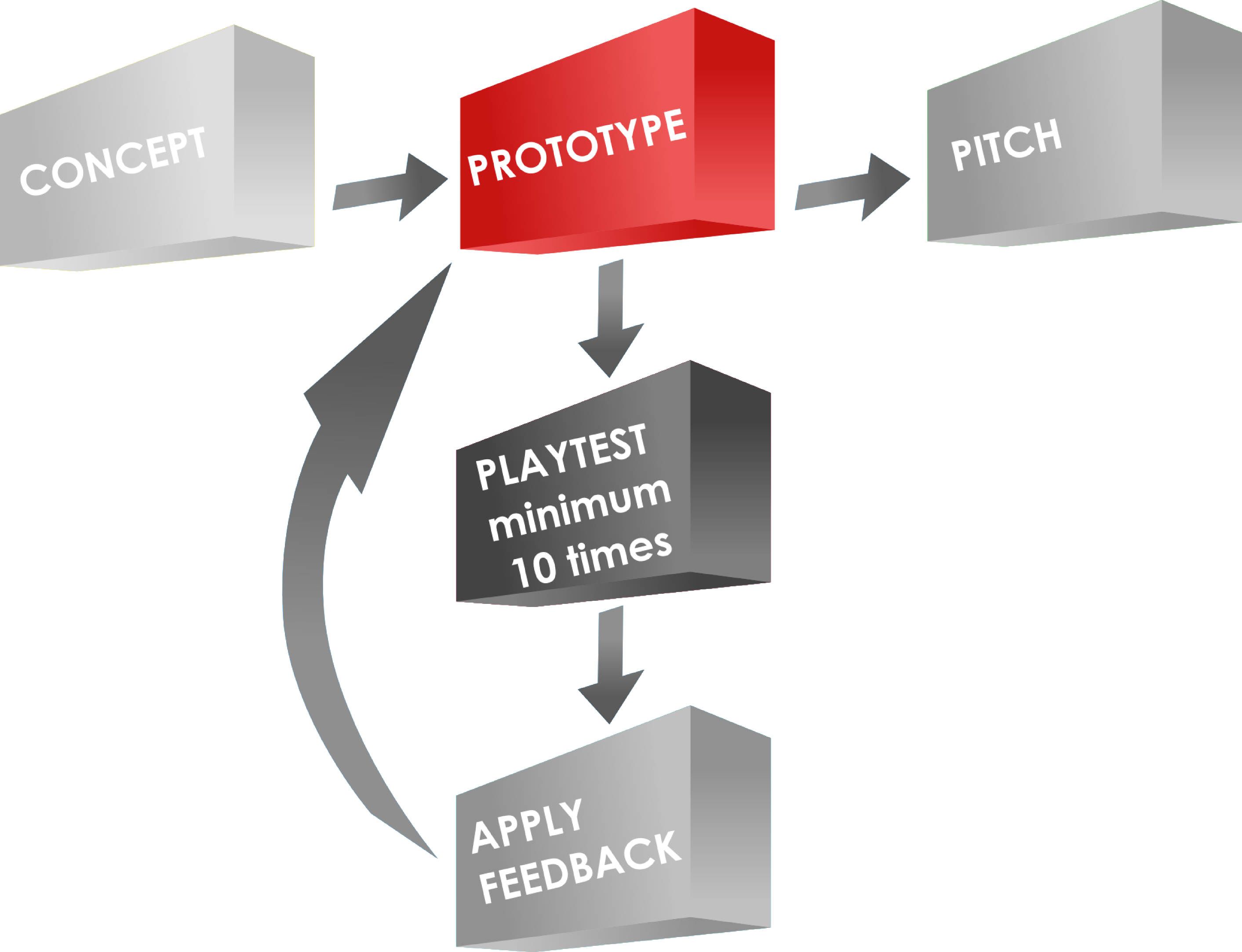 I use Inkscape for all of my game design artwork. It is relatively easy to use and is vector based, so I can make things larger or smaller as needed without any loss in picture quality.
I’ve done a couple other Inkscape tutorials about game design artwork. You can check those out:
Today I want to focus on one specific tool within Inkscape: Alignment.
If you don’t have the software, you can download it from their website: inkscape.org.
Let’s Line Things Up!
The tool I find I use the most within Inkscape is the alignment tool. I use it for every piece of artwork or graphic design that I make in Inkscape.
When you are working in Inkscape and desire to line things up, look for this icon: 
Clicking that will open the Alignment options, which will look like this:

Control Panel of Alignment
Let’s run down what those options are. Here is a new version of that image:
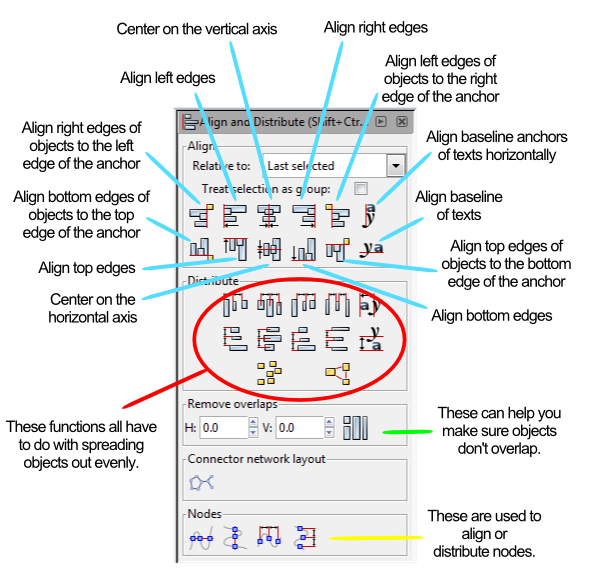
Instead of running through each of those things listed above I am going to provide a couple examples. At the end of this article you will find a the Inkscape file that I used for these examples. Feel free to download it and use it to get familiar with the alignment tools.
Anchors Away!
When aligning things the most important thing is understanding which object is the anchor. The anchor is the object that will not move when the command is applied. You can choose the anchor with the options from the “RELATIVE TO” box at the top, which are the following options:
- Last Selected
- First Selected
- Biggest Object
- Smallest Object
- Page
- Drawing
- Selection
The three that I use the most are “Last Selected,” “First Selected,” and “Page.”
When selecting multiple items, if you chose the anchor last, then you should set RELATIVE TO to “Last Selected.” That way when you choose the alignment function, the anchor will appropriately stay put and the other objects will move.
Likewise, the “First Selected” option will cause the anchor to be the first object you select. Both of these options are nice because you can make sure you’ll know which object won’t be moving.
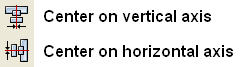
Using the “Page” option will align things with the page. The Page is represented by the black box in the middle of the canvas when opening a new document. I use this a ton when designing artwork for cards since it allows me to center things on the page. This one can come in very handy. You can align things to the center of the page by using these two alignment functions:
Alignment Examples
I’m going to use a circle and a block and show you how several of the functions work. After centering the block on the page I’ll be using the block as the anchor for the remaining alignments.
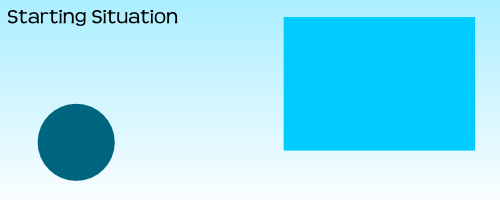
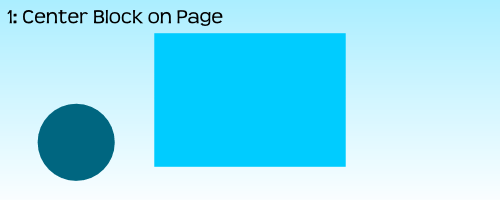
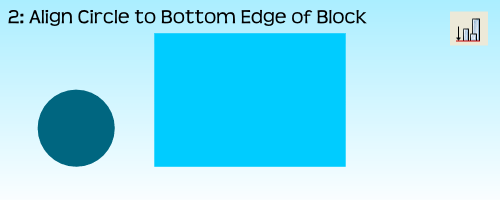
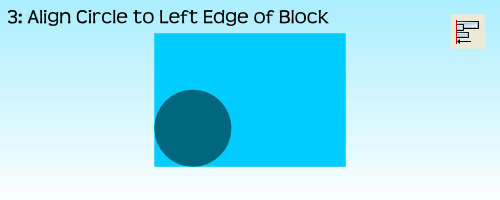
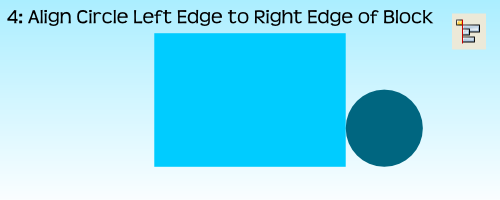
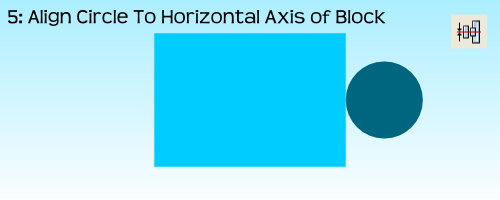
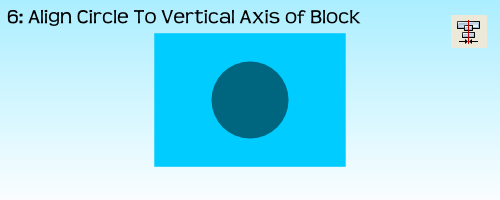
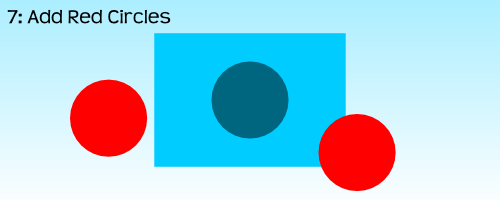

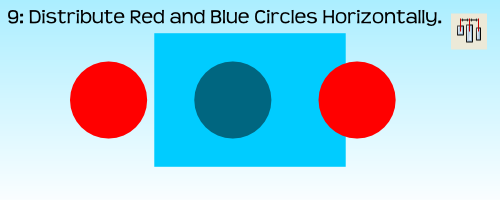
 For the very last example, step 10, I had to use the “Treat Selection As Group” option. If I had not used it the result would have been to stack all three circles on the vertical axis of the block:
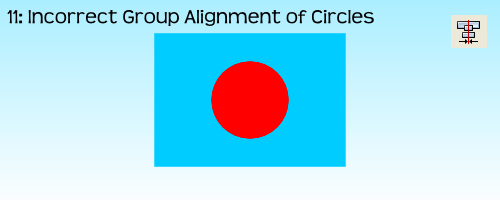
By treating the three circles as a group it allows for the whole group to be aligned without adjusting the relative locations of the objects in the group. Often I’ll just group objects myself before aligning them and then ungrouping them after the alignment. But feel free to do it however you like.
That’s Basically It
I have found that these alignment tools are very useful when making prototype artwork for my game designs. It allows you to consistently place things in the same spots. It allows you to make things line up correctly. And it allows Inkscape to help design your awesomeness!
Here is the file: BoardsAndBarleyAlignmentExample.svg
It is located in Google Drive and to get it to work you’ll have to download it. Please let me know if you have any questions. Thanks for reading.
Design Me: Manhunt
It’s Friday and I haven’t exercised my brain lately. So today I am doing a Design Me challenge.
Design Me challenges are all about exercising your brain. Like soccer players need to practice when not playing games, so I believe designers should practice their design skills. A Design Me challenge is a great way to exercise your designer mind. So let’s exercise our minds using this combination of theme, mechanics, and victory condition from Boardgamizer:
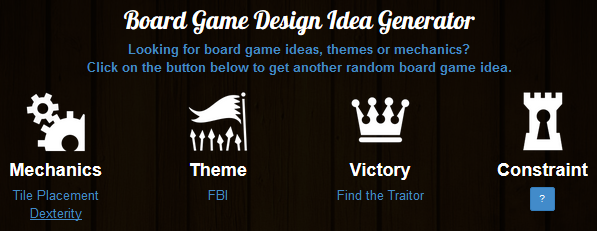
FBI tile placement with a dexterity aspect! Piece of cake!
If you have never checked out Boardgamizer, go do so right now! You just might be inspired for your next awesome game design.
MANHUNT
Manhunt is a tile (card) placement dexterity game for 2 to who knows how many players. Let’s say 8. So 2-8 players. Each player is given an objective card at the beginning of the game. On each card are two goals. The first player to complete both goals will win this fast-paced fun and interactive game!
Components
This game has very few components. They are:
- 8 Objective Tiles
- 46 City Tiles of varying terrain
- Manhunt tokens
- Objective tokens
- Rulebook
How To Play
 Deal each player one Objective tile. This represents that player’s victory condition. Shuffle the City deck and place it face down near the edge of the table. Flip one tile face up and place it in the center of the table. Then flip two more tiles and place them face up next to the deck.
On your turn you will either choose one of the two face up tiles OR you will draw a tile off the top of the deck. Then you will flip, drop, toss, or whatever you need to do to get the tile onto the table. However, you simply cannot place the card on the table.
No matter where the tile lands it becomes part of the city.
Of course you will want to try to do certain things. Let’s look at the tiles and then discuss some strategy:
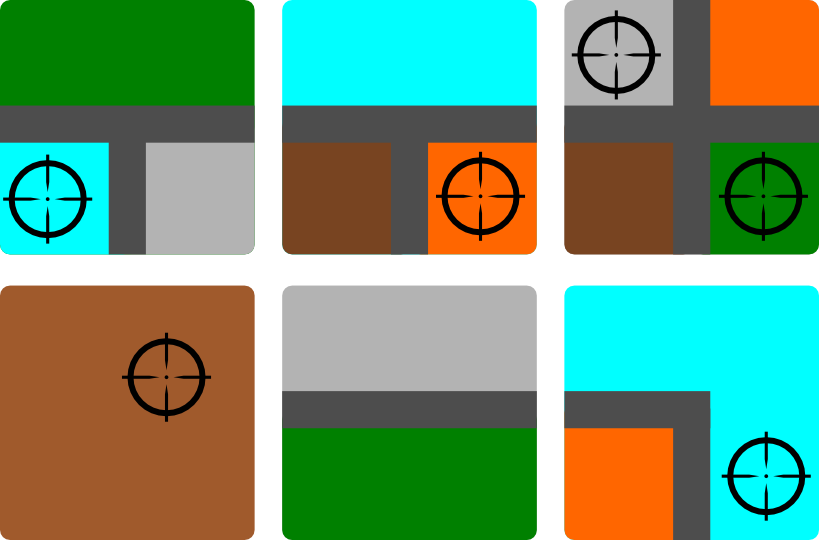
Some sample tiles. The lines that separate the colors represent roads.
Some of the objectives require you to earn Manhunt tokens. To earn a Manhunt token you you to get your tile to cover up a cross-hairs icon. For each icon that you cover you will earn 1 Manhunt token.
Some of the objectives require grouping colors together. So if you can get a group of four brown city sections together then you might meet your objective.
Some objectives could be to get roads together. If you can get three road sections to line up you might meet your objective.
When you complete an objective you should take an Objective token and place it onto your objective tile to indicate that the objective has been met.
So using roads, city sections, and cross-hair symbols you can have a slew of different objectives to meet. The first player who can meet their objectives from their tile will be the winner.
Design Thoughts?
I have successfully exercised my mind and created a tile placement dexterity game that I think could be a fun 10-15 minute filler. I have not played Jason Tagmire’s Maximum Throwdown but I imagine this is similar to that. Sorry, Jason, if this is a rip-off of that. Or I suppose this is similar to FlowerFall. If you think a game like this could be fun, then I suggest you check out Maximum Throwdown or FlowerFall.
Thanks for reading and don’t forget to exercise you designer mind!
Real Favorite Things
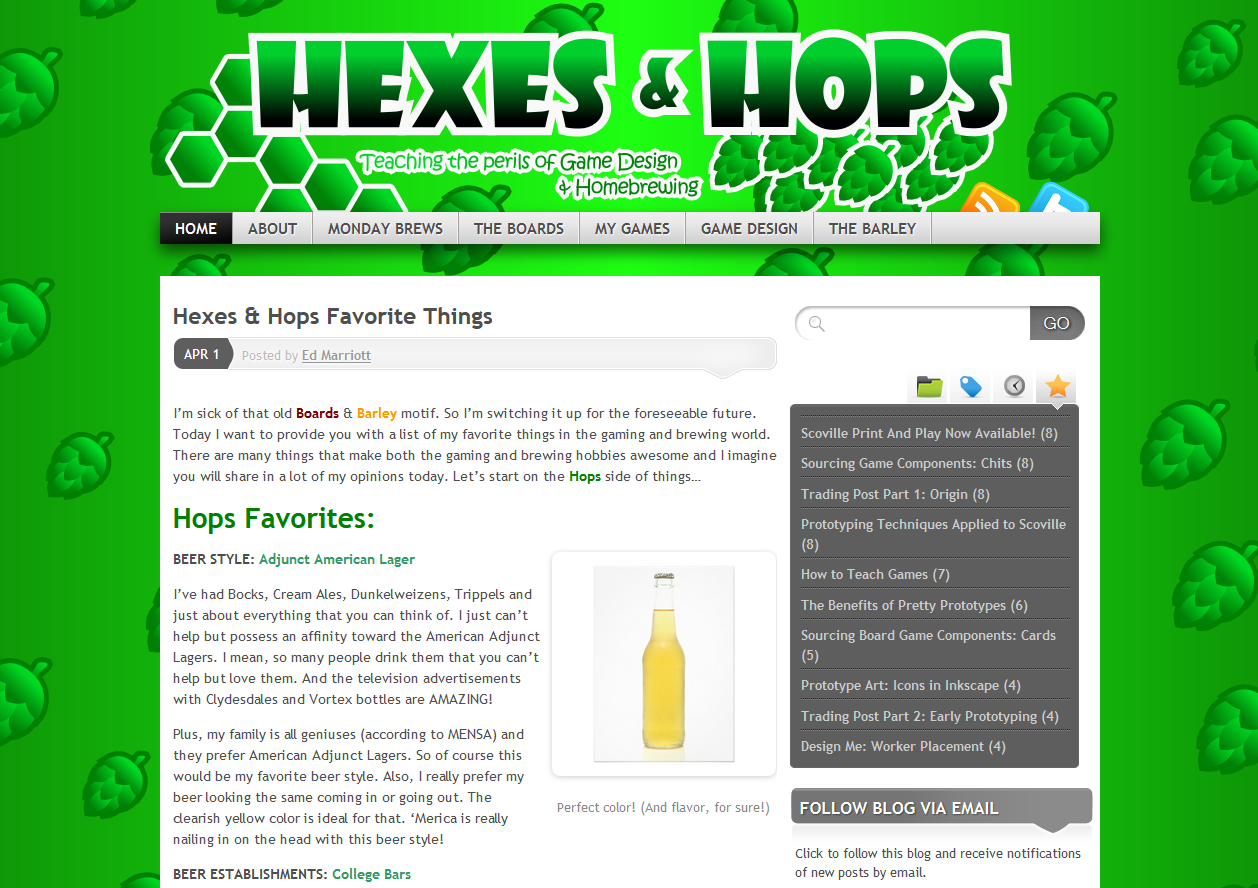
April Fool’s Version of B&B
Most of you understood that my “Hexes & Hops” article was an April Fool’s joke. Others mentioned that they actually preferred the green motif. If you missed out on the fun and want to see what it looked like, just click the image to the right.
I had fun writing that article and I hope you enjoyed reading it. Today I’m posting a true version of my favorite things. And I’m using all the same categories from the April Fool’s article.
Let’s get started with my favorite Barley things…
Barley Favorites:
BEER STYLE: Just about anything Belgian
I love Belgian beers, specifically Trappist beers. They have floral notes and beautiful body. And they are easy enough to understand with the names Dubbel, Tripel, Quadrupel, etc. Of those varieties I would say Tripel is my favorite. But be careful because these tend to be on the strong side. Here’s a picture from Wikipedia showing some of the best Trappist beers and their glasses:

For the next Board Game Night???
Honorable Mention: Honey Anything, Scotch Ale, Hefeweizen
BEER ESTABLISHMENTS: Breweries/BrewPubs
If I’m going out for a beer I’m gonna go someplace where they either brew beer or they serve local beer on tap. There are actually two new places being built near me that will be great Beer Establishments. I’m also blessed to have a brewery within 1 mile of my house, another big one 25 minutes away, and several more within the city. Madison, Wisconsin is a great beer town!
So I’m not going to bother going to one of those places with the bucket of Miller Lite. I’m going to a place that offers at least 10 different “good” beers on tap. I recommend this strategy.
 BEER: Duvel or Orval
To go along with my favorite beer style, I would say my favorite beer would be either Orval, which is trappist, or Duvel. These are both awesome beers with amazing flavor. Of course Chimay, Rochefort, Westmalle, and La Trappe are great substitutes.
Honorable Mention: Leffe, New Glarus Cabin Fever Honey Bock (local), Lake Louie Warped Speed Scotch Ale (local)
BEER BREWING PHASE: Cracking open the first of a new batch!
I’d be fooling myself if drinking that first new beer wasn’t my favorite part. It’s way better than the boiling, racking, or bottling. Obviously we don’t brew beer so we can have fun brewing. That’s a side benefit. The real reason we brew beer is so that we savor and enjoy fine beer!

Boards Favorites:
GAME MECHANIC: Worker Placement
I love worker placement games. Some of my favorites are Agricola (which I rarely play), Belfort, and Stone Age. I like the idea that each player has a “crew” to work with and the winner will be the player who best utilized their crew.
If you want to learn more about the Worker Placement mechanic check out iSlayTheDragon’s guide: Take This Job and Place It.
PLAYER STYLE: Fun People
Games are all about fun. So if you are playing and conversing in a manner that is fun and you are fun to be around, then you fit in the category of “Fun People.”
GAME NIGHT HABITS: Contributors
I like it when people bring beverages, snacks, and games to a Board Game Night. It shows you are taking ownership of it. It shows you are there to have a good time. It shows you are part of the group rather than a clinger-on. I also like it when people take charge and read game rules ahead of time or come prepared to teach a game that they enjoy. Be part of it, people!
GAME ART: Merchants & Marauders
This game wins for the board and the player mats. I absolutely love the use of vivid and bright color. I’ll skip the explanations and just show you the art:
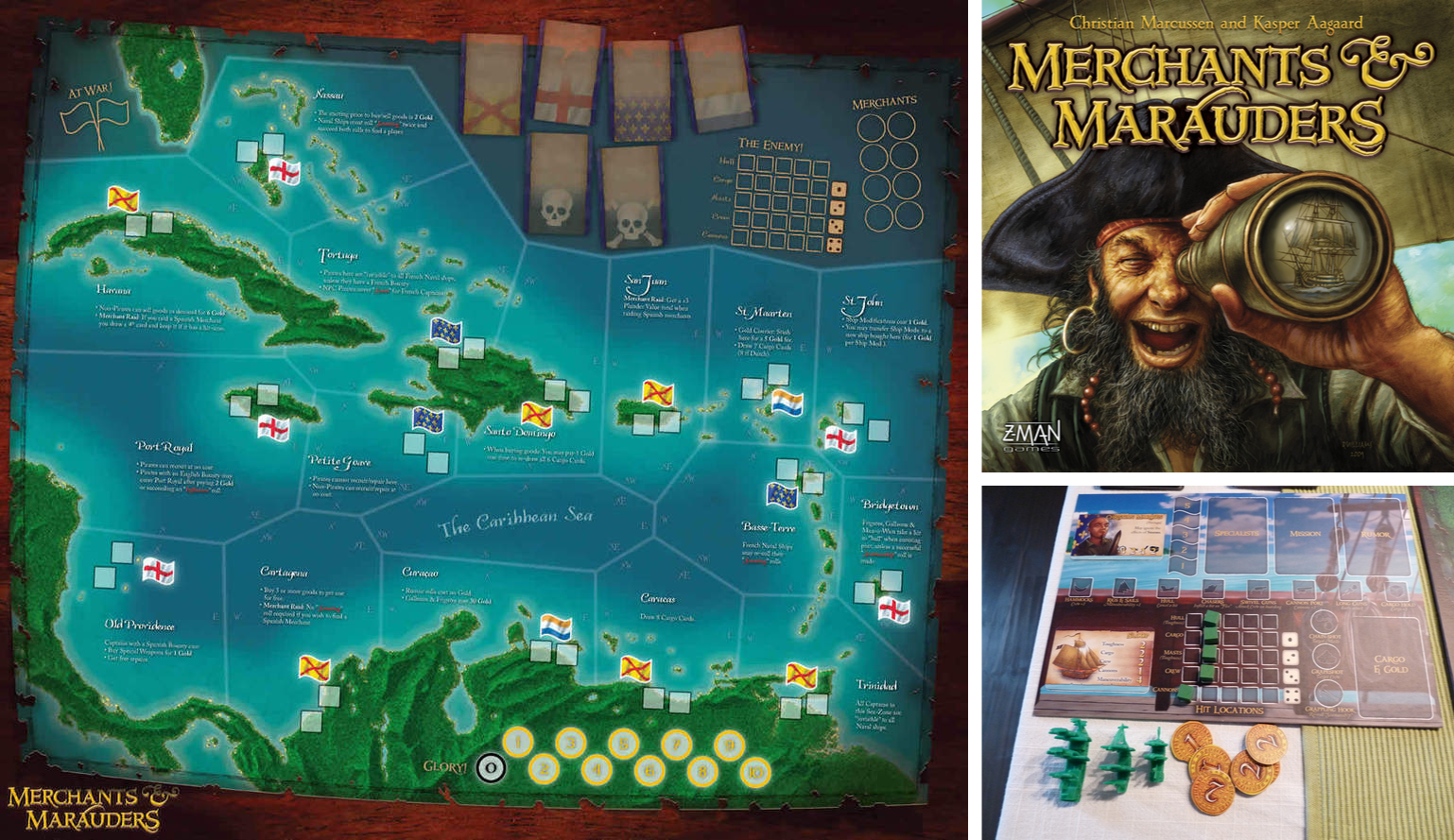
This doesn’t even do it justice.
When you’ve got ships out there on the board sailing around then you can really immerse yourself in the Pirate culture!
GAME: Scoville
Alright… call me out on loving my own game. That’s fine. But I wouldn’t have designed it if I didn’t at least like it. And it turns out that I really love Scoville. I’ve played or taught it over 125 times and I’m not sick of it. It is simple, elegant, easy to learn and play, but deep in the interaction and gameplay departments. When it gets produced I hope you’ll check it out.
GAME DESIGN TIPS (Rebuttal of the fake ones):
- DO NOT hire an artist for a prototype. Let the game persuade a publisher and then THEY will hire an artist.
- DO NOT quit your day job after one successful game. Board game design doesn’t pay the bills.
- You should playtest a game no less than 40 times. Preferably closer to 100. Fine tune that thing like it’s a 50s Corvette that still roars like a lion!
- Playtest your game enough to find any place where it might be broken and fix those places. Broken games suck and demonstrate that you probably haven’t put enough work into it.
- Don’t go hog wild over adding tons of components. Try to keep the component list as streamlined as possible. But if you need to components to make your game great, then go for it!
- Don’t sell out a Kickstarter campaign by adding minis. Just make a great game.
- Don’t force a long playtest on people. Play long enough to get valuable feedback.
- Don’t use spinners. There are almost always better, more fun ways to design random elements of gameplay.
- Paper money works, but I prefer chit coins.
- Don’t design a CCG. But if you do, make it great!
There you go. April Fool’s is over and this article should fit much more closely with your Boards & Barley habits. Feel free to chime in with your favorites as well!
Decision Space in Game Design

New Belgium Brewery offers a nice decision space! Photo via Flickr user quan ha @2009
Decision Space:
– the range of options at the decision maker’s disposal
That simple definition is from a paper titled Supporting a Robust Decision Space from the Association for the Advancement of Artificial Intelligence. It is a nice definition for what I mean by “decision space.”
Decision space is an important concept for game designers to consider when working on their designs. One of the best things a game can offer is a plethora of interesting decisions. One of the worst things a game can do is limit your decisions or take them away completely. There’s nothing worse in a game when it’s your turn and you only have 1 option. It’s as if you have become a robot just going through the motions.
Today I’m going to cover how game designers should consider Decision Space in their designs. At the forefront of game design is the notion that games are supposed to be fun. With that in mind, let’s cover 3 examples of Decision Space in your game can make it better.
- Unlimited Decision Space
- Limited Decision Space
- Tailored Decision Space
Some times it’s good to offer a lot of choices. Some times it’s good to limit a player’s choices. But the point of this article is that the decision space available to players is an important concept to consider in your game designs.
Unlimited Decision Space
Okay… first off, “Unlimited” is a bit of a misnomer. I do not believe there are any games with a truly infinite decision space. Rather, this is meant to point out situations where the decision space is so large that the players do not feel limited in any way. The world is their oyster, in essence.

Build as you see fit!
One great example of an unlimited decision space is the route-building aspect of the classic game Empire Builder. There is a huge map and you have your special little crayon. You can stare at the board and your cards for a long time while yielding the power of the unlimited. Where should you begin your route? Where should the route go? Should you cross the rivers/mountains or go around? How much track should you lay? There are a lot of decisions you could make about the route you want to build.
How is “Unlimited” Fun?
There is a nice liberty in having an unlimited decision space. Players often enjoy being able to choose freely, to mess up freely, to make an awesome move freely.
Consider utilizing an unlimited decision space in games where you want players to have full control and to be fully accountable for their decisions.
Limited Decision Space
Sometimes it is prudent to limit the decisions a player can make. These situations are common at the start of a game.

Starts “Limited,” ends “Awesome!”
Two great examples are Dominion and Eminent Domain. These are both deckbuilding games. In standard deckbuilding games you start with a very limited hand of cards. One your first few turns you will be limited in what you can do.
Limiting the decision space early in a game can be beneficial to help a player get used to how the game operates.
Another example of “limited” decision space comes from the popular game Ticket to Ride. In the game you have three options on your turn. You can draw more route cards, play trains to the board, or draw train cards. And even the choices within those options are limited. You can only play trains to the board if you have the right cards in your hand. You can only draw train cards from the face up cards or the face down pile.
How is “Limited” Fun?
One of the ways that Limited decision space can be fun is by adding tension to game. Using Ticket to Ride as the example again, players have tension due to the limitation. Maybe they just need one more green train to claim that big route. But perhaps another player has already built near the green route. Not that first player is hoping that the other player doesn’t take that green connection that they’ve been working on. But because the decisions are limited, the player has a slight feeling of helplessness.
Limiting the options on a player’s turn can also speed up the game. Sometimes (or perhaps often) the Unlimited decision space games tend to get into the Analysis Paralysis (AP) regime. Limited decision space games tend to decrease the amount of AP in games.
Tailored Decision Space
Tailored decision space refers to situations in games where the decisions you previously made will shape the decisions you have available in later turns in the game. Often games with tailoring offer multiple paths to victory where once a path has been chosen it is better to continue following that path than to start working on a different path.

How will you shape the countryside?
Some of the best examples that I can think of are Uwe Rosenberg’s games Le Havre and Ora et Labora.
In Ora et Labora players start with a plot of land that they are looking to develop. Throughout the game players will add buildings to the land that provide new actions. Then on their next turn, those previously placed buildings add to the decision space available for the player.
This is actually a common thing in engine building games. Engine builders are games where you build something and increase your skills/options/capabilities. In most of these games you can build something, that let’s you improve it, and then make it really awesome. All along the way you can either diversify and build a bunch of stuff that might be mediocre. Or you could possibly build one type of thing and make it really awesome.
The card game 7 Wonders also has a “tailored decision space” feel to it. In each of the three stages you can play cards to tailor your wonder in one of several different types of things. By adding resource production you can set yourself up for different types of things. For example, if you produce the manufactured goods (gray cards) then you can usually do pretty well with the science cards (green). So the cards you choose throughout the game will tailor the decision space that makes the most sense as you move your way toward victory.
How is “Tailored” Fun?
I think having a tailored decision space in games allows players to feel like they are really accomplishing good stuff throughout the game. In Scoville the field acts as a tailored decision space. Each round as new peppers are added you are creating new opportunities for breeding peppers. Each new spot opens up the number of decisions you can choose.
Tailored decision space is also a way that you can steer your strategy in a game. By choosing card A it might make card B much more attractive. Then by choosing card B it might make card C more attractive.
Why Should You Care?
As a gamer none of this really matters. Just find a game that you think is fun and play it.
As a designer, it can be worthwhile to consider the way decision space works in your game designs. Are you limiting players? Are you allowing them freedom of choice?
Decision space is an easy thing to neglect when designing a game. Normally we’ll pick a theme or pick a mechanic and start designing. But I wonder how things would go if a designer chose the type of decision space they wanted and then added a theme and mechanic after the fact.
What are your thoughts about decision space in games? Did I get it completely wrong? Does it make sense?
 Boards and Barley