Category Archives: Game Design
Design Me: Auction/Bidding
Welcome to another Design Me exercise day on Boards and Barley. As a former competitive athlete I know the importance of practice. As a soccer player it is important to practice with your team so that you can learn how you work together on the field. But it is also important to practice and exercise on your own so you make sure your body is in the best shape possible so that you can be successful when it’s game day!
I feel like exercise and practice are important for the brain as well. That’s why I’ve been writing these Design Me articles. The idea for these articles is to exercise my brain so that I can perform as well as I can when actually designing games with the intent of pitching them some day.
I’ve been using a cool new online tool called Boardgamizer. It is perfect for coming up with a topic for these Design Me articles. The way it works is that it spits out a mechanic or two, a theme, and a victory condition. Then you can take that and see if you can come up with a game design around those things. Here’s the result I got for today:
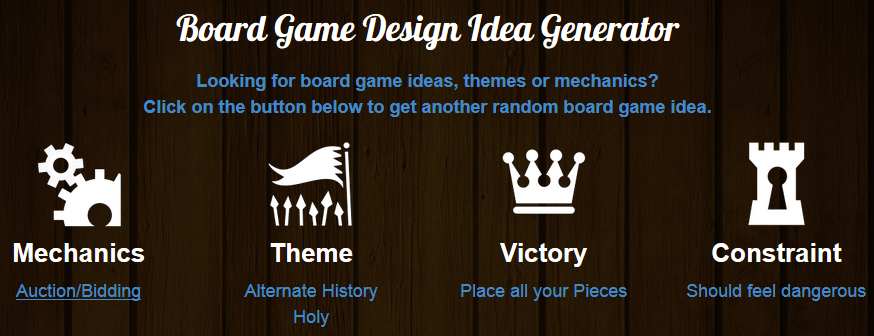
Such a cool tool for inspiration!
So today we are going to exercise our brain and come up with a bidding/auction game with a holy theme where the goal is to place all your pieces. Piece of cake!
In The Beginning

How would you build the Earth?
The idea behind “In The Beginning” is that you are playing a role in building the earth. There are mountains, rivers, forests, deserts, and other terrain that need to be placed onto the bare Earth. The winner will be the player who can put out all of their pieces first.
The pieces that players must place are sets of different terrain tiles. Each round a set of terrain cards will be available for auctioning. Players will then obtain terrain cards from the auction. These terrain cards can then be played according to a small set of rules, which will then allow that player to place some of the terrain tiles from their supply.
Each player begins with the same number and types of terrain tiles. For example, each player might have 2 desert tiles, 3 forest tiles, 4 river tiles, 5 ocean tiles, and 6 mountain tiles and so on. The desert tiles would be the most difficult to place while the mountain tiles would be the easiest to place.
Components:
- 1 Board showing a bare earth covered in a hex grid
- 27 Bidding tokens in each player color numbered 1 to 27
- 1 Blank bidding token in each player color
- Deck of terrain cards – 20 of each terrain type
- Hexagonal Terrain Tiles – 20 per player
- Guide sheets for terrain interactions
- Rulebook
How To Play:
In each round there will be a number of piles equal to the number of players plus 2 placed next to the board. The number of cards in the piles will vary as the game goes on. During the first three rounds the piles will each have 2 cards. During rounds 4-6 the piles will have three cards. And during rounds 7-9 the piles will have 4 cards.
Players will be bidding on these piles of cards simultaneously by using bidding tokens. Each player has a set of bidding tokens numbered 1 to 27. They may place only one token at each pile face down. Players MUST bid on at least one pile. Players may bid a total of 35 bidding points in any given round. For example, a player may bid on one pile with their “27” token. Then they would only have 8 bidding points left. They could place any combination of bidding tokens totaling 8 points onto remaining bidding piles. All players will place their bids face down. Players may “bluff” by placing their blank token at a bidding pile.
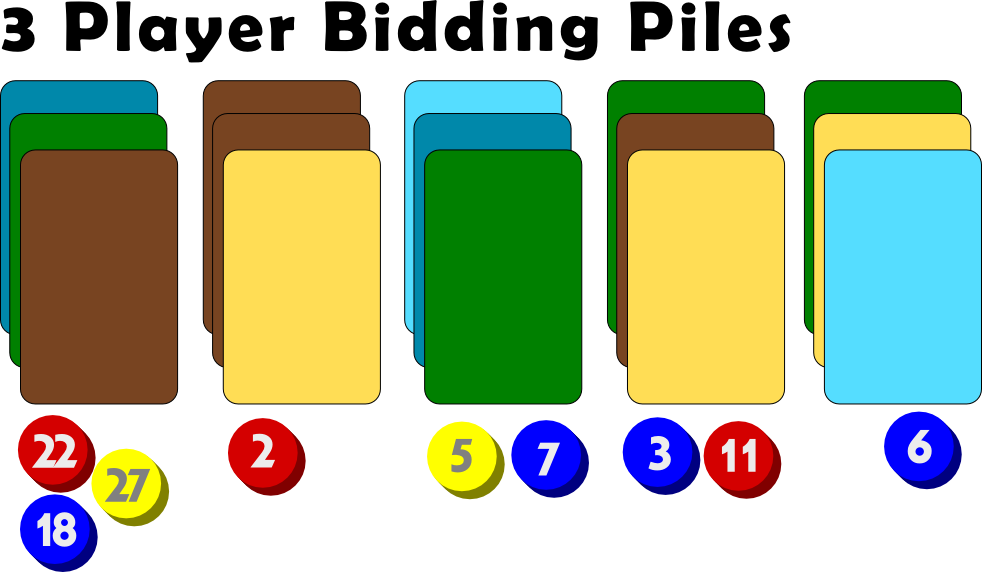
After a round of bidding with the bids revealed.
Once all bids are placed they are flipped face up. Whichever player has the highest bid at a pile wins those cards. Their bidding token is then discarded for the rest of the game. If a player loses an auction by less than 5 bidding points they can draw a card from the deck. Their bidding tokens are also discarded. If a player loses an auction by more than 5 bidding points they will keep their bidding token but do not get to draw a card.
So in the example image above here are the results:
- Pile #1: Yellow wins, discards their bidding token and takes the cards. Red loses, but is only 5 away from the winning bid, so Red discards their bidding token and draws a card from the deck. Blue is not within 5 of the winning bid so they keep their bidding token but do not get a card.
- Pile #2: Red wins, discards their bidding token and takes the cards.
- Pile #3: Blue wins, discards their bidding token and takes the cards. Yellow loses, but is within 5 away from the winning bid, so Yellow discards their bidding token and draws a card from the deck.
- Pile #4: Red wins, discards their bidding token and takes the cards. Blue loses, and is not within 5 of the winning bid, so Blue keeps their bidding token but does not draw a card.
- Pile #5: Blue wins, discards their bidding token and takes the cards.
These bidding piles are important because of the cards that they are offering. Because placement of tiles is what wins the game players will be looking to make combinations of cards that allow them to place as many tiles on each turn as possible. So once players obtain cards they can turn them in, in player order, to place their terrain tiles on the board.
Placing terrain tiles follows a logical order. For example, you wouldn’t put a desert next to a forest. Well, you could, but it would cost you an extra card. At the start of the game one mountain tile is placed as a starting tile on the board. Any other tile can be placed next to Mountain. But after that there are a series of logical rules for placing the other terrain types.
These rules are things like, if you place X terrain by Y terrain then it costs one extra card, or 1 fewer card, or “you must place three”. So there would be a series of these types of rules. So players will want to build the right combinations of sets of cards in their hand so that they can play more terrain tiles than their opponents.
This exercise could turn into a full game design if I put in the effort to create the terrain placement ruleset, which I just might do.
Your Designer Perspective:
So what are your thoughts about this game design? Are there any glaring holes in the design? Is anything obviously broken?
What would you have come up with for the design based on the Boardgamizer criteria? I imagine there are an infinite number of ways to go with those criteria. So make sure you are exercising your game designer mind! And have a great weekend!
Prototype Art: Icons in Inkscape

Inkscape logo of squidy awesomeness!
One of the things that can take your game design from playable to pitchable is iconography. Icons can really help put a nice polish on a game. There are a few benefits that icons can provide for your game design:
- Ease of viewing/understanding
- Beautification
- Language Independence
Those are a few and I’m sure there are more. So today I wanted to present a tutorial similar to my “Cubes in Inkscape” tutorial to help game designers with the creation of icons for their games.
This article will be focused on the software called Inkscape. It is a free Scalable Vector Graphics (SVG) software. Don’t worry too much about what that means, just know that it’s awesome. If you don’t have the software I recommend downloading it and using it for your game design art. Note: if you have Photoshop/Illustrator then I would recommend staying with that and skipping the rest of the article.
Also, if you love icons but just can’t figure out how to make your own, then head over to Game-Icons.net where they have over 1,000 free icons for your use. So let’s get started.
Let’s Get Iconizing!
So “Iconizing” isn’t really a word. But that’s beside the point. The objective for today is to teach you how to make icons that you can use with confidence in your board game designs. We are going to be making a barley icon. But you’ll hopefully be able to use what you learn here today to make any icons you might need for your game design.
Once you’ve downloaded and opened Inkscape you’ll see a plain canvas outlined in front of you. I like to leave it turned on, but you can turn off the “edges” if you visit the document properties under “File.” Here’s what it should look like:

We will be working with the “Create Circles, Ellipses, and Arcs” command for this article.
You’ll often want a web browser open as well. It is often beneficial to do a web search for the item you are looking to iconize. So here’s a snapshot of a web search page for barley:

Using a web search can give you ideas of how to iconize the item.

Barley, you’re about to be iconized!
After I’ve done a web search I like to copy and paste a picture or two into Inkscape as a starting point. In this case I’ll be using the photo on the right as my guide for creating a barley icon. So copy that picture into Inkscape if you want to follow along.
One thing to remember when creating icons is that we want them to be very clear and understandable. Sometimes icons represent things, like resources. Other times they represent actions, like “move an extra space.” We before we create the icon we need to know what we are going for. In the barley example we will simply use the icon to represent a barley resource.
So now that the picture is in Inkscape we can start our tutorial. I like to use a picture so that I can create the correct shape of something in Inkscape by overlaying that shape on the right part of the picture and making the edges line up. I won’t show that today since this image will be for reference only, but it is a useful thing to do. I may write about that in the future.
The icon of a barley begins with one circle…
Go ahead and click on the “Circles, Ellipses, and Arcs” command and click and drag a circle on the page anywhere you like. If you want to change the color, scroll along the color bar at the bottom. If you want to make sure it is a true circle, hold CTRL when dragging. If you hold CTRL and drag at a different angle then it will jump to an ellipse rather than a circle. Once you’ve dragged out the circle and chosen a color you might have something like this:
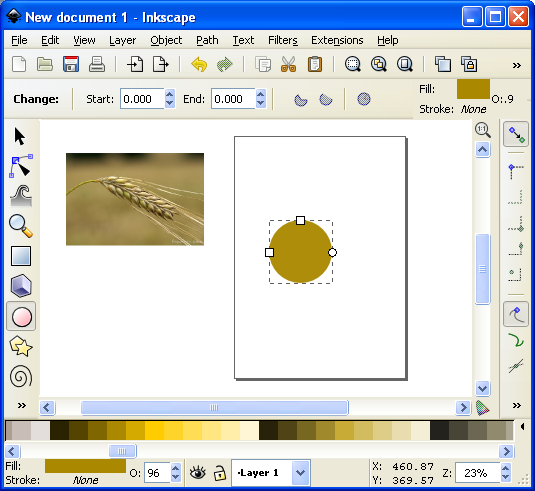
This circle will be one grain of barley.
The next thing we want to do is turn our circle into a Path. There are two ways to do this. The first is to go to the PATH toolbar at the top and click “Object to Path.” The second way to do this is to select the item and press SHIFT + CRTL + C.
 Then we want to use this command from the left toolbar. It is the “Edit Paths by Node” tool and is pretty awesome for what we want to accomplish today. Click on it and then click on our circle. Then your circle should look like this (note that I have zoomed in on the circle):

The dots around the circle are the nodes that we will edit.
What we do next is edit our circle by moving the nodes around. Across the top we have different options for editing the nodes. The tools that I utilize most often are these:
- Insert new nodes into selected segment
- Make selected nodes corner
- Make selected nodes smooth
I recommend playing around with each of those commands so that you become familiar with how node editing works.
So let’s take our circle and turn it into a barley grain. First click on the upper node. Then click on “Make selected nodes corner.” Then you can grab the little circles on the lines extending from the node and move them to wherever you like. Here’s what you might end up with:

By editing the nodes we can make the circle look like a barley grain.
Now go ahead and manipulate the other nodes. I “Cornered” the bottom node and angled up the right side. I moved the bottom node to the right. I moved the top node up and to the left. And I brought in both side nodes. Here’s my result thus far:

Okay. That’s pretty passable for a barley grain. Now we want to make more of them. But instead of following that whole process over and over we are simply going to duplicate this grain. You can duplicate the grain in two ways. The easiest is to simply push CTRL + D. That will make a new copy over the top of the previous version. Then if you click the arrow tool at the top of the left toolbar you can move the new barley grain. Do this about 5 times, line them up, and then you might have something like this (I’ve zoomed out a little):

We are getting there! Who’s excited??
Okay. It is starting to look alright. Let’s go ahead and duplicate the entire thing and mirror it using the “Flip selected objects horizontally” tool. Then you can rotate the whole selection with the arrow tool. You have to click on the selection so that the arrows on the corner of the selection turn into curved arrows. Then click and hold one of the curved arrows and drag to the angle you want. Note that when dragging, if you hold CTRL it will rotate at discrete angles. This can be really useful. After all of that we should have something like this:

Feel free to enjoy a nice brew while we are iconizing barley!
Now we’ve got most of the hard work done. You may desire to shrink a few of the barley grains near the top end. If you do, you can simply click on one with the arrow tool, then click and drag one of the corner arrows around the object you are shrinking. Note that when you drag the corner arrows, if you hold CTRL it will maintain the aspect ratio of the object. If you hold CTRL + SHIFT it will maintain the aspect ratio and resize it while also maintaining its position in reference to its reference point (shown by the plus sign, which can be moved). For the sake of the tutorial today we are not going to shrink any of the barley grains.
So far so good. But now we need the stalk. So we are going to use the “Draw Freehand Lines” tool from the left. With the tool chosen you should then set the tool to “Triangle In” at the top toolbar where it says “SHAPE.” Then starting at the bottom of the stalk click once. Then move the cursor to where you want the stalk to end and double click. A triangle line should be made that looks something like this:

We’re almost done!
You can change the color again by using the color bar along the bottom. And you can manipulate the shape by editing the nodes.
Alright. So I jumped ahead a little bit and did some of the things I’ve already mentioned. I changed the color of the stalk. I make it thicker by adding a “Stroke” to it (See below about adding a “Stroke”). I didn’t like how tall it was so I deleted two of the grains from each side at the top. I shrank two from each side and rotated them slightly. By simplifying all of this I was able to create a better icon for the barley:

It looks more “Icon-y this way.
So there you go. You’ve got yourself the tools to edit nodes, manipulate shapes, and make cool icons. Those are the basics and they can get you off the ground running. But if you want to add some awesomeness, then keep reading!
Adding the Awesomeness!
If you aren’t quite content with your icons there are a few things you can do to spruce them up. The first is to add a border around them. Remember above when I mentioned about adding a “Stroke”? Let’s start with that and see what kind of border we can come up with.
First, with the arrow tool selected, click and drag a box around all the components in the icon. They click on the “Group” tool to group them into one picture. Then go ahead and duplicate that new group. You will have two copies of the same icon. We will add a stroke to one and then place it behind the other. With one of the copies chosen, click on “Object > Fill and Stroke.” This will open a sidebar like this:
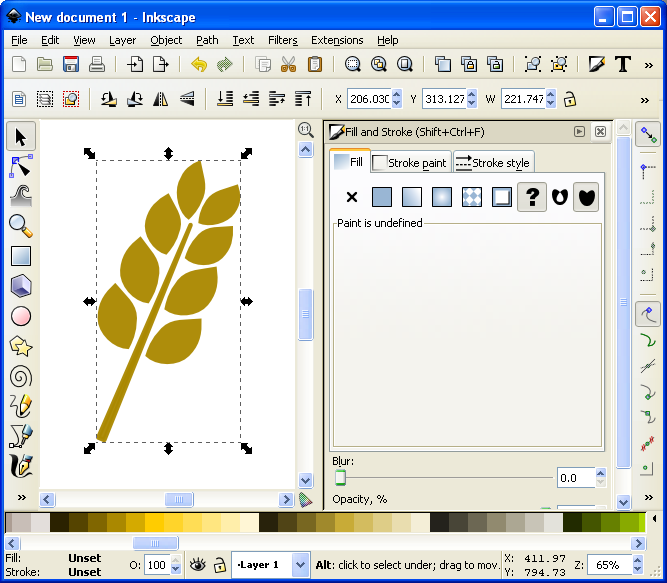
Now we can add awesomeness!
On the “Stroke paint” tab we want to set a solid color stroke. This is the solid blue square icon. For now just keep the black color that it should default to. Then on the “Stroke style” tab let’s go ahead and set the stroke to a value that makes it look nice. In this example the value was 20. You should have a nice big black border around the entire barley. Once you have the border, click on the “Lower Selection to Bottom (end)” command and it will send this copy of the icon behind the other copy, which has no stroke:
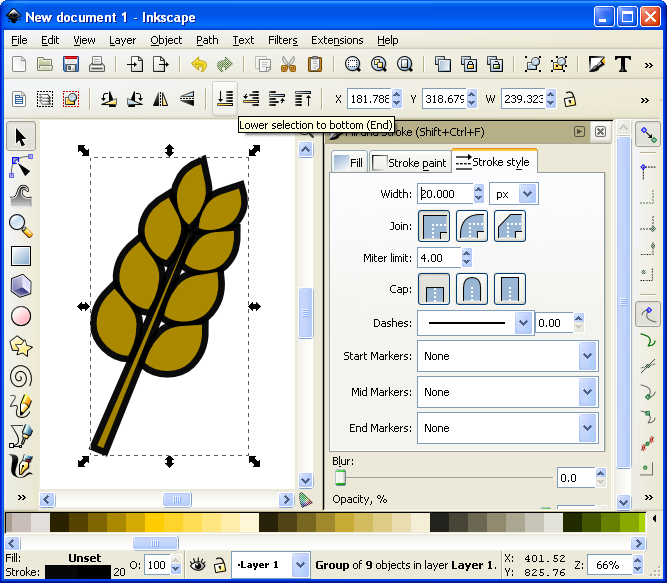
I think it’s really starting to be a nice icon!
Now we’ve got a really nice border. How else might we add awesomeness? We could add gradients to the grains and the stalk!
If you are content with the icon like that, then by all means leave it that way. I think it looks pretty good and icons like that will certainly help with the presentation of your prototype. But if you want to go another level you can add gradients. So let’s see what happens…
First you’ll want to ungroup that top level copy of the barley. We want to add gradients individually to the grains. With it ungrouped go ahead and click on one of the grains. Let’s choose the lower left grain for this example. Then you can click on the “Create and edit gradients” tool on the left toolbar.
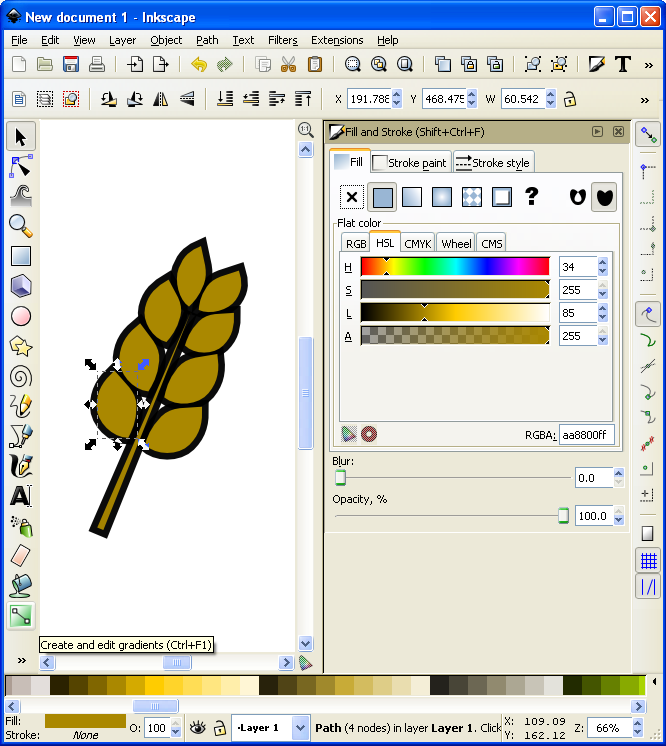
It’s about to get wild!
Then click and drag from one side of the selected grain to the other. You will want to play around with the gradient editor to familiarize yourself with the gradient editing options. The easiest are linear gradients. I recommend you start there. Otherwise a radial gradient could look nice. I’ve used one for the grains (each individually) here (Note that you could have applied a radial gradient after editing the first circle and then duplicated that for each grain of barley):
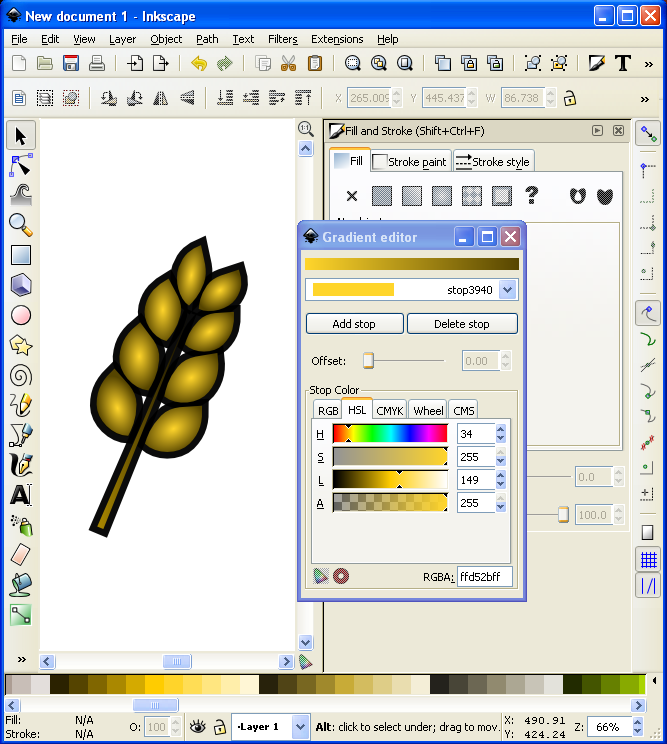
I might actually use this icon!
Alright… we have time for one more layer of awesomeness. What could it be other than a drop shadow??? Thankfully I don’t really have to teach you anything here since Inkscape makes it so easy! With the entire icon (both copies) highlighted go to “Filters > Shadows and Glow > Drop Shadow” and it will open a popup window. If you click on “Live Preview” it will show you what the drop shadow will look like.
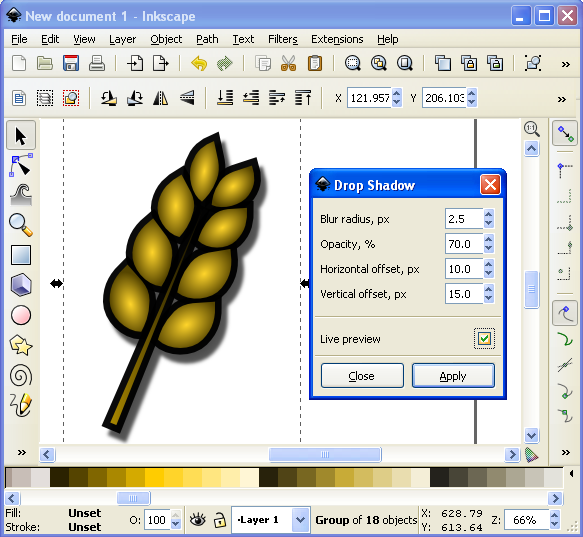
Now that’s what I’m talking about!
And there you have it. A nice and simple icon with three points of awesomeness!
Lesson Complete!
Here is my finished icon of barley, with radial gradients on the grains, a linear gradient on the stalk, a nice “Stroke” border, and a decent drop shadow:

Not too shabby!
That’s all I’ve got for you today. I hope that this article was able to equip you to add some high quality iconography to your game designs to help take them from playable to pitchable and give you confidence in front of the publishers! Please let me know if you have any questions. I would love to help you out. Thanks for reading!
The Game Design Queue

What would you do with an extra hour each day?
Time only offers itself once. So you’d better use it as efficiently as possible. As every designer knows, it’s rare if you are ever working on only one project. I am just the same. I am currently working on four projects, not including Scoville.And I could certainly use a few more hours in the day. So I thought I’d give you a status update for each of the games currently in my “active” queue. My hope is that by writing this I’ll get a better idea of which game(s) on which I should focus my few game design hours per week.
And I’ve decided to set a goal: I want to have a playable and fun game by Christmas.
In the past I have set emotional goals, like “I want to send a game to a publisher by October.” How is that an emotional goal? It’s emotional because it has to do with making me happy versus making a good game. So this new goal is avoidably non-emotional. It’s all about the game. So I am going to attempt to spend the next three months hammering away at the stone to reveal a beautiful sculpture, and hope that it is a decent board game!
Let’s get started with last week’s Design Me game…

Quantum Orcas
I designed it last Friday and by Saturday evening it had already been through four playtests. I’m not sure what your typical Concept to Playtest timeline looks like but this isn’t my typical timeline. There are a few things that the game has going for it to have allowed for four playtests.
- It’s simple to prototype
- It’s simple to teach
- It plays in about 10 minutes
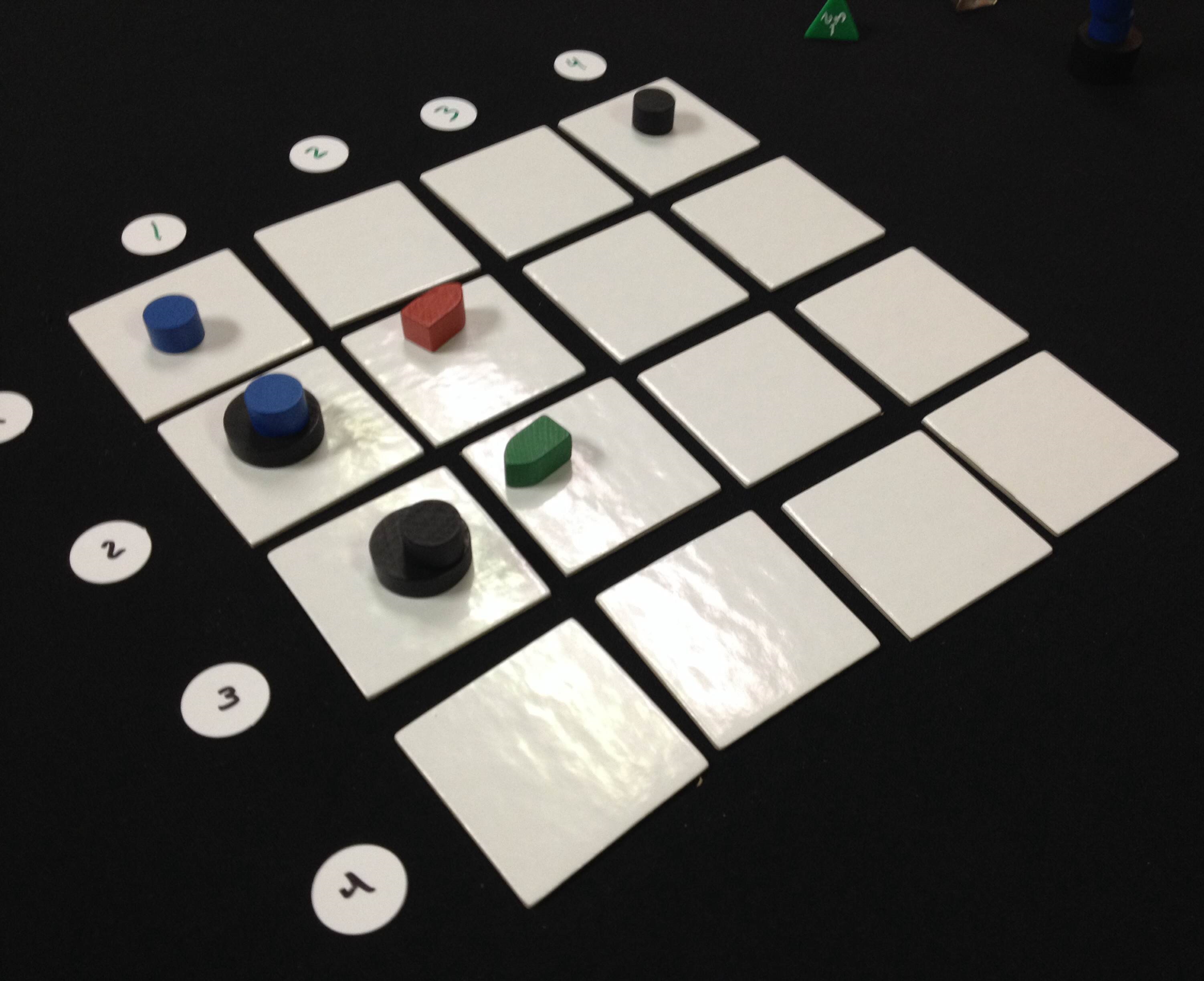
Quantum Orcas (Prototype)
So when I arrived at Protospiel-Milwaukee last Saturday I snagged a few of the free components that The Game Crafter had donated and threw together a copy.
In the game you are a killer whale who can jump across time, which is represented by jumping across the 4×4 grid. The game lasts 8 rounds. Each round two new boats are placed randomly into the grid using two d4s. Then each player chooses one card, which represents a location on the grid, to jump to. If there are boats there, they can eat them. If there are multiple boats, then they’ll have to discard cards to eat them. There are a few other rules, but the player who eats the most boats wins the game.
I think I might be able to design this into a complete game by next week, let alone by Christmas. It could also easily be rethemed. In fact, during Protospiel-Milwaukee I did retheme it based on some components available there. Several people playtested it with the theme of Space Monsters eating asteroids. So maybe I’ll have the game be dual-themed. If you like the killer whale idea you could play on that side of the tiles. If you like the Space Monsters theme you could play on that side.
The bottom line is that this game was fun, plays quickly, and comes in a small box. That’s an awesome combination.
Conclave
 I’m not typically an area control/area majority kind of guy. However, Conclave is all about area control. In the game you represent one of the Preferiti, the cardinal’s on the short list to be the next pope. You are also representing a order of Catholicism, which can allow me to do some interesting things with the design.
The current state of the game is that it isn’t very fun. While I think there are some interesting mechanics in the game, they just don’t seem to work together to make something that is fun. That’s not good.
But I have some ideas. Since the game revolves around holding the control of different tables, with varying numbers of cardinals sitting at them, then I can add in objectives to the game while keeping it reasonably thematic. The idea would be that the game can be won if a global victory condition is met, otherwise it will be won by a combination of points, which represent how well you manipulated the college of cardinals.
There would be both shared and secret objectives. Once a player completes a shared objective, they place a pawn on it and will earn those points at the end. When a played completes a secret objective it must be revealed. This card will remain in from of them and will be scored at the end.
So I have some good paths forward with Conclave. Now I just have to decide where it actually resides in my priority queue.
Trading Post
 Call me Ishmael, for I have discovered a white whale by the name of Trading Post.
Trading Post was my first experience with trying to design a really heavy game. I failed miserably. However, I love the theme and some of the core mechanics so I’d like to do a third complete reboot. Note, however, that the first two reboots were more like retrofitting rather than redesigning.
To redesign the game I want to achieve the following things:
- Make it more historic
- Make it focused on Trading, explicitly about trading furs for European goods.
- Make it fun.
- Make it complex.
So I sat down at the end of August and came up with what I think will be a really great game. The idea of the game is that you are a Trader working for a Trading Post. Your objectives in the game (read: “Ways to score points”) are to go on hunting excursions to collect furs, trade furs for goods, use goods to help build the Trading post. That’s the 10,000 foot view of the game.
There are a few other things going on in the game that I think are unique and interesting. There is a time-dependence for being able to do things in the game. For example, when you send furs to Europe, they have to ride on the boat, which takes time. There is also a concept of chopping wood and floating it down the river towards the Trading Post. So players would have to set themselves up to receive the large amounts of wood when they arrive.
Overall I’m pretty excited to be able to think about this game from a fresh perspective. It’ll be interesting to see how it comes along.
Brooklyn Bridge
This is a very recent game design of mine. As you can imagine, the theme is that of the Brooklyn Bridge. In the game you represent a crew of workers that are helping to build the bridge. It is similar to Stone Age in that you place workers in different areas of the board one location at a time. It is different from Stone Age in that one player cannot remove all their workers and take all their actions at once. Instead, players will remove their workers and take the actions one location at a time.
What that introduces is an interesting dichotomy about placing and removing workers. You might be able to get a good spot in the Materials office, but someone might beat you to building a section of the bridge. You might get lucky and not experience the bends when working in the caisson, or your worker might have to undergo a stage decompression.
This game will be a balance between obtaining goods and earning money. The goal is to contribute the most to the bridge and that will ultimately be the player who earns the most money.
As of today this is still a pretty rough concept. I’ve mocked up some tiles so that I can test a few things. I’m not sure this one (or Trading Post) could really be a full prototype by Christmas, but we shall see.
The Path Forward
So those are the four concepts currently in my active queue. This gives me enough variety and enough challenges to work on while not being overwhelming. But if I try to work on all four then I’m afraid none of them will be ready before Christmas. So I present my first ever poll, for which I am sure to get thousands of votes. Please vote for the game design you would most like to see fully prototyped:
Thanks for reading and voting! I’m hoping to bring you good game design updates over the next three months!
Design Me: Area Movement
It’s time to flex my brain muscle once again! Why? Because it’s a Design Me Friday! Every other Friday I do some exercise… of the mind! The idea behind these Design Me articles is to practice being creative and see what I can come up with in the spur of the moment.
In the last two exercises I designed a dice rolling worker placement game about brewing beer and a grid movement resource collection game about flying your aircar around a distopian world. What ever might I come up with today???
Once again I am using the tool from Boardgamizer for the inspiration for today’s exercise. Let’s see what it came up with:
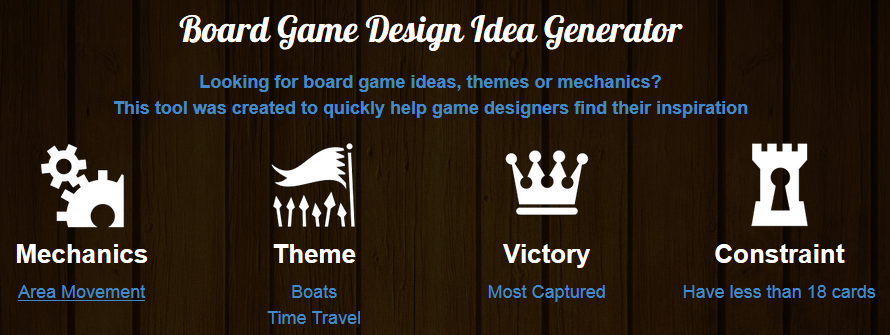
Time traveling boats capturing other boats while only having 18 cards. This could be challenging to design!
Quantum Orcas

A little closer and that boat’s a goner!
Alright, where would one begin with a time traveling boat game based on capturing other boats all while having less than 18 cards?? Time Pirates is the first thing that came to mind, but I cannot compete with the Alan R. Moon version of that game. So I’ll go a different route. Whales.
This is only my third Design Me article, but all of the names of these fake games have been terrible. So there’s no reason I can’t call this game Quantum Orcas. But I admit, it is a pretty lame title.
In Quantum Orcas you are a killer whale that likes to eat boats. You also possess the awesome ability to jump through time. Okay… you can’t really jump through time. You can merely freeze time to make it appear that you are jumping through time. I guess the whales realized that swimming was too slow so they had their scientists (Beluga whales) design time jumping suits for them to wear so they could eat more boats.
Setup
I’m designing this as a two player game of epic boat munching awesomeness. Here are the components:
- 48 Cards (16 for each player and 16 for the grid)
- 8 Number tokens to mark the grid (4 gray and 4 blue)
- 2 Four-sided dice (one gray and one blue)
- 2 Whaleeples
- 6 Large boat pawns
- 12 Small boat pawns
- Rulebook
The objective of the game is to chomp the most boats. To set up the game, shuffle and randomly place the 16 grid cards into a 4 x 4 grid. Then line up the blue and gray number tokens along the top and left edges of the grid as shown below. Then each player will roll the two 4-sided dice to determine their starting grid location. In the image below Blue rolled Gray-4 and Blue-1 while Green rolled Gray-2 and Blue-3.
Each player has a hand of 16 cards that represent the grid locations. Throughout the game you can only play each card once. The game is played over 10 rounds, so not all locations will be visited by both players.
At the start of the game each player will roll the two dice to determine the location of a small boat and a large boat. Therefore there will also be 4 boats out on the water. Note: Boats cannot be placed on the whale locations, so if that happened, the dice should be re-rolled until the boat can be placed on a vacant spot. Here’s the game after initial setup:

The orcas are getting hungry!
How to Play
In each round (except the first) players will each roll the dice to determine where to place a new boat. Once rolled, players will choose whether to place a big boat or a small boat at that location. At this point it does not matter whether or not a whale is already at that location. Place the boat there anyway because the whale will be moving off of that spot.
Once the boats have been placed then the players will choose a card from their hand, which represents a grid location. Each player will reveal their card simultaneously. Players will then move their pawns onto the corresponding grid spot.
If there is a small boat at that location, players will “EAT” the boat and move it to their area on the table in front of them. If there is a big boat at that location, players will “EAT” the boat and move it to their area on the table in front of them AND randomly discard one of their remaining cards. Over time a whale may come to a spot where there are more than 1 boat. If this is the case, the player may discard cards from their hand equivalent to the number of boats on that location and then eat them all. For example, if the green player moved to a spot where there were two small boats, that player may discard two cards and eat both of them. A player may choose to not discard any more cards and then would get to eat only a small boat from that spot. Big boats always require the discarding of a card, so if a whale came to a spot where there was a small boat and a big boat, it would cost three cards to eat them both.
Note: discarded cards are removed from the game.
Once each player has moved their whale and eaten a boat if possible, then it’s on to the next round. Note: this movement mechanism represents the whales jumping through time to come up on the boat without the boat being able to flee.
If, however, both players chose the same location then it becomes a Whale Duel! Players check to see how many boats they have eaten (Big boats count as 2 small boats). If one player has eaten fewer, that player wins the duel since their voracious appetite would cause them to womp on the other whale and win the battle. If both players have eaten the same number of ships then each player will choose and reveal a card from their hand. They will add together the blue and gray values. Whomever has the highest total will win the battle and will have to discard their card. The loser does not have to discard their card. If there is still a tie, no player eats the boat and the bosun and captain grab a bottle of rum and celebrate!
After ten rounds each player will total their value of boats eaten, keeping in mind that big boats count as 2 small boats. The player who has eaten the most boats wins the game!
Your Designer Perspective
So what would you change about this game design? Did I miss anything major? Are there holes in the design? Anything seem broken?
Those are all excellent questions that designers need to constantly be asking about their designs. I challenge you to use the Boardgamizer tool to try and come up with something on the fly. It can be a lot of fun!
Today’s Design Me exercise was actually a lot of fun. I think I could mock this game up relatively quickly and see how it plays out. Thanks for reading today, and don’t forget to exercise your game designer brain!

Sourcing Game Components: Dice

Just think of the potential game designs waiting in that pile!
Today is the final article in a series of four articles about where to find prototype worthy game components. Here is the list of articles from this series:
- Sourcing Cards: 9-5-13
- Sourcing Meeples: 9-12-13
- Sourcing Chits: 9-19-13
- Sourcing Dice: Today!
Before we get started I want to make one point clear: This article is not about standard dice or even RPG dice. You can find standard d6s and RPG dice at your favorite local game store. If you want standard dice visit your local store or local thrift store. Or if you want really nice standard dice then check out Chessex. This article is about where to find blank dice, or special dice, or even dice that you can write on!
And my disclaimer: I have not used dice in any of my game designs. While I know where to buy dice, I cannot speak to their quality, feel, or character.
As a reminder I want to give credit to the list that inspired me to write these articles. This list is much more exhaustive than mine since I am just highlighting a few of the major suppliers. But here’s the list so you can check it out yourself:
So today I present a few of the sources that I think are worth checking out…
Indented Blank Dice

They are just waiting for your awesome design!
When it comes to using blank dice for game design, look no further than Indented Blank Dice! These are six sided dice with indented sides.
Why indented sides? The sides are indented so that when you put a sticker on the side it won’t rub off or cause irregular rolls.
These are 19mm on an edge and the indented portion measures 1/2″ x 1/2″. They will also sell you sheets of labels on which you can print your game design’s custom icons. Here is their pricing for US and International:
| # | Option | Price |
|---|---|---|
| 1 | 25 Dice – Domestic US | $15.00 |
| 2 | 25 Dice – International | $35.00 |
| 3 | 50 Dice – Domestic US | $25.00 |
| 4 | 50 Dice – International | $45.00 |
| 5 | 125 Dice – Domestic US | $50.00 |
| 6 | 125 Dice – International | $70.00 |
| 7 | 250 Dice – Domestic US | $95.00 |
| 8 | 250 Dice – International | $115.00 |
| 9 | 1000 Dice – Domestic US | $300.00 |
| 10 | 1000 Dice – International | $320.00 |
Those prices seem a little expensive to me, but if you’ve designed the next Kingsburg, Alien Frontiers, or Macao, then you can probably justify the cost.
Each sheet of labels that they sell will handle 36 dice. Two sheets will cost your $6.
BlankDice.co.uk

They look similar to Indented Blank Dice, but they’re from Europe!
If you are a friend from across the pond, i.e., from Europe, then perhaps your first stop should be BlankDice.co.uk!
In addition to a nice assortment of indented six sided dice they also offer 8 sided indented dice. Here is the page for their six sided dice: BlankDice.co.uk – 6 Sided Dice
But here’s the kicker… If you were to purchase 25 of these at £0.20 each (to compare the pricing against the source above this one) you would find that it would cost roughly US$15.50 to ship to the US. That’s only $0.50 more than the above source. So if BlankDice.co.uk has a color that you desperately need, then maybe you could order from them instead.
Print & Play Productions
 They make the list again since they offer so much awesomeness! If you are looking to order a bunch of different components for your game prototype and you need dice as well, then consider ordering from Print & Play since you can get cards, chits, meeples, and dice all from the same source! Here are a few different dice options offered by Print & Play:
- 16mm Stickerable Blank Dice: $0.15 ea.
- 19mm Indented Blank Dice: $0.50 ea.
- Stickerable Polyhedral dice (d8, d10, d12): $0.99 ea.
- 16mm Translucent Dice (Red, Green, or Blue): $0.45 ea.
Side Note: I personally met the guy behind Print & Play productions at GenCon and I can safely say he’s an awesome guy. I would definitely feel confident when purchasing from him. And the fact that you can order basically all of the components you would need for your prototype from one source makes Print & Play pretty awesome!
EAI Education
 The EAI Education catalog is a fantastic one-stop-shop for game designers. You can order cards, dices, cubes, and more all from their online catalog at excellent prices!
If you do a search for “Dice” you’ll get 206 results. While they have way too many awesome options of standard dice, fudge dice, fraction dice, etc., here are some blank dice options that I think could be useful to game designers:
- Blank Dice – Set of 12: $1.99
- Blank Dice and Label – Set of 144: $26.95
- Dice Domes Deluxe (with foam dice): $13.95
- Magnetic Foam Write On/Wipe Off 1.5″ dice Set of 12 (Available in Classic or Bright colors): $8.95
- Magnetic Foam Write On/Wipe Off 3″ dice set of 36: $99.95
And if you need standard dice to compliment your game design, then you can believe that EAI carries what you need!
The Game Crafter
 The guys at The Game Crafter also offer black indented dice. If you choose “dice” from their parts selection you’ll get a bunch of standard dice as well as blank dice.
They offer 8 different colors at $0.40 each, though if you order more than 9 of any color the price will drop to $0.38 each. These prices are better than some of the other sources listed above for indented blank dice.
But as I mentioned when writing about TGC for the Meeples article, if you are ordering components like these you still have to wait in their production queue. Since I live in the Madison area I think I should volunteer my time to fulfill component-only orders with no customization of cards or boxes or rules. That way, if you order stocked components only, the order would skip the custom production queue and be able to be mailed to you much more quickly. This isn’t a huge complaint and it doesn’t hold me back from ordering from TGC. It’s just something I think they could do a little better.
Amazon
The interwebs offer a bunch of sources for dice, but Amazon seems to have some good options. Here are a few that might be good for game designers:
- 25 Blank White 16mm Dice: $2.95
- 1 Inch Foam Color Resources Cubes Set of 102: $13.21
- Chessex Set of 6 Blank White Polyhedral Dice: $3.59
- Set of 100 Colored Blank 16mm Dice: $18.95
So perhaps Amazon will be your go-to source for dice.
***
And there you have it, folks! This is the conclusion of my series on sourcing game components. You should now know where to find all of the components you need. Thanks for reading along during this series. It has prompted me to desire a large order of components from all these different sources. I’d love to simply stock up on tons of stuff so that I can have the world of game components at my finger tips in case inspiration strikes! Good luck game designers!
 Boards and Barley