Category Archives: Game Design
GDP: Playtesting Big Picture
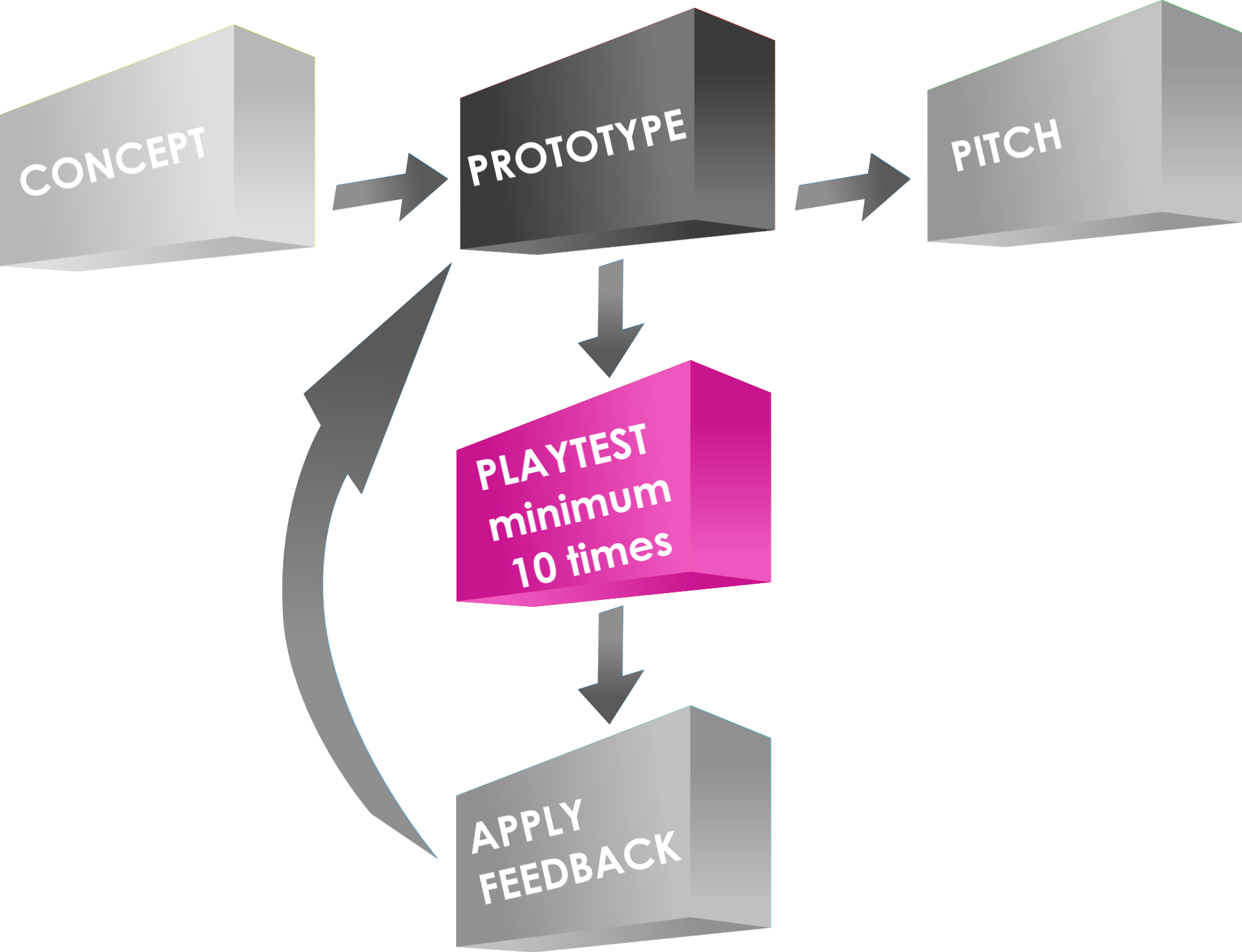
Perhaps the most important step in the Game Design process!
First things first… should there be a space between the words “play” and “test”? Does it matter? I prefer them together so for the duration of today’s article I will refer to it as playtesting.
Today I am continuing a series of articles about my take on the Game Design Process (GDP). It’s Friday so there’s probably a few of you out there who will be playing games tonight. And I’m guessing a few of you will be playing unpublished games that need playtesting. So this article should be of some assistance today!
Let’s imagine the playtesting process as if we’re carving a sculpture into stone. (In fact, one could reasonably treat the entire game design process in a similar way). For this article let’s assume you’ve already chosen the stone you want to carve (this is equivalent to creating your CONCEPT and creating the first PROTOTYPE). As Michaelangelo said (notes in parentheses are mine):
Every block of stone (protoype) has a statue (refined/perfected game) inside it and it is the task of the sculptor (designer & playtesters) to discover it.
So today I’m going to cover how the playtesting process takes that raw stone of a prototype and carves it down into something that is beautiful!
Rough Cut that Stone! (Playtest #1)

What exciting sculpture is within, waiting to be found?
So you’ve chosen your concept, decided on your mechanics, and created your first prototype. It’s time to rough cut that stone.
Getting the prototype to the table is an exciting moment! You’re ready to try it out. Don’t let disappointment cloud your excitement. And don’t expect things to work perfectly.
The goal of playtest #1, like rough cutting a stone, is to get rid of the large chunks that need not be there. To put it in gaming terms, find what’s broken. If there are broken mechanics, either eliminate them or chip away at them. The more you chip away, the closer you’ll get to a beautiful game!
Playtest #1 should be a solo playtest. Don’t submit your friends to something that is likely to be a waste of their time. Note: it will not be a waste of your time. Playtest #1 is a HUGE step in the game design process. But do it by yourself.
When sitting down for your first playtest I recommend having some questions prepared in advance. These can be things like whether or not you think mechanic A is broken, or whether mechanic B doesn’t work quite right, or whether the cards are balanced enough. For games with a lot of depth/detail it’s important to ignore the small things during this first playtest and even the first ten playtests. Remember, we are looking at the big picture here. We’re rough cutting the stone. So go ahead and rough cut your game!
Shaping that Stone! (Playtests #2-10)
Here’s a rule of thumb I try to follow when playtesting:
Don’t change things on the fly while playtesting, never change more than one thing at a time, and make sure you have enough plays under your belt to be able to compare your changes to the previous form (10 playtests seems appropriate).
Following this rule means that playtests 2-10 will be run with the same rules/components/etc. Since you’ve already rough cut your game via Playtest #1, feel free to invite your friends over to try it out. By getting 10 playtests under your belt you’ll begin to get a feel for what the beautiful sculpture within the stone actually looks like. Those first 10 playtests should provide a lot of great feedback.
But don’t change anything during those first ten plays unless there are things which obviously don’t work or are broken. These sorts of things should have been cleared up during solo Playtest #1.
During Playtests 2-10 try to pay attention to what people are saying about the game, how they react to certain elements, and most importantly pay attention to any feedback that is mentioned by different players independently. The more people that mention the same thing, the more important that thing is.
Fine Shaping that Stone (Subsequent Playtests in increments of 10)
From here forward you are in the “Fine Shaping” realm of game design. This is a VERY important section of game design. This is were things really begin to look like a final product. The objective here is to take each element of the game and work on making it beautiful. Here’s a list of things to pay attention to during these subsequent playtests:
- What is your goal/objective with this game design?
- How well does each mechanic work?
- Does each mechanic do what I want it to do? (Note: this is different from the previous bullet)
- What portions of the game are players responding positively/negatively to?
- When implementing new things (every 10 playtests) how are players reacting differently from the previous version?
- How well are things balanced? Do players always make the same choices? Is there only one path to victory?
- Pay attention to Downtime, Kingmaking, Runaway Leader, Tension, Endgame Awesomeness.
Those are just some of the things I try to pay attention to when playtesting. But the point of emphasis is not to change things except for every 10 playtests. If you change things sooner than that you’ll likely not have a good enough understanding of your game to really be able to tell if it has gotten better or worse.
That’s also why it’s important not to change two things at once. If you change two things and the game gets worse, how will you know which one caused it? Sure, sometimes it might be obvious, but it’s still an unnecessary risk. Change one thing at a time every 10 playtests so that you get to know your game really well.
Smoothing that Stone
We’re getting to the fun point. You’ve rough cut the game, you’ve shaped it, and you’ve refined it. You’re almost there. Once you’ve done a lot of playtests it’s time to start thinking about finishing it off and making a high level prototype. This is where things get a little different from the sculpting stone analogy.
When sculpting a stone, once you remove a chunk of that stone it’s gone forever. But with game design you can always add material back into the game. I chose the stone sculpting analogy because I am a proponent of keeping the game design simple. Here’s a lesson I’ve learned along the way:
It’s easy to add complexity and detail. It’s very difficult to simplify down to the game you actually want.
By this point in the game design process with numerous playtests under your belt you should only have to be changing small details. You should be at the point where you can see the beauty of your work. There’s just small imperfections in it. So smooth them away with refining.
The “Final” Product

A masterpiece, just like your game design after numerous playtests!
You’ve done all the dirty work. You’ve chipped away, you’ve refined, you’ve smoothed it out. You’re all set to pitch the game (which is something I know nothing about!). Your beautiful product is “complete.”
Okay, the word “Complete” is an absolute misnomer unless you publish the game yourself exactly how it is. Unlike a sculpture, board games can continue to be worked on incessantly. My perspective is to get the game to a point where you are confident in sending it to a publisher, and then send it to a publisher! If they sign your game, they might change it from something like David into something like the Sistine Chapel but it will still be YOUR work of art!
This has been a sort of 10,000 foot view of playtesting. In the future I’ll write another article more focused on an individual playtest session. Thanks for reading!
Scoville Print And Play Now Available!

Let the awesomeness be printed and played!
For those interested I have posted Version 0.1 of Print and Play files for Scoville, including the Rules, onto Board Game Geek. You can follow this link to obtain them:
BoardGameGeek: Unpublished Prototype: Scoville Rules & PnP
If you decide to print it out and play it I’d be happy to answer any questions. Just leave a comment below! I’d also be VERY interested in hearing your feedback from your plays of the game. So let’s stay in touch and make this game as best as it can be!
You can also hit me up on Twitter (@EdPMarriott) if you have any questions.
Thanks!
Prototype Art: Cubes in Inkscape

Inkscape Logo of Squidy Awesomeness
There are a lot of you out there who are working on board game prototypes. Often those prototypes will utilize the ever popular cube. And that usually results in the cube being placed onto graphics such as cards or tiles or the board itself and then later on, in the rulebook. So today I wanted to give you a quick tutorial to show you how I make a cube for board game graphics using Inkscape.
You can create your own set of awesome looking Scalable Vector Graphics versions of cubes using the free Inkscape software. If you don’t have the software, you can download it from their website: inkscape.org.
Let’s Get Cubing!
Once you’ve downloaded and opened Inkscape you’ll see a plain canvas outlined in front of you. I like to leave it turned on, but you can turn off the “edges” if you visit the document properties under “File.”
What we are going to do first is click on the “Create 3D Boxes” icon on the left. Here is a picture showing what this should look like:
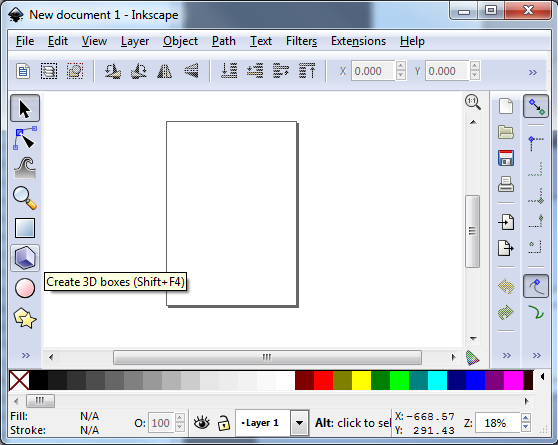
There… on the left… the icon that game designers love!
Click on the icon. Then click and drag within the framed region to create a generic box. It should look something like this:
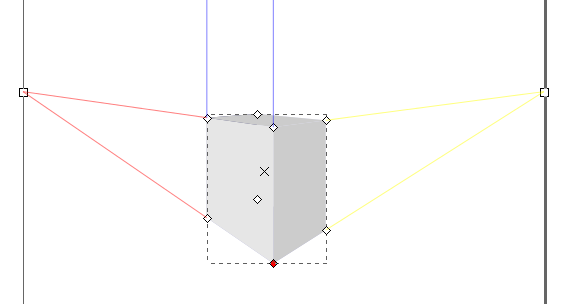
Great! You’re doing it!
You can see we’ve created a generic gray box. Now it’s time to make it look like a cube of awesomeness that you would be proud to include in your board game graphics!
So the next thing you should do is “shape” the box to look like a cube. This can be done by clicking and dragging the little diamonds on the corners of the generic box. Go ahead and try it out. Once you’ve dragged then to the positions of your liking then you might end up with something like this:
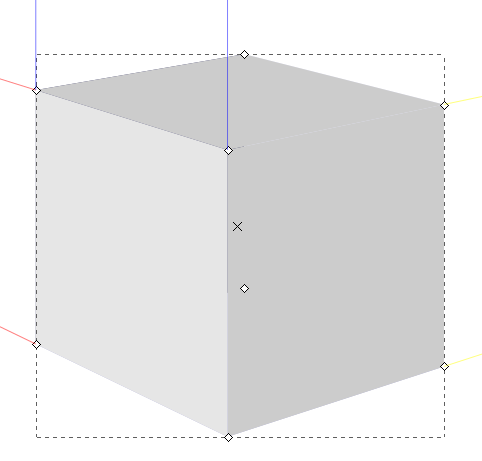
Our cube of awesomeness is started to be awesome!
Assuming you’re pleased with the shape of you cube it’s then time to make it look good. Normally you can just click on an object using the “Select and Transform” icon (it’s the black arrow on the left). Once you’ve selected the “Select and Transform” icon, click on the cube. Then you can change the color by selecting any color from the color row at the bottom of Inkscape. But that’s not the way I do it. Why? Because you end up with a flat monotone cube of ugliness rather than a sweet cube of awesomeness. Here’s what it might look like:
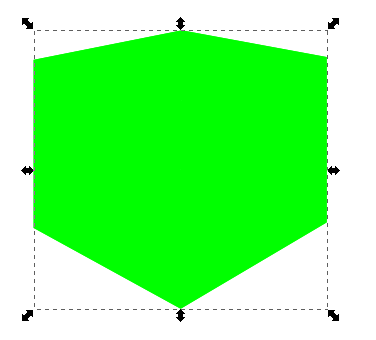
Our awesome turned ugly. Let’s fix that!
Don’t be afraid! We can transform that cube from ugly to awesome in just a few easy steps! First, we’ll want to use the “Edit paths by node” tool, which is right below the “Select and Transform” icon. This one looks like a quarter of a circle, with three nodes, and a black arrow. By clicking on this icon you can then go and choose a specific face of the cube. Once you’ve selected a face of the cube you can then change its color without changing the other faces. In this next picture I have changed two of the faces and have selected the top face:
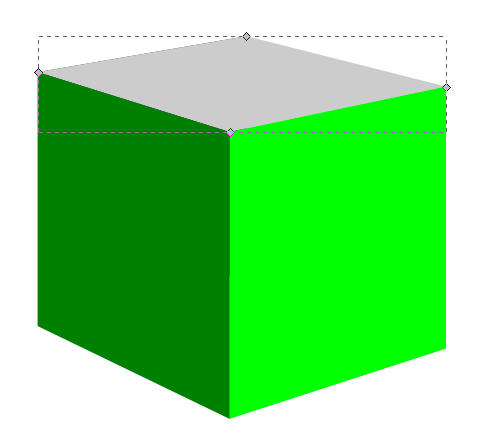
Looks like we’re back on track!
So I had selected the right face and made it a light green. Then I selected the left face and made it a dark green. Now with the top face selected I can choose its color, in this case an even lighter green. Now you should have something like this:
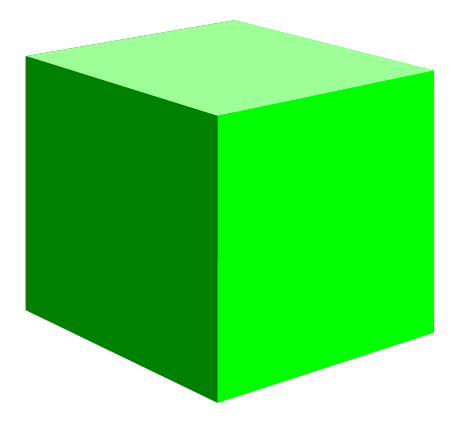
Not too shabby!
Alright!
Just a side note, if you have trouble selected the individual faces, make sure you’ve chosen the “Edit Paths by Node” tool rather than the “Select and Transform” tool.
So we’ve got a green cube with differently colored faces. What’s next? I found that sometimes the hidden faces will show through along the edges. So we can change their colors too. This is a little tricky though, so follow closely.
Go ahead and click on the left face. Then what you want to do is press the “left” arrow on your keyboard to move the face over. Don’t use your mouse to drag it since it will be almost impossible to easily put it back in the right spot. It should look something like this:
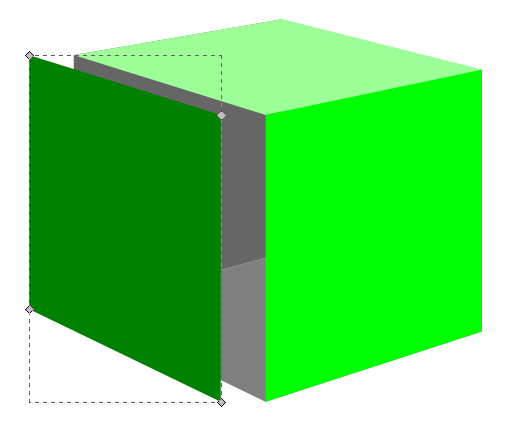
The hidden “ugly” faces show themselves!
With two of the three ugly faces exposed you can click on each one and change them to a color that matches your cube color. In this case I just choose a dark green for these two hidden faces. Then slide the moved left face back into place using your “right” arrow key. You can then move the right face or the top face to expose the third hidden side and change its color.
Now you’ve got your beautiful cube. You can call it quits right there if you want a nice simple cube. Just select the cube, click “File > Export Bitmap” and you can save it as a nice little .png file. And I also recommend saving the .svg file so that you don’t have to recreate the cube every time. But if you want to spruce it up a bit then keep reading!
Adding Awesomeness!
Sometimes cubes can look better with a border. There’s a very easy way to create one. With the cube selected click on “Filters > ABCs > Black Outline” to get something like this:

Oh boy! Things are looking good!
Pretty dec, right! (Note: dec is short for “decent,” all the cool kids know that!) Just be careful because the smaller your cube the larger the border will appear relative to the cube.
If you don’t want a black outline there are other options, but it’s slightly more complicated. With the cube selected you’ll want to click on “Object > Fill and Stroke.” That will open a panel on the right. “Fill” will color the main area of the object. “Stroke” will add a border to the object. We want to use Stroke. Taking our border-less cube and applying a simple black stroke will result in a cube like this (Note, on the Stroke Style tab you will want to choose the “Round Join” option):
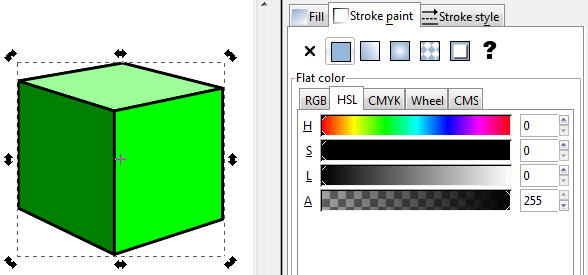
Not quite as awesome as I’d hoped!
I am not a fan of the lines along each edge. It just doesn’t look that clean to me. So here’s my trick: duplicate the cube and apply a stroke to the copy in the back. To duplicate the cube make sure it is selected and then right click. On the pop up menu click “Duplicate.” This will create a duplicate directly on top of the original. Adding a stroke to the copy in back will show allow only the outside edges of the stroked cube to show past the unstroked cube. Then you can create cubes that look like this:
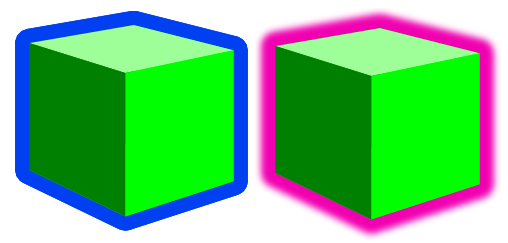
Awesomeness complete, even though these two examples look pretty ugly!
On the left is a duplicate cube with a blue stroke applied to the back copy. On the right is a duplicate cube with a blurred pink stroke applied to the back cube. One final note is that if you choose the duplicate cube option you will want to group the two together so that when moving them around you won’t have to constantly be lining them up.
Lesson Complete!
Now you know how to use Inkscape to create nice looking cubes for your board game graphics! If you are a starving artist and you have little computer skills then I have a special bonus for you. I am supplying a .svg file for all of you with a slew of cubes that you can use freely without crediting me, without paying me, and without worrying about getting sued. Feel free to use this file and the cubes wherever you want, however you want, and in whatever way you want so long as you use them for the greater good! Here is an image of the .svg file:
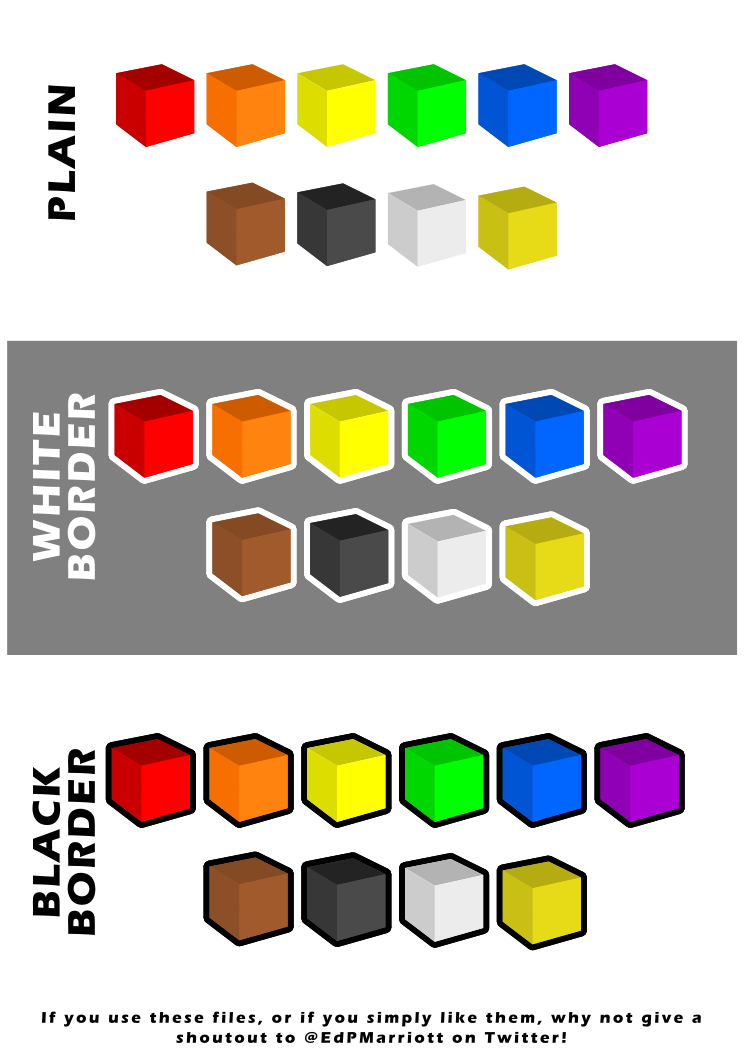
Go on… use this artwork freely! Make your prototypes look awesome!
To download it just click here: Google Drive > FreeUseCubesbyEdPMarriott.svg
Note, if you have trouble downloading the file from Google Drive you might want to allow third party cookies. You can read more here: http://productforums.google.com/forum/#!topic/docs/_pXrQmwkrGU . If you have further problems, please let me know!
And let me know how they work for you. Now get Cubing!
Game Design Process: Concept
Discussing how I arrive at a concept.
Last week I wrote about prototyping a board game and I shared my prototyping techniques for Scoville. This week I am sharing my concept process. How do I come up with a game design? Do I choose a theme and then add mechanics? Or do I choose a mechanic and then slap on a theme? Do I purposefully try to integrate an appropriate theme for the mechanics? These are the sorts of questions I’m answering today in a “self-interview” format.
Q: Where do you get your inspiration?
A: Everywhere awesomeness can be found. I can be easily inspired by just about anything. Make a game about boll weevils? Sure! Make a game about nuclear radioactive decay? Why Not! My main rule of thumb for game design, whether it’s the concept phase, prototyping, or potentially pitching a game is this:
Make sure it’s fun and relate-able!
If what you are designing is something that is fun, then the theme can be just about anything. I usually get inspired by the things that I waste spend my time on. If I’m enjoying the NCAA basketball tournament I’ll probably start thinking of making a card game where you represent a team in a region of the bracket and via set collection and hand management you have to play the right cards to get your team through the Final Four and eventually to win the championship. If I’m working out in the gym I might be inspired to design a game where you are a person who is trying to lose the most weight. You’d have to compete against the other players to burn the most calories or increase your bench press weight the most. The bottom line, though, is that it must be something fun. Players may love a set collection/hand management game, but if the theme is something boring that no one can relate to, then maybe you should come up with something else.
Q: Regarding a game designer’s Chicken vs. Egg Debate: Mechanic or Theme first?

Theme or Mechanic first?
My inspiration is typically theme based, so I usually start there. I’m not a huge fan of abstract games, either. So that probably guides me toward choosing a theme first.
When you choose a theme first it allows you to sort of steer your game in a direction that fits cohesively. Once you have a theme you can pick and choose the mechanics that you think will work best. Imagine you have chosen the NCAA tournament theme. It would be important to understand how the tournament works. You have 64 teams playing games over several weekends. Each game eliminates one team. Eventually you get to a Final Four. So once you understand how the tournament works you can then start to add mechanics. One way to do this would be to have players each represent one region of the tournament. Your objective would be to get your best team into the Final Four. Other players can play the spoiler role and try to cause upsets in your region. To do all this you could use a blind card mechanic with a drafting round before players apply cards. All players could draft a card and then cards could be played onto each game. The overall idea here is that when choosing a theme first you can then go and apply mechanics that you think fit the theme AND make the game fun.
On the other hand when you choose a mechanic first you are almost automatically starting with a more abstract game. A theme could be slapped on that probably fits the mechanic. Or a different theme. Or another different theme. The reason I typically don’t start with a mechanic is because the theme part of a game is typically what makes a game fun and relate-able. That’s just how I roll!
Q: What about boring themes? People seem to like them too!
Valid point, self. So there are a lot of games that have very boring (my opinion) themes that people still really like. Farming, for example. How can a game about farming be fun? The game Agricola is the third highest rated game on BoardGameGeek.com. So clearly the theme isn’t the whole picture in whether a game is fun or not. In fact, many Euro style games involve “trading” or “resource management,” which can be very boring topics. The key is this:
When the theme is boring, make sure the mechanics are innovative and unique (and fun!) (Or have awesome artwork!)
Sometimes people buy games because of the theme. Sometimes they buy games because of the mechanics. As long as the game is fun it can have a super dry and boring theme and people will potentially enjoy it.
Q: You keep mentioning “Fun.” How do you make sure a game is fun?

It looks like they’re having fun!
When I first got into designing games I searched for articles about making games fun. I found some interesting things that I wanted to list here. Some of them are less about fun and more about making a game “good.” But it’s my philosophy that if a game isn’t good, it won’t be fun. So making a game “good” is a prerequisite for making a game “fun.” Here are my rules of thumb for the conceptual phase of the game design process:
- Interaction is Critical! (Otherwise I’d be designing solo video games!)
- Avoid Downtime.
- Provide many options on each turn – you don’t want players to only have one option on their turn. If they can only do one thing then the cease playing a game and become robots.
- Provide multiple paths toward victory. Even if there is only one victory condition, make sure that there are numerous ways to get there.
- Avoid a runaway winner.
Let’s quickly run through why each of these is important for making a game good and fun:
Interaction: If there is nothing you can do to affect the other players, then you’re playing a solo game against other solo gamers. Not fun. If there is no interaction on a verbal level then it doesn’t matter that you’re sitting around a table with friends. You may as well make your game into an app that people can play when they’re sitting on the toilet. Provide a way for players to interact in the game.
Downtime: No one likes sitting around for a long time while other players are taking their turns. Try to design your game so that people are constantly paying attention. Make sure they’re invested in what the other players are doing. It’s no fun to be sitting around waiting.
Options: Without options a game of strategy or tactics or even luck becomes a simple matter of doing whatever it is that the game is forcing you to do on your turn. That’s no fun at all! Designers: give your players options! Don’t turn us into robots.
Paths to Victory: It’s important for players to be able to play your game in different ways. This can be as simple as having destination tickets like in Ticket to Ride. Or it can be complicated like choosing the best way to fill in your estate in The Castles of Burgundy. Just make sure that you’re giving the players different ways to reach a winning condition.
Runaway Winner: I just as easily could have said to avoid player elimination. With a game where a player can get so far ahead that no one can catch up it is effectively player elimination anyway. A good and fun game design will include a way for players to catch up to a leader. This can be done several ways, including hindering the leader or benefiting a last place player. Think of the NCAA thing again. Which games are more enjoyable to watch, blowouts? or close games where a team was down big and they came back and hit a buzzer beater at the end?
Of course there are other things that can determine whether or not a game is any fun. Those above are just the main five things that I always keep in mind when designing a game. Another one that I did not mention because it is difficult to get right in a game is having an ever increasing amount of tension in a game. That is one of the things that Agricola does really well. This can be done by having limited resources or a first-come-first-serve option. Agricola has both!
Q: You’ve got a theme, now what?

So you’re going with Boll Weevils, huh? Could be worse!
You’ve chosen an interesting theme that could be fun and is relate-able. Where do you go next? I like to do a little research about whichever topic I’m thinking about designing into a game. When doing the research I try to figure out things about the topic that would work well for game mechanics.
In the Boll Weevil example I just learned that boll weevils, though not native to the United States, migrated here in the 19th century and by the 1920s had devastated much of the cotton industry. So perhaps while the boll weevil theme itself may not be very fun or interesting, as a designer I could go several different routes. I could make the game be a cooperative game about controlling the infestation. I could make it so that players represent individual boll weevils trying to infest the largest amount of territory. I could even make the game about farmers trying to grow the best cotton while other players can launch infestations of boll weevils on their opponents. So I could definitely produce a game about Boll Weevils. Question is, would anyone care?
The point is that once you choose a theme, do a little research and figure out what you really want the objective of the game to be.
Q: How do you add mechanics?
Now that you’ve gotten to the point of understanding what your objective is in your game it’s time to start turning it into a real game. The key is understanding the theme. You don’t want to add things to your game that don’t really fit the theme. I recently ran across this with the game Archipelago. There are mechanics in that game that just don’t seem to fit the theme of exploring an archipelago and dealing with indigenous persons. One example is that if the rebels are advancing you can get them to stop by selling fruit. But you aren’t selling fruit to the rebels. You simply have to sell fruit. It just didn’t make much sense to me.
So when I think about adding mechanics to the theme I figure out how the theme really works. It’s like the boll weevil example above. Since boll weevils spread and infest I would probably add a mechanic where a swarm of boll weevils is taking over precious territory.
I also like to keep in mind the 5 points I made above about making a game good. If a mechanic adds too much downtime, for example, I might not go with that mechanic. Or if a mechanic has no player interaction I’d probably leave it out. It is important as a game designer to be cognizant of how the mechanics in your game not only allow for players to reach the game’s objectives, but also to make the game good and fun!
Conclusions:
Game designers face an interesting challenge. The whole idea of creating a game is almost a game in and of itself. Designers strive to make games that are fun, induce emotions from the players, create an atmosphere of engagement between players, and be innovative all at the same time. Finding a theme, applying mechanics, and balancing the game are all things that go into making a great game. If there’s a game out there that you really enjoy, find the designer on Twitter and thank them! A lot went into that game!
Prototyping Techniques Applied to Scoville
 While at Protospiel I heard a lot of kind words for the quality of my prototype of Scoville. So today I am sharing my prototyping process with you. I hope that it can help you make a quality prototype that you are confident about.
When I was first getting into board game design I was a little overwhelmed by what it took to make a prototype. I watched a few prototyping videos on BoardGameGeek.com. Those only made me shy away from the whole process. It can be intimidating. But today you can learn that it isn’t perhaps as daunting as you might think.
Overview of my Process
 First things first: you need a game concept. Assuming you’ve got a great idea in mind it’s time to start prototyping. Early on in my board game career I was designing a heavy Euro game. I waited to make a prototype until I had worked through all the details of the game. That was a mistake. It is my recommendation to make prototype components of your game as early as possible. For example: If you have an auction in your game, test it independently from the other mechanics. Test each mechanic individually and test them early on. There is no point to design an entire game only to find out that the individual parts don’t work.
Once the individual elements seem to work then you can try to put them all together to make a full game out of them. Here is a rule of thumb I try to follow:
Never add complications unless they are absolutely necessary.
This is a difficult thing to do. It is always easier to add another rule or add another component. But if you want to make a good game, focus on the innovative mechanic rather than all the little rules about the rest of the game. Keep it simple.
So I start with a concept. I usually write about 10 pages of notes and sketches about that concept. Then I’ll go ahead and start prototyping (this is what I’m covering today). Once I have a prototype ready then I’ll play test it at least 10 times. This will give me a solid amount of feedback. Only after testing 10 times will I apply any changes. Here’s another rule of thumb:
Don’t try to change things in the game on the fly, and don’t change more than one thing at a time.
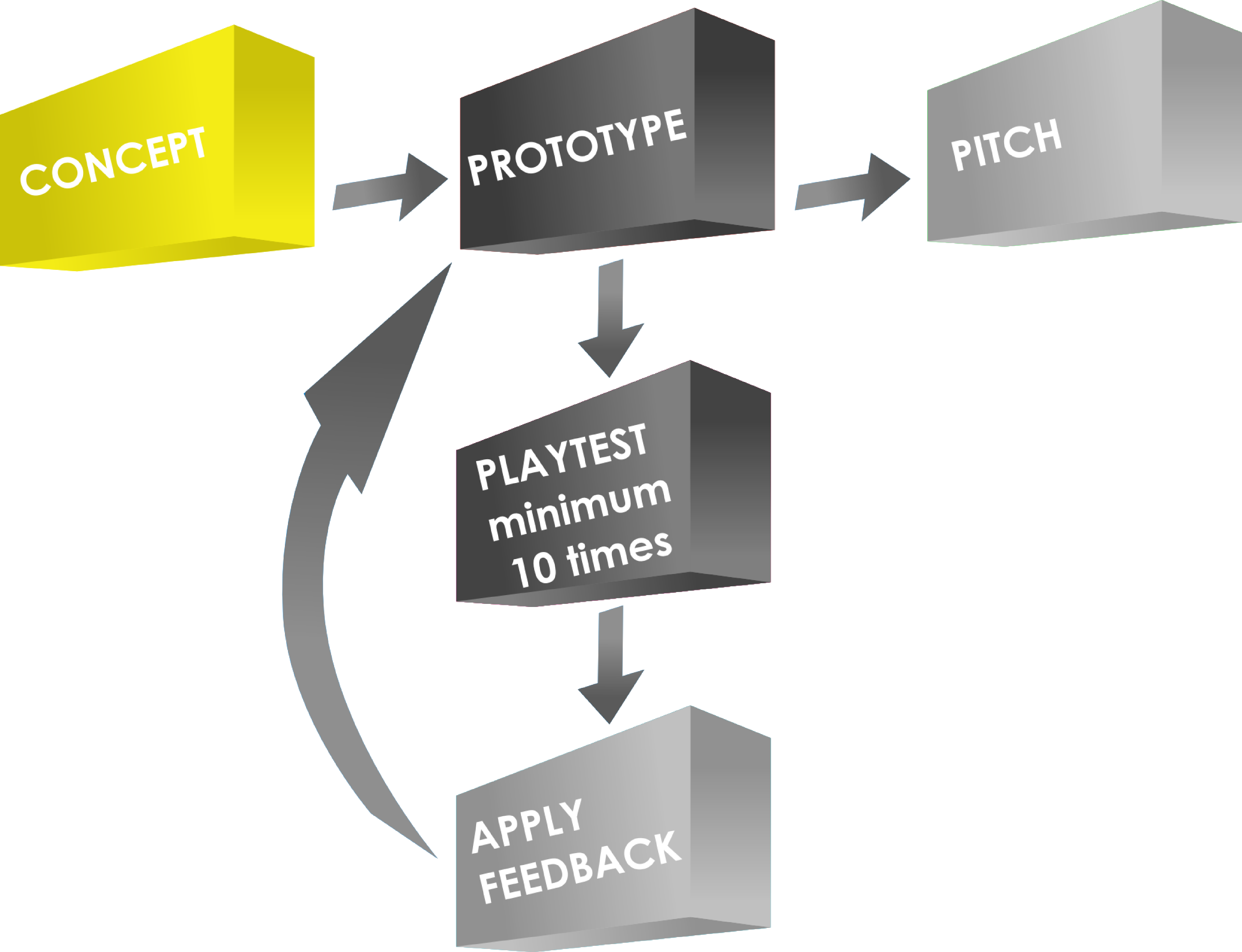
Following this rule is critical, especially the part about changing more than one thing at a time. If you change more than one thing it can be difficult to know which of the things you changed made the game better (or worse). Change one thing at a time and test it profusely. So I apply feedback and adjust things after 10 play tests. Once the game has gone through the PROTOTYPE – PLAY TEST – APPLY FEEDBACK phase several times to the point where there are only very subtle changes then I get to the point where I am confident about contacting publishers about it. There is no point in pitching a game unless you’ve gotten it to the point where you are proud of your product and confident to show it off.
Getting Started: What do I need?
When making a prototype I usually begin with a spreadsheet. A spreadsheet allows you to create custom tiles or cards very easily. You can print them out yourself and turn them into quality prototype components. Here’s a list of everything I use(d) to create a copy of Scoville:
- Spreadsheet software
- Graphic Design Software (I prefer Inkscape, but The Gimp is also very useful)
- Paper (Plain paper for first prototypes, Glossy photo paper for pitch-able versions)
- Thick card stock – As thick as you prefer, though the thicker it is the more difficult it is to cut.
- Components: cubes/meeples/coins
- Circle Punch
- Paper Cutter (I have this one)
- Bingo chips
- Glue Stick
- Scissors
- Gerber Baby Food Containers – if you don’t have kids find some friends who do and beg them to save these for you!
Here is a picture of all the components that go into the game:
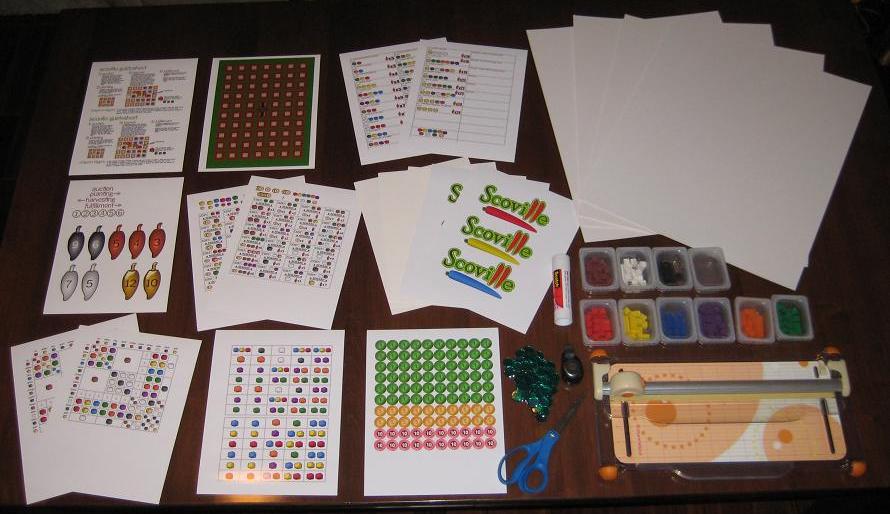
Scoville components fresh off the press!
That’s everything (except a box) I need to make a copy of Scoville. Let’s walk through the prototyping (physical creation) process.
Make it Rain! Or Something Like That
Assuming you’ve taken your concept and created artwork that suits you, it’s time to actually make something real for testing. What that means to me is that it’s time to print stuff out! Scoville has 13 pages of printing required for a full copy. The next step is to adhere those pages to the thick card stock. I like to buy the stuff that is as thick as standard board game chit board. This gives me the feeling like I am playing a real game when I test it.
So I use the glue stick and cover the back of the paper and then stick it to the card stock. Once I’ve got them all glued down I can start to cut them to size. Since the large card stock boards I buy are too big for my paper cutter I run a scissors through them to separate the difference components before using the paper cutter.

Cover with glue, adhere to card stock, coarse cut to separate.
Then I use the paper cutter to trim the fat and make them nice and clean. Shown here as an example is the first cuts done to the auction tiles:

I then go ahead and cut each tile out individually and end up with a pile of nice thick quality components:

My precious little auction tiles!
I continue this process for all of the components in the game.
Making Player Shields
Another part that seemed a little overwhelming to me was the production of player shields. But I found a nice, easy way to make them. If you don’t want pictures on them then just cut some paper and fold it. If you want pictures or logos then follow this procedure:
-
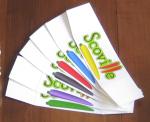
Easier to make than I thought.
Print the logos.
- Cut the logos to a rectangular size.
- Glue the logo centered on a sheet of thin card stock.
- Angle cut each edge so that it will lean when completed.
- Fold gently.

For Scoville I made the artwork on the shields include the player color. Making your own player shields rather than using shields from games you own can really spice up your prototype.
Making Money
One of the more tedious things in this process is making my own coins. I don’t have to make it as hard on myself as I do, but I prefer a really professional looking prototype.
It would be much easier to simply write a money value on the plastic bingo chips with a marker. This would make them more difficult to read and they wouldn’t look as nice.
So my process for making coins is this:
- Create the artwork.
- Insert the coin images into a document file.
- Print the document.
- Punch the coins out of the paper.
- Adhere them to the bingo chips.
Here is a tip for punching, if you use a circle punch like mine:
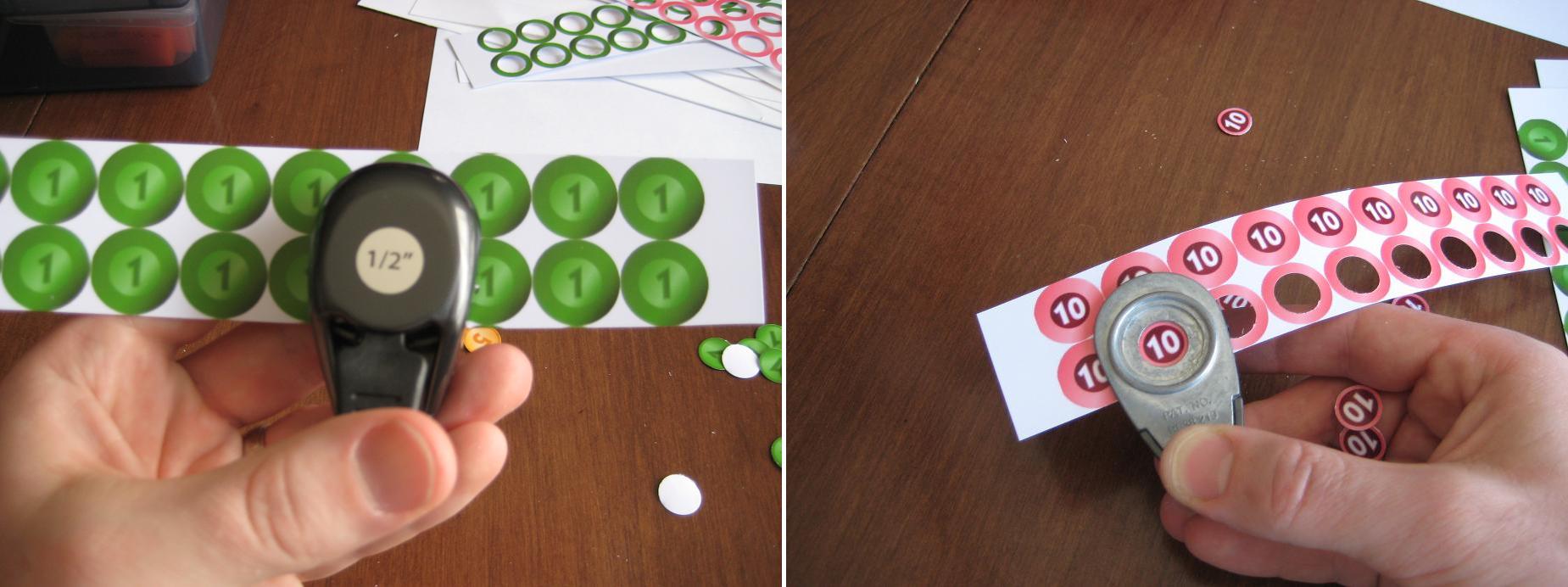
Flip the punch over for better visual alignment!
If you hold the punch like it seems it should be held then you have to rely on the little plastic bump guides on the side of it. Just flip the punch over and you can visually align the punch with the coin. This makes it so much easier!
Once you’ve got them all punched you can simply glue them to the bingo chips. I recommend watching something on TV that is really attention grabbing, so that it draws your attention from the tedium of gluing little circles to bingo chips.
If you don’t like the idea of gluing circles to bingo chips then go ahead and use the same thick card stock that you’ve been using. Just be aware that the circle punch may not punch through the thick card stock. That’s why I went with the bingo chips.
The Final Product
Once you’ve got all the components glued-punched-cut-etc. then it’s time to put it all together. Here is a before and after picture showing the reduction in volume for Scoville:
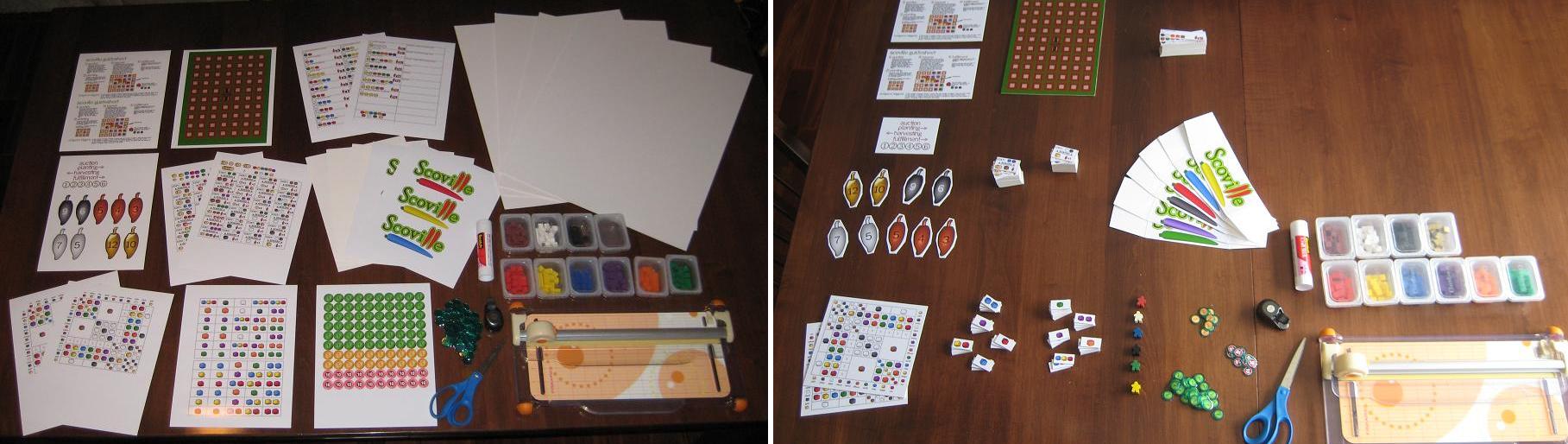
What looked overwhelming turned into a nice, quality prototype.
To continue with the theme of a quality, pitch-able prototype I like to use a nice container to hold everything. You can buy these at Target.com or you can find different colors in the store. They are only $5. I should also note that these fit into a Medium Flat Rate Priority box from the United States Postal Service. So it is pretty easy to mail one off to a publisher!
Now you’ve got your container so throw in the components, a couple copies of the rules, a business card, and you’re ready to pitch your game! Note, you do not need to have a high quality prototype to pitch a game. I am just a firm believer in making a good first impression. Here’s what Scoville looks like in it’s full prototype form:

This is the third copy of Scoville in existence! May the other two copies in the wild prosper and flourish!
How Much Is It Gonna Cost Me?
I mentioned earlier that you can make an high quality prototype that is also inexpensive. Here is a rundown of the costs for a full copy of Scoville:
- 13 sheets of glossy photo paper: $3
- Printer Ink (I buy cheap Non-OEM ink off Amazon): ~$2
- Glue Stick: $3.30
- 4-Pack of Thick Card Stock: $13
- Bingo Chips: $0.50
- Meeples ($0.14 each): $0.84 – I live near The Game Crafter so I can pick them up and avoid paying shipping costs
- Plastic Cubes (250): $7 – I bought a tub of 1000 cubes for $25 (shipping included) from EAI
So the total for a high quality prototype for Scoville costs me under $30. So maybe you wouldn’t characterize that as inexpensive. But when $30 can allow you to create a pitch-able high quality prototype that might catch a publisher’s eye, I don’t think $30 is too bad.
What techniques do you use? I wanted to point out that I did not write about making cards. Most people, when making prototype cards will purchase penny sleeves, insert their custom made cards, and make them thicker by dropping in a M:TG card. I don’t use cards in Scoville, so I didn’t include that.
I hope that you enjoyed this article. It has been a fun process for me to figure out some of the best ways to make a prototype. If you have any ways to make the process more efficient, please leave a comment so others can see!
 Boards and Barley