Author Archives: edpmarriott
I’m Pulling for Him – An Interview with Chevee Dodd

Available via Kickstarter!
Today we have the first ever interview on Boards & Barley and I’m happy that it is with the magnificent Chevee Dodd of West Virginia fame and folklore. Chevee currently has a Kickstarter campaign for his awesome trick-taking card game, Pull! I played it in March at Protospiel-Milwaukee and I recommend it!
Chevee is the designer of Scallywags by Gamewright. Has has also designed several games that are for sale on The Game Crafter that are worth checking out. My personal favorite is Tuesday Night Tanks.
I have had the privilege of enjoying an Oktoberfest celebration with Chevee and consider him a good friend. If you have not had the pleasure of meeting him, seek him out some day. Or twitter stalk him. (@cheveedodd). But enough rambling… let’s learn about him and his campaign.
Interview with Chevee Dodd
Boards & Barley: Why did you start designing games? Why is this one of your passions?
Chevee Dodd: I’ve explored dozens of creative outlets in my time. Typically, I try something new and then get bored with it and move on. Games have been the one constant in my life since early childhood. I started designing because I found inspiration in James Earnest and his then startup, Cheapass Games. Suddenly there was a way for the little guy to do something on his own and succeed, so I went for it. I found that the creative outlet was extremely satisfying because I get to flex all sorts of skills: writing, design, crafting, and art. It encompasses so much of what I love to do.
B&B: We first met at Protospiel-Milwaukee last year. What do you think are the biggest benefits of designer conventions like Protospiel and UnPub?
CD: Meeting people like Ed P Marriott.
Seriously, there is a great bunch of people at these shows that are more than willing to help test and refine. They love being creative together and some awesome projects have come out of that community… but for me, it’s the people. In fact, I generally have to be coerced to test my own games at these shows. I’m there to form relationships. We are all building something much larger than a few games. We are building a collective that will herald each others efforts for years to come.
 B&B: What is your favorite non-Chevee game that you love playing more than anything else?
CD: Acquire is my all-time favorite. I would play multi-day marathon sessions of Acquire and never get tired of it. Also, Tichu. Oh my Tichu. With the right teammates, we’ll run it back to back to back. Best of 7? No problem!
B&B: Other than Pull!, which is your favorite Chevee game and why?
CD: Leathernecks ‘43/Princess Fairy Rainbow Unicorn dice is the only other Chevee game I’d actively ask someone to play. I generally don’t enjoy playing my own stuff but that design, and PULL! have both surprised me. I feel like I was able to inject just a touch of interaction into press-your-luck that makes the game something more without tacking on a bunch of thinking. I’m pretty proud of it.
 B&B: If you could have a PBR with any two game designers, who would they be and why?
CD: Michael Schacht and Antoine Bauza. I’d love to have a PBR with Sid Sackson, but I don’t think that’d go over so well. Bauza and Schacht both design the types of games I love: simple rules with deep decisions. I’d love to talk shop with them… but being that they are both from more cultured areas of the world, I have a feeling they’d balk at my PBR.
B&B: What are your three favorite pieces of advice for new game designers?
CD: 1) Fail. Fail often. We learn so much more from our failures than we do our successes. It’s hard to know why something works, it’s easy to spot why it’s flawed.
2) Try. You can’t fail if you don’t try. Talking about designing games is way different than actually doing it. Just try. Get out the pen, paper, and scissors and go at it.
3) Ask. Get help. You can’t do this alone, no matter how great you think you and your idea are. You WILL need people to help you with the design and it’s better to start early than late.
B&B: I love your “Open Source” game design approach where you utilize open source software and like involving other people. Where did this philosophy come from?
CD: I’ve been a hacker of sorts all my life. Not a hacker in the movie sense of someone that breaks into banks security systems and steals money… a hacker that makes things by learning and deconstructing. I started writing software when I was about 8 years old… that was before the Internet as we know it today… and I relied heavily on books to teach me what I was doing. When services like American Online, Prodigy, and CompuServe came along, it was like opening a floodgate for me. Suddenly there were all these free references and resources available for me to learn from and my progress with software increased rapidly. I like giving back for this same reason. If I can help someone else through my stories and tribulations, I’m all for it.
 B&B: You utilize The Game Crafter for prototypes and components quite a bit and I know you have a few games available on the site. Do you have any other “go-to” resources for game design components?
CD: The dollar store. Most of what I work with outside of printed components are things like sharpies, tape, paper, pens… all the stuff that’s readily available at a dollar store. But also, you can find stuff you didn’t think about there like glass beads and other trinkets that make great game components. I like to look everywhere I go for things that inspire.
B&B: What was the inspiration for Pull!?
CD: PULL! came about during a lull in my creativity. I asked the Twitter community to give me some ideas and it was the one that stuck out. I tried working through some of the other concepts, but this one just wouldn’t’ leave my head and I had to make it.

These awesome duck tokens are only a $5 add-on! Bump your pledges, people!
B&B: What sets Pull! apart and makes it awesome?
CD: It plays like a trick taking game, but not like any you’ve tried before. There is a deck of cards driving each round instead of the players winning the lead and those cards also score you points. On top of that, there are two tricks each round instead of just one. There are many different levels of decisions that go into each card play but it’s not so complex that you can’t just sit down and enjoy it. In fact, I’d say it feels less challenging than most trick taking games even though it offers significantly more decisions.
B&B: What are the best ways for people to share the Pull! campaign so that we can get it uber-funded?
CD: Facebook has brought me the most backers. Simply hitting the Facebook “Like” button under the Kickstarter video has had a great impact on the campaign, but also unlocks a stretch goal! For all of Facebook’s reach, however, there are more communities that are actively involved in gaming like Reddit and Google Plus. Sharing there and talking about the game all over the internet is going to help bring backers our way. So far, I’ve been extremely humbled by the support I’ve received from the backers.

Some cards and the game box.
B&B: What have been the most challenging aspects of putting together a Kickstarter campaign?
CD: Simply the sheer volume of work. Putting together all the graphics. The copy. The videos. The art. I started months in advance and I’m glad I didn’t wait until the last moment! So many campaigns are obviously thrown together, I really wanted the PULL! page to shine and I spent many many hours editing.
B&B: Do you have any sources of advice for the Kickstarter campaign? Jamey Stegmaier’s blog, for example, has a ton of great Kickstarter information.
CD: I think I’ve read most of Jamey’s posts… TWICE. Seriously… there is a ton of stuff there to think about. I don’t agree with all of Jamey’s advice, but that’s not the point. The point is to get you thinking about all the aspects of the campaign. Other than Jamey’s blog, I listened to most of Richard Bliss’ podcast and spent Monday’s researching the previous week’s campaigns. I spent a great deal of time analyzing both successful and unsuccessful launches for anything I could use to my advantage.
B&B: Do you have any personal advice to offer people that will be setting up their own Kickstarter campaigns? What key aspects of a campaign shouldn’t be excluded?
CD: The biggest piece of advice I have is to have an audience before you launch. Kickstarter is NOT a marketing platform and you need to sell yourself WELL before the campaign. I’ve spent the last two years building myself up and that got me nearly 70 backers on the first day. Now that the campaign is in full swing, they are barely trickling in… and most are finding the campaign because of my awesome backers sharing the campaign. Very few are coming in from Kickstarter alone.
As for exclusion: be transparent. Don’t hide any aspect of your game or the production. Even if there is something you are embarrassed about, you need to point it out. Dont try to trick people into backing your project. Let it sell itself. Be 100% transparent, good or bad. It may not pay off on this campaign, but it certainly will in the future!
B&B: Game design, Graphic design, Woodworking. How is the best way for people to reach out to you for design advice or graphic design work?
CD: I answer Twitter more than anything… and quickly. The notification sound for Twitter is my favorite on my phone. I grab it up as soon as it goes off. After that, email is the second best method… and my gmail account is also linked to my phone.
cheveedodd [at] gmail
 B&B: What other great things can we look forward to from Chevee Dodd over the next year or so?
CD: I designed a pretty neat 2 player zombie game that’s coming up. The artist that’s working on it is doing great stuff and I can’t wait to share it with the world. I designed it for Jayme though, so I’m not letting anyone else have it before her. I’ve considered bringing it to Kickstarter also, but it’ll likely be up as a print and play and maybe at thegamecrafter.com long before. I can only handle so much stress in one year.
Other than that, I’ve hinted at a secret project a few times over the past few months. The announcement of that should come mid-July, and it should be fun. Mayfair is still plugging away on developing Hedeby. Even if they greenlight the game, I doubt it will be out in the next year, but who knows?
B&B:Anything else you want people to know?
CD: I am forever indebted to this community and am constantly humbled by the support I receive. I would like to thank each and every person individually, and in person. I hope one day we can meet to make that happen!

Thanks, Chevee, for the interview. I wish you the best for the rest of the Pull! campaign and I hope it does really well for you. For those who read this, if you haven’t backed the project, go do so now. If you want to learn more about Chevee and what he does, head on over to his website: cheveedodd.com.

Monday Brews 4-28-14
Monday in Madison is rainy. Yesterday was rainy. Tomorrow will be rainy. Wednesday and Thursday will be rainy. And people wonder why Spring is my least favorite season. Oh well… at least we have board games to keep up happy during depressing weather like this.
So here we are starting another work week. While it’s dreary outside let’s look back and the Boards & Barley I enjoyed last week. That might brighten my mood.
The Barley:

So good! So smooth! So luxurious!
BARLEY SPOTLIGHT: Young’s Double Chocolate Stout
I enjoyed this on tap at a new local establishment in the glass shown in the picture. It is chocolatey, smooth, creamy, and delicious. I recommend you try it if you are a fan of any beer styles what-so-ever.
- Homebrew: Oatmeal Stout
- Hofbrau Original
- Lakefront Cherry Lager
- Lake Louie Warped Speed Scotch Ale
- Homebrew: Scotch Ale
The Boards:

Small tin, Big game!
BOARDS SPOTLIGHT: The Builders
I picked this up for several reasons. The artwork is awesome. The game has been getting a little buzz from Euro lovers. And it was only $18.
The Builders is a game about building buildings. Each turn you have three actions which you can use to hire workers, begin construction, send workers to build the buildings, or take money. Play continues until someone reaches 17 points from their completed buildings or tools.
This game plays quickly and includes a plethora of interesting decisions. I played it twice last week and I’m looking forward to playing it again!
- Glass Road
- Crokinole
- NEW! Unpublished Prototype
- NEW! Thebes – I love the theme of this one. Doing research and then visiting archaeological dig sites to search for artifacts is great! But the way this game manages the time aspect adds a very interesting concept. While I thought the artifact digging added a little too much luck, I found the game to be very enjoyable and I’ll play it again.
- NEW! Hab & Gut – I’m not normally a fan of stock market games. Money is a very bland theme for me. But this game, with it’s lingering concept of player elimination for the lowest charitable donor, and its hidden information market manipulation aspects made this a love-hate game for me. I wanted to know more information than I knew. I actually thought the design of this game was really clever. I would definitely play it again.
I didn’t do any design work last week. I really need to finish reading Words of Radiance so I can get back to spending my free time on game design. But that book is so good. What Boards & Barley did you enjoy last week?
Monday Brews 4-21-14
Welcome back to Boards & Barley! I hope you all had an enjoyable Easter weekend. It was a VERY slow week in terms of enjoying Boards & Barley. So today’s Monday Brews will be very short. Let’s start with the Barley…
The Barley:
 BARLEY SPOTLIGHT: St. Bernardus Abt 12 Quadrupel
I enjoyed this fine beer on tap from a new local establishment that has an outstanding list of beers on tap. Most of them are European beers. Many of those are beers I haven’t ever seen on tap. I will definitely be going back there to enjoy more awesome tap beers!
The Quadrupel was quite exceptional. But weighing in at 10% abv means it should be a slow drinking beer. I didn’t drink it slowly. It was too good to drink slowly.
The other beer I enjoyed last week was a Belhaven Scottish Ale on tap at the same establishment (another reason I should have enjoyed the Quadrupel a little slower!). I’ve enjoyed Belhaven from a nitro can in the past but to have it on tap (nitro tap!) was awesome. It’s such a smooth beer with an excellent flavor. Yum!
I did happen to have a New Glarus Spotted Cow while I was working on my garden bed last week, but Spotted Cow is not close to those other two tap beers.
The Boards:
 BOARDS SPOTLIGHT: Tessen
Tessen was the only game I played last week. The rest of my free time was spent on building my garden and reading Brandon Sanderson’s Words of Radiance, which is amazing.
I taught Tessen to my brother-in-law who after the weekend was over mentioned that he wanted to play it more. It’s such a fun, light, and quick battle game that has you feeling tense as you are trying to collect sets of animals. If you’ve never played it, go pick it up from Van Ryder Games.
Designer’s Corner:
Since the garden and Words of Radiance were so prevalent last week I didn’t really do much game design. However, I did sit down for a while and put together some good ideas for Brooklyn Bridge. One of the things I’m working on is how to make the tower more appealing to build.
In the playtests that I’ve run so far it seems like it is VERY slow to develop. Players don’t seem to be incentivized enough to build the towers. And the whole point of the game is to build the bridge. SO I needed to come up with a better way to incentivize the actual building of the bridge. I think I figured that out last week. I’ve got a much better system in place that I’m hoping to try this week. Instead of having scoring bonuses for “area majority” in each section of the bridge I am switching it to physical rewards like an extra brick, money, or perhaps an advance token. This will also make the game move along more quickly. People will build. People will earn rewards. Rewards will help people build faster. And so on.
Hopefully I can revise my prototype this week and get it to the table.
And then I also hope I can work on Armada Galactica. I think this game has a potentially larger audience and it would be fun to design an awesome space-themed game. I’ll keep you posted.
***
So those are the very few Boards & Barley I enjoyed last week. What did you enjoy?

Prototype Art: Alignment in Inkscape
 I use Inkscape for all of my game design artwork. It is relatively easy to use and is vector based, so I can make things larger or smaller as needed without any loss in picture quality.
I’ve done a couple other Inkscape tutorials about game design artwork. You can check those out:
Today I want to focus on one specific tool within Inkscape: Alignment.
If you don’t have the software, you can download it from their website: inkscape.org.
Let’s Line Things Up!
The tool I find I use the most within Inkscape is the alignment tool. I use it for every piece of artwork or graphic design that I make in Inkscape.
When you are working in Inkscape and desire to line things up, look for this icon: 
Clicking that will open the Alignment options, which will look like this:

Control Panel of Alignment
Let’s run down what those options are. Here is a new version of that image:
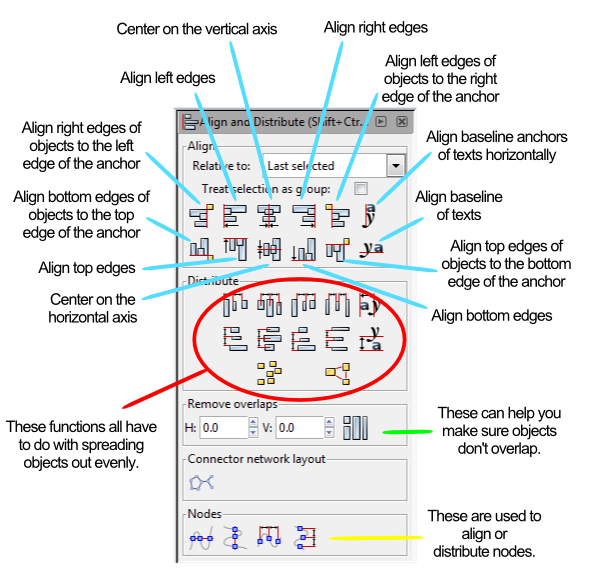
Instead of running through each of those things listed above I am going to provide a couple examples. At the end of this article you will find a the Inkscape file that I used for these examples. Feel free to download it and use it to get familiar with the alignment tools.
Anchors Away!
When aligning things the most important thing is understanding which object is the anchor. The anchor is the object that will not move when the command is applied. You can choose the anchor with the options from the “RELATIVE TO” box at the top, which are the following options:
- Last Selected
- First Selected
- Biggest Object
- Smallest Object
- Page
- Drawing
- Selection
The three that I use the most are “Last Selected,” “First Selected,” and “Page.”
When selecting multiple items, if you chose the anchor last, then you should set RELATIVE TO to “Last Selected.” That way when you choose the alignment function, the anchor will appropriately stay put and the other objects will move.
Likewise, the “First Selected” option will cause the anchor to be the first object you select. Both of these options are nice because you can make sure you’ll know which object won’t be moving.
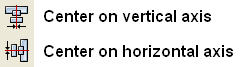
Using the “Page” option will align things with the page. The Page is represented by the black box in the middle of the canvas when opening a new document. I use this a ton when designing artwork for cards since it allows me to center things on the page. This one can come in very handy. You can align things to the center of the page by using these two alignment functions:
Alignment Examples
I’m going to use a circle and a block and show you how several of the functions work. After centering the block on the page I’ll be using the block as the anchor for the remaining alignments.


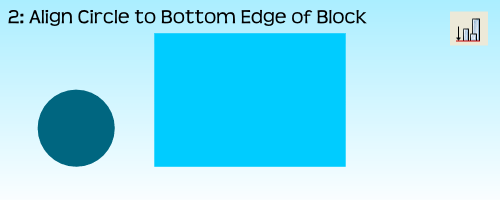
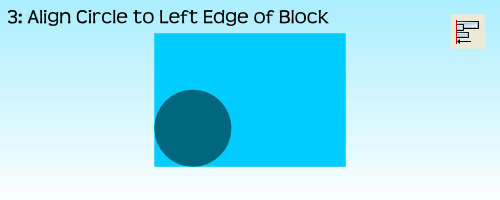
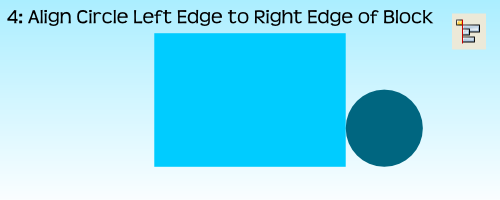
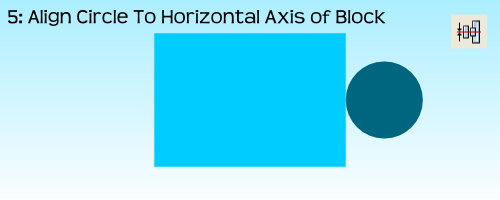
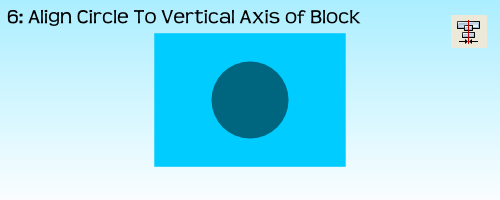
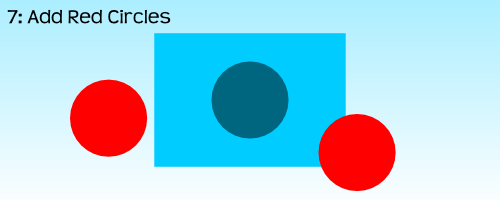

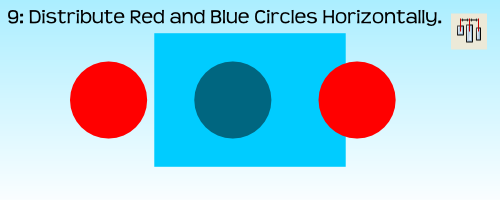
 For the very last example, step 10, I had to use the “Treat Selection As Group” option. If I had not used it the result would have been to stack all three circles on the vertical axis of the block:
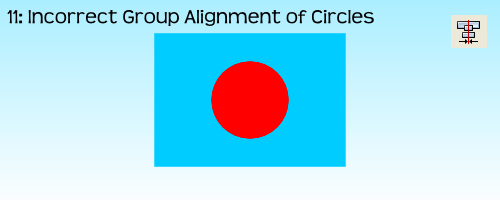
By treating the three circles as a group it allows for the whole group to be aligned without adjusting the relative locations of the objects in the group. Often I’ll just group objects myself before aligning them and then ungrouping them after the alignment. But feel free to do it however you like.
That’s Basically It
I have found that these alignment tools are very useful when making prototype artwork for my game designs. It allows you to consistently place things in the same spots. It allows you to make things line up correctly. And it allows Inkscape to help design your awesomeness!
Here is the file: BoardsAndBarleyAlignmentExample.svg
It is located in Google Drive and to get it to work you’ll have to download it. Please let me know if you have any questions. Thanks for reading.
Monday Brews 4-14-14
Happy Monday everyone. I hope all of you that attended PAX East of the Gathering of Friends had a great time. I attended neither, babysat Saturday evening, and played one game all weekend. But that’s okay.
Today is Monday so I present you with me recap of the Boards & Barley I enjoyed last week:
The Barley:
 BARLEY SPOTLIGHT: Wisconsin Brewing Co. Porter
I enjoyed this Porter at a dinner on Sunday evening with my wife for her birthday. The Porter is from the still new Wisconsin Brewing Co. I found it to be a very nice porter with characteristics one would expect from a porter. I would drink it again as it was easy to drink and enjoyable to taste.
They recently brewed a coffee porter that is only available on tap. I would definitely like to try it since I enjoy coffee flavored/infused brews.
- NEW! Founder’s Porter – I enjoyed this porter during Board Game Night. Not too much to say about it. It was decent.
- NEW! Saint Francis Gluttony – From a Milwaukee brewery that names their beers after the seven deadly sins. This was their Maibock. It was okay. I found it a little too sweet and not “Spring” enough.
- NEW! Penn Pilsner – It’s been a while since I had a straight up pilsner. This tasted like a pilsner, smelled like a pilsner, and was pilsner through and through. Yet I enjoyed it.
- Central Waters Mudpuppy Porter
- New Glarus Spotted Cow
The Boards:
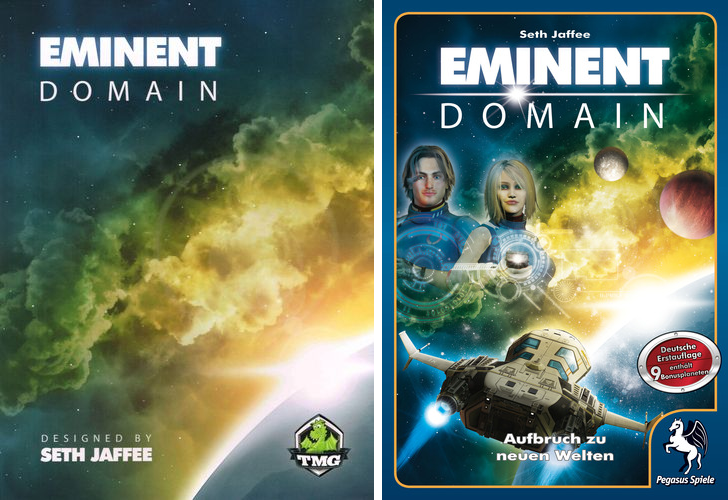
US (Awesome) and German (Ugh) box covers.
BOARDS SPOTLIGHT: Eminent Domain
Eminent Domain has become my favorite deck builder. That’s probably due to the deck building portion being subtle. There are planets to colonize or attack. There are new planets to survey. There are new for of research to develop. There are so many awesome elements in Eminent Domain that the deck building portion is somewhat of a side thought. But that’s not to say you don’t need to consider how you build your deck.
For those who are sick of Dominion and don’t like the theme of Trains, I highly recommend Eminent Domain!
- Unpublished Prototype
- Dungeon Roll
Designer’s Corner:
The only design efforts I completed last week were from the Design Me article where I designed a new tile placement via dexterity game called ManHunt.
This week I hope to compile and balance the abilities in Brooklyn Bridge as well as make some modifications to how the Tower is built. These will make the game more “Euro” in style, which I am fine with.
I also have the necessary components to prototype Manhunt, which I just might do.
So those are the Boards, Barley, and Design Efforts I enjoyed last week. What did you enjoy?
 Boards and Barley